
Best Game Settings and Options
★ New Events: Battle Rush EX, Encirclement Breakthrough Battles, Total War
★ New MS and Pilot: Gundam Unit 5 (Bst) and Fold Romfellow
★ Tier Lists: Mobile Suits (PvE / PvP) and Pilots (PvE / PvP)
★ Check out our Arena Strategy Guide!
★ Answer our survey for Gundam UCE or try our gacha simulators!
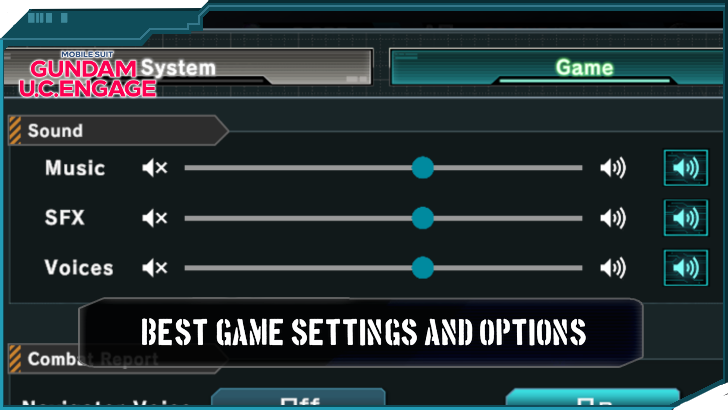
Gundam U.C. Engage's settings allow players to customise the gameplay experience to their liking. Read on to learn the optimal system and game settings for the best experience.
Best Gundam U.C. Engage System Settings and Options
Best System Settings
These are the most recommended options for the best game settings when playing Gundam U.C. Engage.
| Best System Settings | |
|---|---|
| Graphics Quality | Normal |
| Text Display Speed | Normal |
| Brightness | Dark |
| Home Screen Quality | Robust Version |
| Skill Rate Effect View | Show |
| Haro Navi View | Show |
| Push Notifications | Player Preference |
| Download All Data | Player Preference |
Graphics Quality
Graphics quality refers to the level of fidelity dedicated to the in-game models and effects. Higher graphics quality generally means a better-looking game in exchange for it requiring more resources to run.
The three levels of graphics quality in Gundam U.C. Engage are: low, normal, and high. While it is ultimately up to the player to decide what level is best, it is generally safe to leave this setting at Normal.
Leaving graphics quality at normal ensures an aesthetically pleasing game without having to worry about issues such as lower frame rate or a slower system.
Text Display Speed
Text Display Speed refers to how fast each letter in a group of text appears. Faster settings will make the letters faster.
It is recommended to leave this at normal because the slower speeds can make reading the in-game dialogue and story move at a snail's pace as the player waits for each letter to appear.
Brightness
Brightness affects the intensity of the lights that emanate from the screen while the game is running. A higher brightness level means a more intense light.
Among the three brightness levels, it is recommended to use "Dark", the lowest level, for playing the game. Gundam U.C. Engage has instances of flashing bright lights that can affect the player's health and safety when it gets intense. Setting the game to Dark will help prevent adverse effects from taking hold.
Home Screen Quality
Gundam U.C. Engage's home screen quality can also be tuned to three different settings: "Normal", "Robust", and "Pause".
It is important to remember that performing Potential Unleashed on a mobile suit until it is completely unleashed will unlock a special animated background for the home screen. Setting home screen quality to Normal disables this function. When set to Robust, the animation will appear, while setting it to Pause will pause the animation at the current frame.
The best level to select is Robust. While more resource-heavy, the animation shows how much progress was made with the invested mobile suit. Furthermore, the animations make the home screen more customizable.
Skill Rate Effect View
This setting will affect the glowing outline shown by mobile suits with a high skill rate. Once a mobile suit reaches a skill rate of ten, a glowing outline will appear around its icon, indicating that the mobile suit is frequently used.
Skill Rate Effect View can be disabled, but it is recommended to keep this setting enabled. This is due to the fact that mobile suits with high skill rates have higher stats, and it is important information for the player to know.
Haro Navi View
The Haro Navi View setting determines if the small icon containing suggestions for player activity will appear next to the notices button in the home screen. It is recommended to keep this setting enabled, especially if new to the game, to always be informed of possible activities.
Push Notifications
These settings refer to the notifications that pop up when a player or game triggers a certain event. These events are: "Restore All AP", "Restore All BP", "Research Complete", "Module Exchange Complete", as well as "Evening Notifications". It is important to note that the evening for Gundam U.C. Engage is from 11:00 PM JST to 7:00 AM JST.
Ultimately, it is up to the player's preference over which push notifications to enable. These settings do not affect gameplay, but they can prove to be helpful to players who wish to maintain a more organized playstyle.
Download All Data
Players have the option to download all data to avoid having their gameplay interrupted by downloads.
It is up to the player to ensure that there is enough space and resources for all the incoming data, but this will help speed up gameplay by avoiding download interruptions.
Best Gundam U.C. Engage Game Settings and Options
Best Game Settings
Gundam U.C. Engage's Game settings affect the customisation of the in-battle experience. Allowing the players to tailor the battle to their liking. However, the settings here will not affect the outcome of mobile suit battles.
These are quality-of-life features designed to make the gameplay experience smoother and help players focus on the more important aspects of the battle.
| Best Game Settings | |
|---|---|
| Sound | Default setting for music, SFX, and Voices |
| Combat Report Navigator Voice | On |
| Animations | View once per day for EX Skill and Cooperative Battle Conversations Off for Enemy Ace Cut-In Transcendent and Hyper Awaken Effect can be left to player preference |
| Target Line in Battle | On |
| HUD Display | Default |
| Auto-Deployment Button | On |
| Co-op Quests Automatic Rescue Feature | Off |
| Sortie Formation Mission List | On |
Sound
Sound refers to the loudness of the in-game music, SFX, and voices. It is best to leave it on default, as the different game sounds can get very loud.
Combat Report Navigator Voice
This affects whether the combat reports done by the chosen navigator will be enabled or not. It is generally advisable to keep it on. While it can get repetitive, the combat report also tells players if their EX skills are available to use, which can prove valuable when playing with manual EX skills enabled.
Animations
Animations are a group of settings that will determine if specific animations like EX skills, Enemy Ace Cut-Ins, or Cooperative Battle Conversations will play. For EX skills and Cooperative Battle Conversations, it is recommended to set it to "View once per day" as some of the animations are enjoyable to watch, but can get boring after being played several times.
Enemy Ace Cut-In is best set to "Off" as their quotes can start to feel repetitive after a while, and this will help save time as well.
Transcendent Effect and Hyper Awaken Effect can be left to player preference, as these do not affect gameplay when disabled or enabled.
Target Line In Battle
This setting will determine if the target line will show or not. It is best to leave it on to keep track of what the mobile suits are targeting.
HUD Display
HUD display is recommended to be left on default rather than Always Display, as the screen can feel cluttered and overwhelming with all the HUD elements and mobile suit action happening.
Auto-Deployment Button
This button will automatically deploy the player's forces for them. Keeping this enabled is recommended as a quality-of-life feature.
Coop Quests Automatic Rescue Feature
This is recommended to be set to "Off" just in case the player does not want assistance from other players. Keep in mind that an SOS will be sent at the beginning of battle when enabled.
Sortie Formation Mission List
Incomplete missions will cause a pop-up to appear, informing the player that they need to change the formation to complete said quests. It is recommended to leave this on to ensure that full rewards are acquired from each sortie.
Gundam U.C. Engage Related Guides
All Tips and Tricks Guides
 Arena Beginner's Guide (PvP)
 Arena Guide
 How to Get Started With the Arena?
 Beginner's Guide: Tips and Tricks
 Beginner Mistakes to Avoid
 Daily Tasks Checklist
 Intermediate Guide
 How To Pair Pilots and Mobile Suits
 Team Building Guide
Comment



Author

Best Game Settings and Options
Rankings
- We could not find the message board you were looking for.
Gaming News


![Resident Evil Village Review [Switch 2] | Almost Flawless Port](https://img.game8.co/4432790/e1859f64830960ce4248d898f8cd38d9.jpeg/thumb)


Popular Games

Genshin Impact Walkthrough & Guides Wiki
Resident Evil Requiem (RE9) Walkthrough & Guides Wiki
Honkai: Star Rail Walkthrough & Guides Wiki
Monster Hunter Wilds Walkthrough & Guides Wiki
Umamusume: Pretty Derby Walkthrough & Guides Wiki
Pokemon TCG Pocket (PTCGP) Strategies & Guides Wiki
Arknights: Endfield Walkthrough & Guides Wiki
Wuthering Waves Walkthrough & Guides Wiki
Zenless Zone Zero Walkthrough & Guides Wiki
Digimon Story: Time Stranger Walkthrough & Guides Wiki









Recommended Games
Fire Emblem Heroes (FEH) Walkthrough & Guides Wiki
Yu-Gi-Oh! Master Duel Walkthrough & Guides Wiki
Super Smash Bros. Ultimate Walkthrough & Guides Wiki
Diablo 4: Vessel of Hatred Walkthrough & Guides Wiki
Pokemon Brilliant Diamond and Shining Pearl (BDSP) Walkthrough & Guides Wiki
Elden Ring Shadow of the Erdtree Walkthrough & Guides Wiki
Monster Hunter World Walkthrough & Guides Wiki
The Legend of Zelda: Tears of the Kingdom Walkthrough & Guides Wiki
Persona 3 Reload Walkthrough & Guides Wiki
Cyberpunk 2077: Ultimate Edition Walkthrough & Guides Wiki










All rights reserved
Game Copyright© SOTSU・SUNRISE All rights reserved.
The content we provide on this site were created personally by members of the Game8 editorial department.
We refuse the right to reuse or repost content taken without our permission such as data or images to other sites.
© SOTSU・SUNRISE (Provider)