
How to Change Appearance
Players can change their appearance using the mirror in the Eternal Rift in Nioh 3. See how to unlock the change appearance mirror and what you can customize here!
List of Contents
How to Change Appearance
Unlock the Eternal Rift Base
The game’s home base, the Eternal Rift, must first be unlocked to access the Change Appearance mirror. You get here by completing The Hamamatsu Incident main mission, where you defeat Jakotsu-baba in the Crucible at the end. Afterward, the Eternal Rift becomes available to fast travel to.
Use the Mirror in the Eternal Rift
| Change Appearance Steps | |
|---|---|
| 1 | 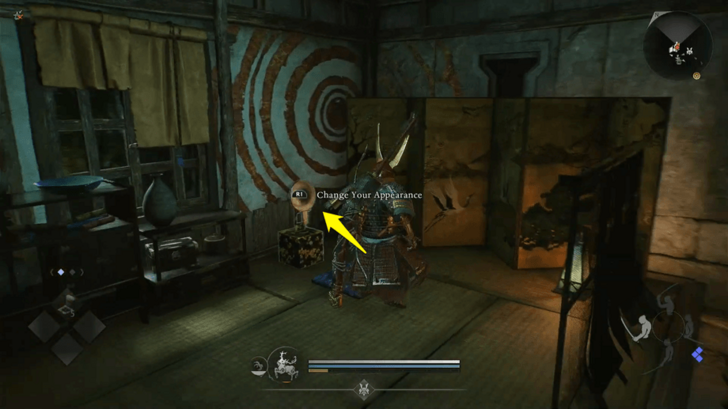 At the Eternal Rift, head to the northern building and go upstairs. Past Saito Fuku is a room with the appearance mirror. Interact with it to start the process. |
| 2 | 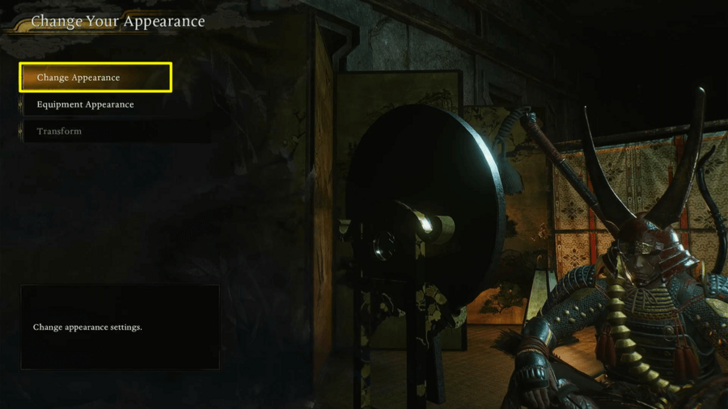 Select the first option, "Change Apperance", to edit your character. You also have the option to Transmog Equipment from here, or Transform into another character in your save files. |
| 3 | 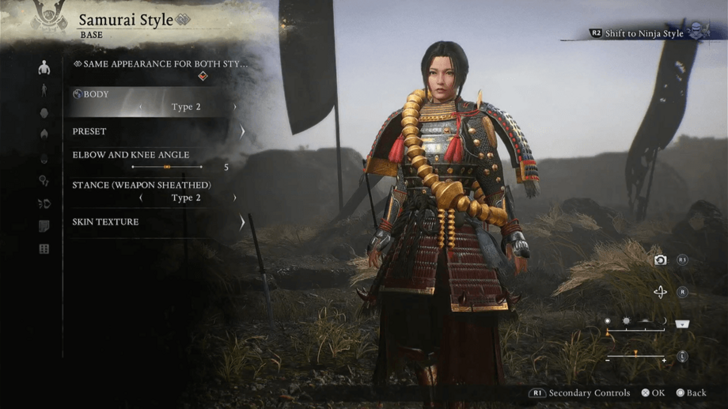 In the Change Appearance menu, the full range of character creation options from the start of the game becomes available again, allowing complete customization of body type, voice, character codes, and more. |
Nioh 3 Related Guides
Beginner's Guide to Nioh 3: Tips and Tricks
Comment



Author
How to Change Appearance

Rankings
Gaming News





Popular Games

Genshin Impact Walkthrough & Guides Wiki
Umamusume: Pretty Derby Walkthrough & Guides Wiki
Crimson Desert Walkthrough & Guides Wiki
Monster Hunter Stories 3: Twisted Reflection Walkthrough & Guides Wiki
Honkai: Star Rail Walkthrough & Guides Wiki
Pokemon Pokopia Walkthrough & Guides Wiki
The Seven Deadly Sins: Origin Walkthrough & Guides Wiki
Wuthering Waves Walkthrough & Guides Wiki
Zenless Zone Zero Walkthrough & Guides Wiki
Arknights: Endfield Walkthrough & Guides Wiki










Recommended Games
Fire Emblem Heroes (FEH) Walkthrough & Guides Wiki
Diablo 4: Vessel of Hatred Walkthrough & Guides Wiki
Cyberpunk 2077: Ultimate Edition Walkthrough & Guides Wiki
Yu-Gi-Oh! Master Duel Walkthrough & Guides Wiki
Super Smash Bros. Ultimate Walkthrough & Guides Wiki
Pokemon Brilliant Diamond and Shining Pearl (BDSP) Walkthrough & Guides Wiki
Elden Ring Shadow of the Erdtree Walkthrough & Guides Wiki
Monster Hunter World Walkthrough & Guides Wiki
The Legend of Zelda: Tears of the Kingdom Walkthrough & Guides Wiki
Persona 3 Reload Walkthrough & Guides Wiki










All rights reserved
©KOEI TECMO GAMES CO., LTD. All rights reserved.
The copyrights of videos of games used in our content and other intellectual property rights belong to the provider of the game.
The contents we provide on this site were created personally by members of the Game8 editorial department.
We refuse the right to reuse or repost content taken without our permission such as data or images to other sites.