
What Do You Do if You Augmented the Wrong Gear?
MementoMori's Augment system allows you to strengthen your witches by adding buffs to their gear. But in case you augmented the wrong gear piece, there's a way to transfer it to the gear piece you originally wanted to augment. Find out how in our guide.
What to Do if You Augmented the Wrong Gear
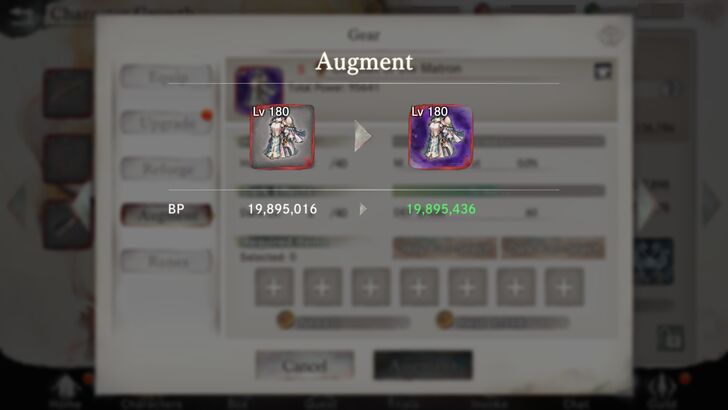
When you unlock the ability to Augment your gear after clearing Quest 6t-20, you finally have a new way to increase your main attacker's damage output (by pumping their chest armor full of Dark levels for PM DEF Break buffs).
But in a rush to augment your witch's gear, you might've accidentally augmented gear that belongs to another witch instead. At the beginning of MementoMori, resources are scarce, and Dark or Holy weapons are no exception, so you might not have enough resources to just Augment the right piece of gear again.
That's why in this guide, we have two options you can use to deal with this situation without having to spend another piece of Dark or Holy gear.
Option 1: See if You Can Just Make Your Witch Equip the Augmented Item
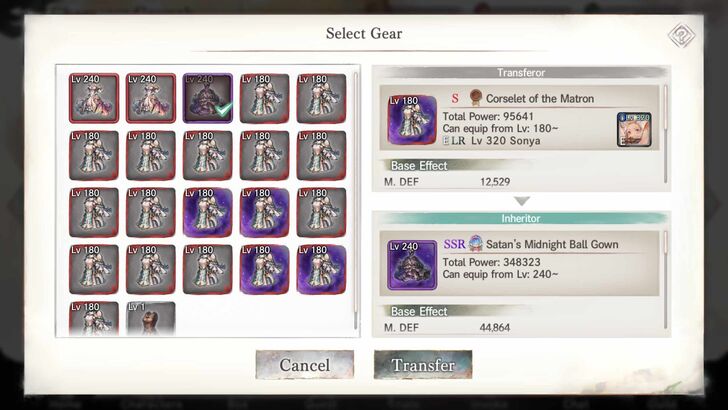
If the character whose gear you were originally trying to augment is wearing fresh gear pieces without any upgrades whatsoever, it might be alright to just remove the augmented piece from your other witch, and then make your desired character wear it.
Even if the level of the augmented gear is lower than what your witch's level is, you can simply make your witch wear the augmented piece of gear, press the "Equip All" button, and you will be asked if you want to "Transfer" the augment from your lower-level gear to the new piece of gear.
But what if the gear of your desired witch is the best gear you have, and it's already been upgraded? You wouldn't want to put that to waste. So, here's another option that also involves transferring a gear piece's augments.
Option 2: Transfer Your Augments From the Augmented Item to Your Witch’s Item
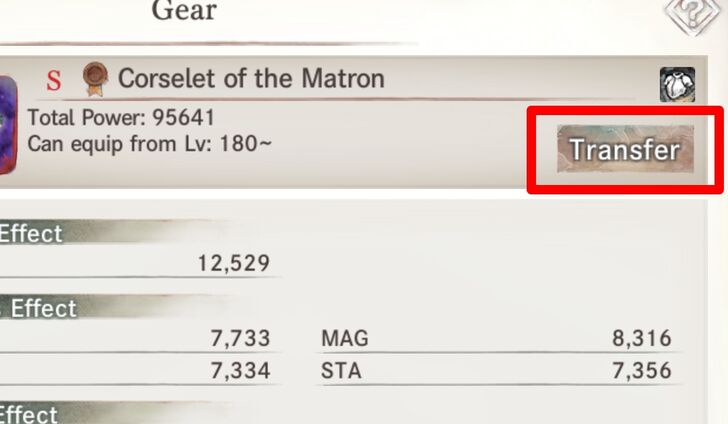
This method is the most effective way to transfer a gear piece's augment to another, particularly if the target gear piece is valuable or is a weapon incompatible with the witch whose gear you mistakenly augmented.
| 1 | 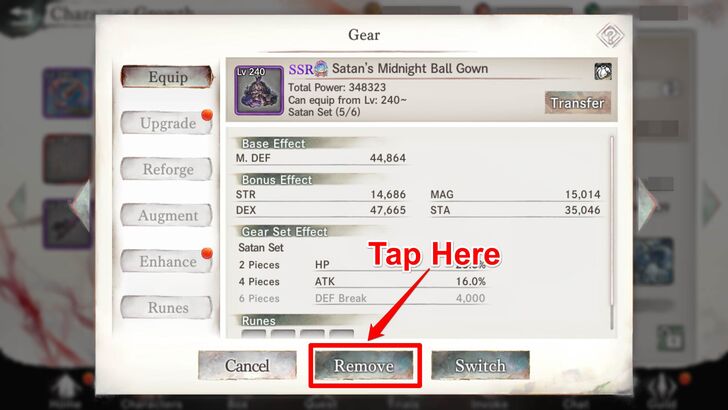 Remove the gear piece you originally wanted to put the augment in from your witch. |
|---|---|
| 2 | 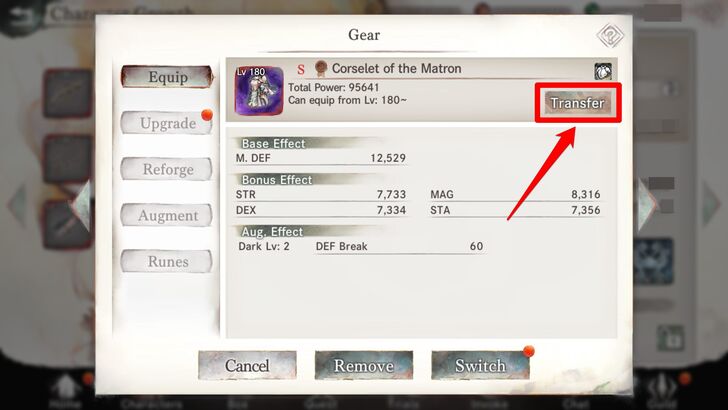 Go to the gear you first put the augment in and tap the "Transfer" button. |
| 3 | 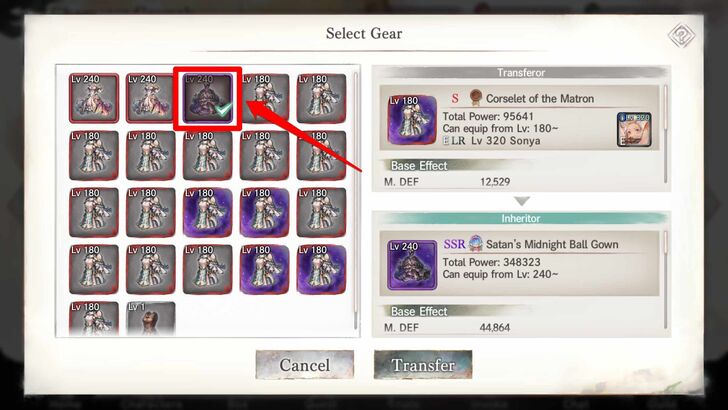 Choose the gear piece you want to transfer the augment to. |
| 4 | 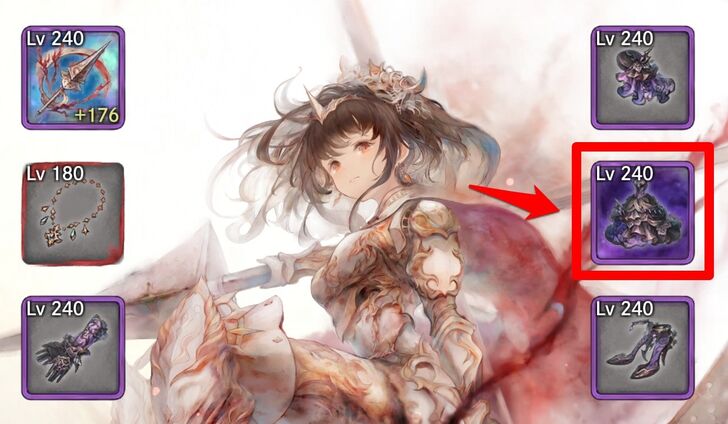 The targeted gear piece should now have the augments. Have your witch equip it. |
MementoMori Related Guides

Beginner's Guides
Gear Guides
Farming Guides
Game Mechanics
Intermediate Guides
Gacha Guides
Trial Guides
| Trial Guides | |
|---|---|
| List of All Trials and Their Rewards | Cave of Space-Time Guide |
| Tower of Infinity Guide | Fountain of Prayers Guide |
| Tower of Souls Guide | Temple of Illusions Guide |
Guild Guides
PvP Guides
| PVP Guides | |
|---|---|
| When Should You Start Playing PvP | Battle League PvP Guide |
| Legend League PvP Guide | PvP Team Building Guide |
FAQs
Comment



Author

What Do You Do if You Augmented the Wrong Gear?
Rankings
- We could not find the message board you were looking for.
Gaming News


![Resident Evil Village Review [Switch 2] | Almost Flawless Port](https://img.game8.co/4432790/e1859f64830960ce4248d898f8cd38d9.jpeg/thumb)


Popular Games

Genshin Impact Walkthrough & Guides Wiki
Resident Evil Requiem (RE9) Walkthrough & Guides Wiki
Honkai: Star Rail Walkthrough & Guides Wiki
Monster Hunter Wilds Walkthrough & Guides Wiki
Umamusume: Pretty Derby Walkthrough & Guides Wiki
Pokemon TCG Pocket (PTCGP) Strategies & Guides Wiki
Arknights: Endfield Walkthrough & Guides Wiki
Wuthering Waves Walkthrough & Guides Wiki
Zenless Zone Zero Walkthrough & Guides Wiki
Digimon Story: Time Stranger Walkthrough & Guides Wiki









Recommended Games
Fire Emblem Heroes (FEH) Walkthrough & Guides Wiki
Yu-Gi-Oh! Master Duel Walkthrough & Guides Wiki
Super Smash Bros. Ultimate Walkthrough & Guides Wiki
Diablo 4: Vessel of Hatred Walkthrough & Guides Wiki
Pokemon Brilliant Diamond and Shining Pearl (BDSP) Walkthrough & Guides Wiki
Elden Ring Shadow of the Erdtree Walkthrough & Guides Wiki
Monster Hunter World Walkthrough & Guides Wiki
The Legend of Zelda: Tears of the Kingdom Walkthrough & Guides Wiki
Persona 3 Reload Walkthrough & Guides Wiki
Cyberpunk 2077: Ultimate Edition Walkthrough & Guides Wiki










All rights reserved
Game Copyright© Bank of Innovation, Inc. All rights reserved.
The content we provide on this site were created personally by members of the Game8 editorial department.
We refuse the right to reuse or repost content taken without our permission such as data or images to other sites.
© Bank of Innovation, Inc. (Provider)