
Guild Guide
MementoMori players can join guilds to interact with other players and gain access to guild-only challenges and rewards. Read on to learn how to join a guild, how to form a guild, how to leave a guild, and what kind of guild activities are available.
List of Contents
Guild Guide
Get Gold, Gear, Holy Fragments, and Useful Supplies From Guilds
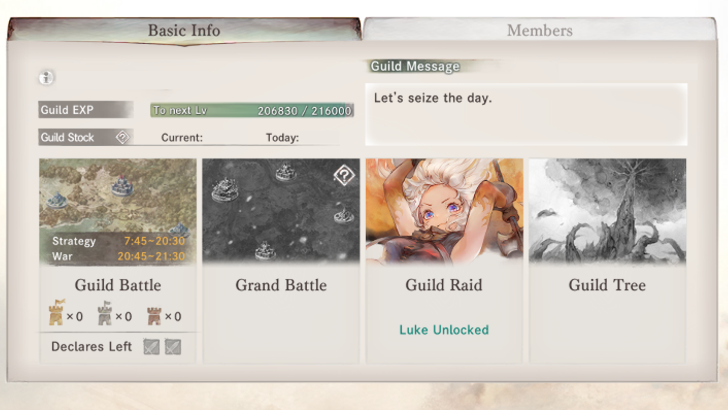
A Guild is an in-game group of players. If a player joins an existing Guild, they can receive Guild Coins, Gear, Holy Fragment, Guild Stock, and Gold as rewards for participating in Guild activities. Accumulating Guild EXP increases the Guild’s level, which can go up to Level 20.
As the Guild level rises, more members can join and the daily cap for Guild EXP players rises.
How to Join a Guild
Steps to Join a Guild
| How to Join a Guild Explained |
|---|
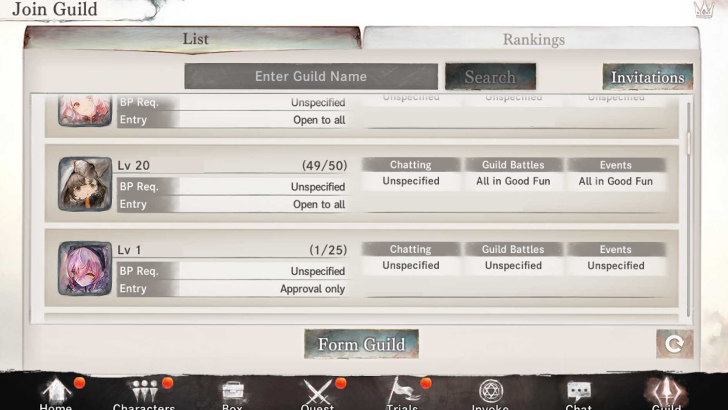
| 1. From the Home Screen, tap the Guild Tab. 2. At the Join Guild menu, either select your preferred Guild from the list, search for them with the Search Box, or check out the strongest guilds in the Rankings tab. 3. Tap on a Guild to see their Guild info. If you are happy with the requirements, tap Apply. 4. Depending on the Guild's settings, you may have to wait some time before being allowed into the Guild, especially if its "Entry" setting says Approval Only. |
Make Sure to Join Active Guilds
The first thing you have to make sure when joining a Guild is to check if the Guild is active at all. All of its members should have relatively high Guild Stock, which increases the Guild's standing while also acting as a barometer of how active its members are.
To check a guild's Guild Stock, simply go to your Guild, go to the Members tab and you should see which players are members of your guild and how much Guild Stock they've made in the last few days. If most members' Guild Stock is in four digits, then it's likely that you joined an active guild.
Being in an active Guild is important, as it not only gives you a new network of players you can communicate with, but also rewards from Guild Battle and even Grand Battle (if your guild is big enough in terms of guild stock to participate).
Join Guilds That Suit Your Playstyle
Guilds in MementoMori vary in terms of how active they are, how talkative their members are, and how active they are during guild events. These requirements are put out in the Guild Info screen, in the form of Chat Policy, Guild Battle Policy, and Event Policy. These can help set your own expectations of whether or not the Guild is a good fit for you before tapping Apply.
A guild can also have a set BP requirement that says the minimum amount of BP a prospective applicant must have before they are accepted into the Guild. If your BP below the Guild's BP requirement, then there's a good chance they might not accept your application.
Finally, a guild can have two modes of entry: Approval Only and Open to All. Open to All means that the moment you apply to the Guild is the moment you become a member. Meanwhile, Approval Only means that higher officials within the Guild will have to approve your applications first before you are allowed in.
How to Form a Guild
| How to Form a Guild |
|---|
| 1. From the Home Sceen, tap the Guild tab again. 2. But instead of picking a guild to join from the Guild Menu, tap the Form Guild button instead. 3. A menu will pop up, asking you to set your Guild's name, Policies, BP requirement (if any), and Entry Policy. 4. Tap Form Guild again and pay the 500 Diamond fee. |
Positions in Guilds
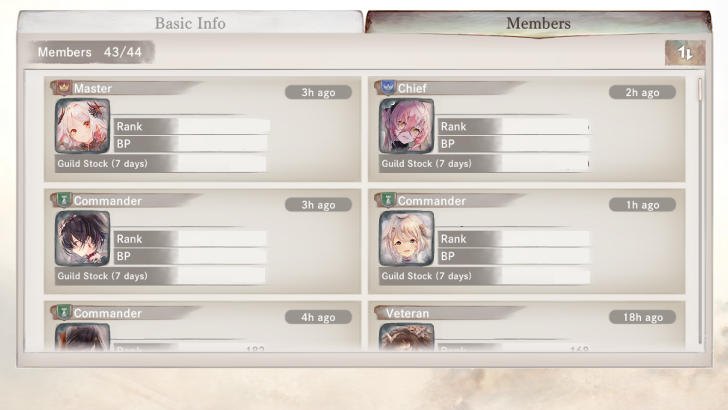
During the Version 2.18.0 Update, MementoMori added new roles to Guilds. The 4 types of roles in guilds are the following: Master, Chief, Commander, and Veterans.
| Role | Availability |
|---|---|
| Master | 1 Member |
| Chief | 1 Member |
| Commander | Up to 3 Members |
| Veterans | Unlimited |
If the amount of Guild Stock the Master has in the past 3 days is 0, a new master will be forcibly selected via following of order of priority.
| Order of Priority |
|---|
| Chief |
| Commander |
| Veterans |
| Regular Members |
If there are multiple members appointed to the role next in line to be the new Master, the one with the highest amount of Guild Stock in the past 7 days will be selected.
Grow Your Guild Stock and Communicate With Your Members
When your Guild is still starting out, focus on building up your Guild Stock and promoting your Guild. When your get members, communicate with them through the in-game chat.
Eventually, when your Guild is large enough, you can consider having a chatroom using a thirdy-party service like Discord to communicate more closely.
When your Guild Stock grows large enough that you can participate in Guild Battle, you can use the in-game chat to coordinate with your Guildmates as to what location to attack/what location to defend from the enemy.
How to Leave a Guild
| How to Leave a Guild | |
|---|---|
| 1 | 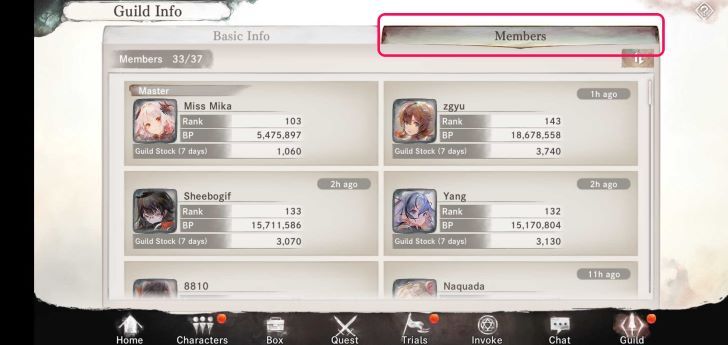 Go to the Guild Tab and select Members. |
| 2 | 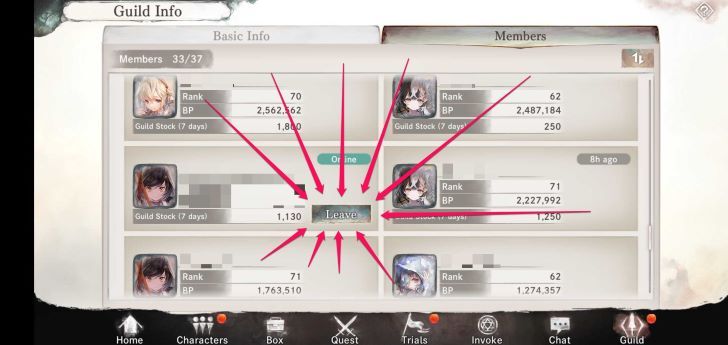 Beside the Player’s Guild Profile, there should be a Leave button |
| 3 | 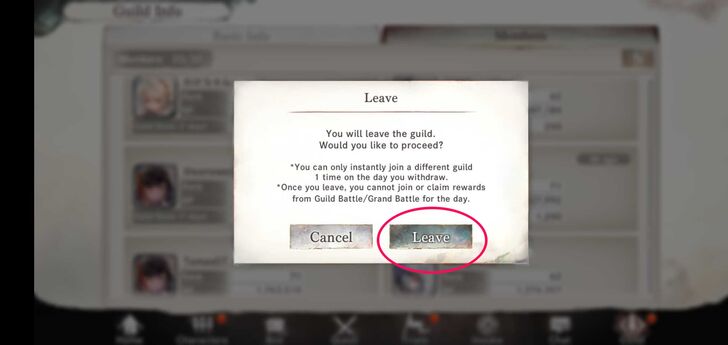 Click Leave, and it will warn that you are about to leave the Guild. |
| 4 | Click Leave again, and you are now out of the Guild. |
Can Only Leave a Guild Twice a Day, and Join a New Guild Once a Day
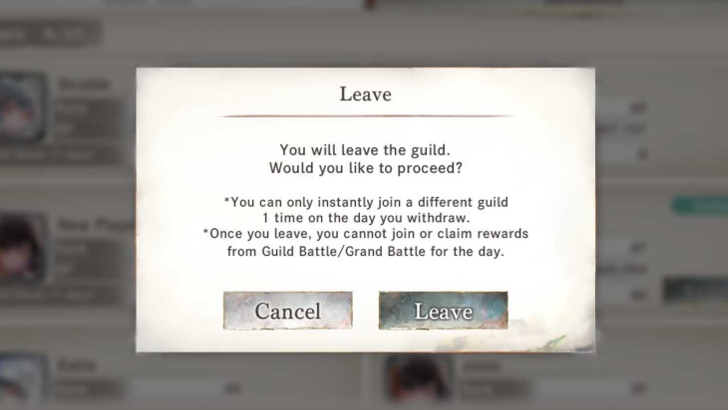
If you exit a guild, you can join another one on the same day. However, if you leave a second time, you must wait until 4:00 a.m. (Server Time) the next day to join a new guild.
If you created the Guild, you must remain in it unless you first appoint another member as the new Master. If a member leaves or is removed, their Guild Stock from the past seven days will still be shown.
Types of Guild Activities
Guild Raid
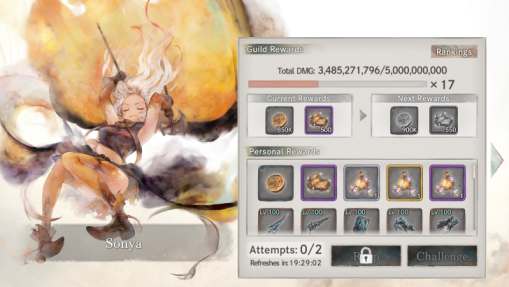
In Guild Raids, the total damage dealt to a boss determines your rewards. There is a set number of times you can challenge a boss in one day.
On top of personal rewards, you can get guild rewards based on the total damage all guild members deal. The total damage will be reset every day.
Sonya Guild Raid Comp (Sample)
| DPS | Support | Support | Support | Support |
|---|---|---|---|---|
 Florence Florence
|
 Fenrir Fenrir
|
 Sivi Sivi
|
 Merlyn Merlyn
|
 Mertillier Mertillier
|
Luke Raid
| DPS | DPS | Support | Sub-DPS | Support |
|---|---|---|---|---|
|
Florence
|
 Cordie Cordie
|
Merlyn
|
 Luke Luke
|
Mertillier
|
For guild raids, there are two recommended team setups. 1 DPS or 2 DPS. In the 1 DPS setup, you use a single DPS with support characters. In a 2 DPS setup, the general turn order is DPS1, Fenrir, and DPS2, with two additional supports. Most teams included Fenrir and Mertillier as mandatory supports, while the other two support slots can be flexible.
Guild Battle
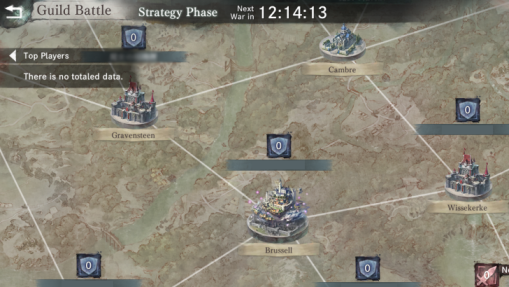
In Guild Battles, you compete against rival guilds for control of bases on the map. During the Strategy Phase, you select which bases to attack in the War Phase. Only the top 16 guilds from the previous day’s Guild Stock Ranking can participate.
The more bases you capture, the greater the rewards. Larger bases offer more rewards, with Brusell, the central base, providing the highest rewards.
Win Guild Battles by Communicating Closely With Your Guildmates
Join one of the top 16 guilds to be able to participate in Guild Battles. Completing daily Guild Raids earns Guild Stock, which helps your Guild rank up and qualify for battles.
Effective communication with your Guild Master and Chief is essential for planning attacks and defenses. Deploy your strongest teams for Sieges, with characters like Nina being highly effective due to her evasion and AoE capabilities. Place your best defending team last to wear out attackers with weaker teams first.
Grand Battle
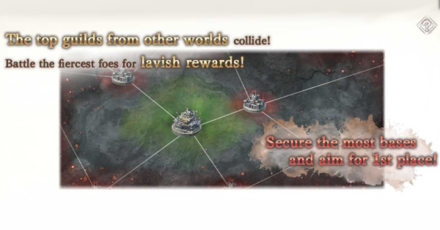
The Grand Battle is a type of Guild Battle where 48 elite guilds are chosen and divided into four groups in a single season.
Guilds engage in combat over several maps, battling over essential territories. Their standing within the group increases with how well they control certain areas. The goal is to establish which Guild is the strongest in the server.
Guild Tree
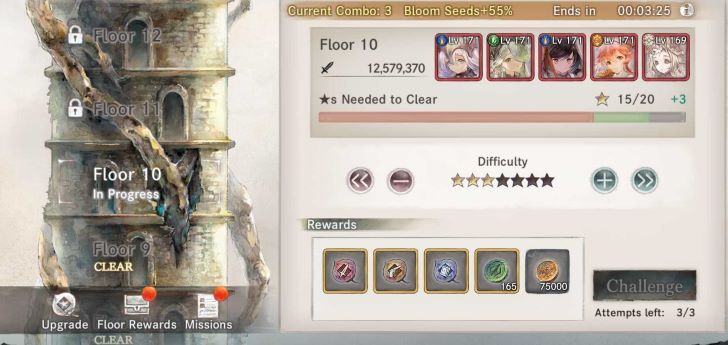
The Guild Tree is where you and your fellow guild members can cooperate to challenge bosses on different floors, similar to the Tower of Infinity. The more cooperation, the farther you will get. Each floor will have an adjustable difficulty - the more complex the floor, the bigger the rewards.
To maximize your success in the guild tree event, join an active guild to ensure more members can earn stars, as each player has only three attempts. Prepare three teams from the 20 registered characters, rotating them after each challenge to maintain their stats.
Aim for higher difficulty levels to earn more stars, adjusting as needed for newer characters. Lastly, regularly update your Bloom Bonus to boost your stats, spending Bloom points after each attempt.
MementoMori Related Guides
Beginner's Guides
Gear Guides
Farming Guides
Game Mechanics
Intermediate Guides
Gacha Guides
Trial Guides
| Trial Guides | |
|---|---|
| List of All Trials and Their Rewards | Cave of Space-Time Guide |
| Tower of Infinity Guide | Fountain of Prayers Guide |
| Tower of Souls Guide | Temple of Illusions Guide |
Guild Guides
PvP Guides
| PVP Guides | |
|---|---|
| When Should You Start Playing PvP | Battle League PvP Guide |
| Legend League PvP Guide | PvP Team Building Guide |
FAQs
Comment



Author
Rankings
- We could not find the message board you were looking for.
Gaming News

![Monster Hunter Stories 3 Review [First Impressions] | Simply Rejuvenating](https://img.game8.co/4438641/2a31b7702bd70e78ec8efd24661dacda.jpeg/show)


![Monster Hunter Stories 3 Review [First Impressions] | Simply Rejuvenating](https://img.game8.co/4438641/2a31b7702bd70e78ec8efd24661dacda.jpeg/thumb)
Popular Games

Genshin Impact Walkthrough & Guides Wiki
Honkai: Star Rail Walkthrough & Guides Wiki
Umamusume: Pretty Derby Walkthrough & Guides Wiki
Pokemon Pokopia Walkthrough & Guides Wiki
Resident Evil Requiem (RE9) Walkthrough & Guides Wiki
Monster Hunter Wilds Walkthrough & Guides Wiki
Wuthering Waves Walkthrough & Guides Wiki
Arknights: Endfield Walkthrough & Guides Wiki
Pokemon FireRed and LeafGreen (FRLG) Walkthrough & Guides Wiki
Pokemon TCG Pocket (PTCGP) Strategies & Guides Wiki










Recommended Games
Diablo 4: Vessel of Hatred Walkthrough & Guides Wiki
Cyberpunk 2077: Ultimate Edition Walkthrough & Guides Wiki
Fire Emblem Heroes (FEH) Walkthrough & Guides Wiki
Yu-Gi-Oh! Master Duel Walkthrough & Guides Wiki
Super Smash Bros. Ultimate Walkthrough & Guides Wiki
Pokemon Brilliant Diamond and Shining Pearl (BDSP) Walkthrough & Guides Wiki
Elden Ring Shadow of the Erdtree Walkthrough & Guides Wiki
Monster Hunter World Walkthrough & Guides Wiki
The Legend of Zelda: Tears of the Kingdom Walkthrough & Guides Wiki
Persona 3 Reload Walkthrough & Guides Wiki










All rights reserved
Game Copyright© Bank of Innovation, Inc. All rights reserved.
The content we provide on this site were created personally by members of the Game8 editorial department.
We refuse the right to reuse or repost content taken without our permission such as data or images to other sites.
© Bank of Innovation, Inc. (Provider)