
Focus Guide
★ Endings: Normal | Bad | Good | True | UFO
★ Best: Difficulty | Settings | Weapons
┗ Omamori Tier List | Builds
★ Puzzles: My Room | Locker Code | Mural
★ Missables: Door & Box | Ema | Inventory Size
★ Beginner's Guide | Fox Mask | Lore Explained
Focus allows you to see enemy's attack clearly and unleash a Focus Attack once your gauge is full in Silent Hill f. Learn how to use focus mode, the focus buttons, and all focus mechanics here in this guide!
List of Contents
How to Focus in Silent Hill f
Use Focus Button
| PlayStation | Hold  |
|---|---|
| Xbox | Hold  |
Hold the Focus Button to activate Focus mode while charging up the Focus Gauge. Once it is full, press the Focus Attack button to execute a heavy attack on an enemy.
Focus Attacks Deals Heavy Damage
| PlayStation | Hold + Press  |
|---|---|
| Xbox | Hold + Press  |
Focus Attacks unleashes a devastating attack on enemies, but it decreases your Sanity as the gauge fills up. Performing this stuns the enemy for a while, allowing players to inflict damage until they recover.
Silent Hill f Focus Mechanics
Visual Hints are more Visible
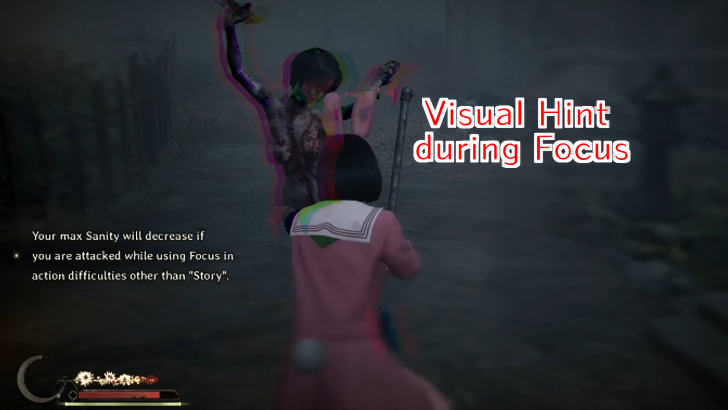
You can use Focus Mode to slow down the time just a little bit to give you a glimpse of the visual hint of your enemies. Attacking on the enemies' visual hint executes counter which is more effective than just hitting them randomly, making them easier to defeat.
However, not all enemies have a visual hint, but you can still use Focus Mode to slow down time to dodge or position yourself much better for the incoming attacks.
Requires Sanity
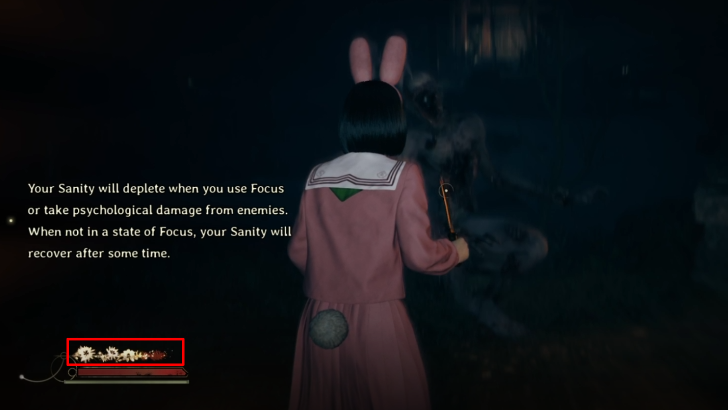
Using Focus mode, sanity is required, and it will slowly drain your sanity while holding the Focus button. Monitor your sanity meter to avoid completely depleting it, which will cause to start draining your HP instead.
Silent Hill f Related Guides

Beginner's Guide: Tips and Tricks
All Tips and Tricks
| Gameplay Guides | |
|---|---|
 How to Perfect Dodge How to Perfect Dodge |
 List of Controls List of Controls |
 How to Heal How to Heal |
 Do Enemies Respawn? Do Enemies Respawn? |
 Is There a Minimap? Is There a Minimap? |
 How to Counter How to Counter
|
 How to Restore Sanity How to Restore Sanity |
Focus Guide |
 How to Skip Cutscenes How to Skip Cutscenes |
 Can You Escape Grabs? Can You Escape Grabs? |
Comment



Author

Rankings
- We could not find the message board you were looking for.
Gaming News
![Animal Crossing: New Horizons Review [Switch 2] | Needlessly Crossing Over to a New Generation](https://img.game8.co/4391759/47d0408b0b8a892e453a0b90f54beb8a.png/show)
Popular Games

Genshin Impact Walkthrough & Guides Wiki
Honkai: Star Rail Walkthrough & Guides Wiki
Arknights: Endfield Walkthrough & Guides Wiki
Umamusume: Pretty Derby Walkthrough & Guides Wiki
Wuthering Waves Walkthrough & Guides Wiki
Pokemon TCG Pocket (PTCGP) Strategies & Guides Wiki
Abyss Walkthrough & Guides Wiki
Zenless Zone Zero Walkthrough & Guides Wiki
Digimon Story: Time Stranger Walkthrough & Guides Wiki
Clair Obscur: Expedition 33 Walkthrough & Guides Wiki









Recommended Games
Fire Emblem Heroes (FEH) Walkthrough & Guides Wiki
Pokemon Brilliant Diamond and Shining Pearl (BDSP) Walkthrough & Guides Wiki
Diablo 4: Vessel of Hatred Walkthrough & Guides Wiki
Super Smash Bros. Ultimate Walkthrough & Guides Wiki
Yu-Gi-Oh! Master Duel Walkthrough & Guides Wiki
Elden Ring Shadow of the Erdtree Walkthrough & Guides Wiki
Monster Hunter World Walkthrough & Guides Wiki
The Legend of Zelda: Tears of the Kingdom Walkthrough & Guides Wiki
Persona 3 Reload Walkthrough & Guides Wiki
Cyberpunk 2077: Ultimate Edition Walkthrough & Guides Wiki










All rights reserved
©2025 Konami Digital Entertainment
The copyrights of videos of games used in our content and other intellectual property rights belong to the provider of the game.
The contents we provide on this site were created personally by members of the Game8 editorial department.
We refuse the right to reuse or repost content taken without our permission such as data or images to other sites.