
How to Save Your Game
★ Story Walkthrough | Upgrades and Abilities
☆ Characters | Bosses | Puzzles
★ Viewros Map: Energy Tank | Missile Expansion | Shot Expansion
★ Game Details: amiibo Unlocks | How Long to Beat | Switch Edition Differences

Metroid Prime 4: Beyond allows you to save your game progress by using Save Stations scattered around the map. Learn how to save your progress, make a Manual Save, and copy save files here!
List of Contents
How to Save Your Progress
Find Save Stations Around the Map
To save your progress, find Save Stations scattered around the map. The Save Stations are usually found inside a room, but some are hidden behind sealed doors that can be unlocked with Samus's psychic abilities.
Besides saving your progress, using a Save Station also replenishes Samus's health and ammo.
The Game Will Sometimes Autosave
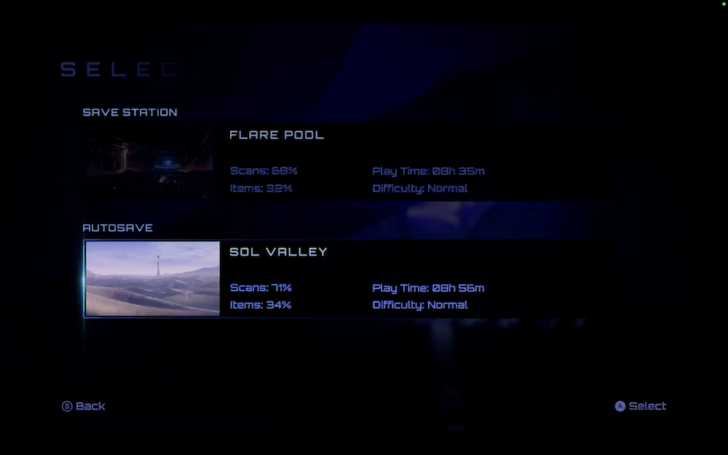
While most of your saves are done manually via the Save Stations, Metroid Prime 4 does have autosaves at certain points, such as when returning to Sol Valley from Flare Pool.
Make a Manual Save in the Main Menu
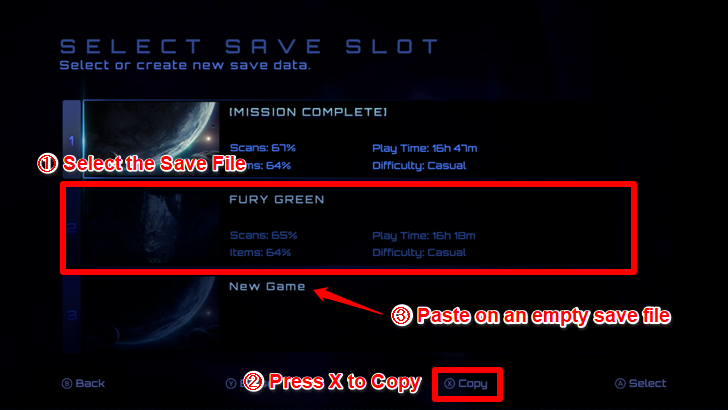
Aside from saving your progress while playing the game, you can create what is called a Manual Save file in the main menu. Make a copy of an existing save file to return to a certain point in the game.
Why Should You Make a Manual Save?
Recommended to Manual Save before the Point of No Return
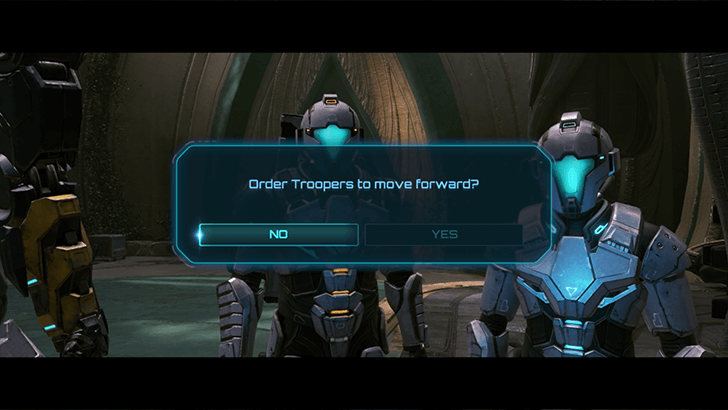
To avoid being soft-locked in the endgame, it is recommended to copy a save file before you get asked the prompt, Order Troopers to Move Forward?. This is considered the point-of-no-return and will lock you into the end game with no access to backtracking.
Multiple Manual Save files are recommended to complete the game to 100%. Once you proceed with the end-game prompt and complete the game, the Save File cannot be used anymore as it will be labeled Mission Complete.
How to Copy Save Files
Copy the File in the Game Menu
Open Metroid Prime 4: Beyond and head to the game menu. Then, click Play to see all save files. Next, select a save file and press the X button to copy. Finally, duplicate it onto another slot and use the second save file to return to the game state it's in when you last saved it.
Metroid Prime 4: Beyond Related Guides

Beginner's Guide: Tips and Tricks to Get Started
All Tips and Tricks
Comment



Author

How to Save Your Game

Rankings
- We could not find the message board you were looking for.
Gaming News

![Monster Hunter Stories 3 Review [First Impressions] | Simply Rejuvenating](https://img.game8.co/4438641/2a31b7702bd70e78ec8efd24661dacda.jpeg/show)
![Monster Hunter Stories 3 Review [First Impressions] | Simply Rejuvenating](https://img.game8.co/4438641/2a31b7702bd70e78ec8efd24661dacda.jpeg/thumb)
![The Seven Deadly Sins: Origin [First Impressions] | A Promising Start](https://img.game8.co/4440581/584e0bfb87908f12c4eab6e846eb1afd.png/thumb)

Popular Games

Genshin Impact Walkthrough & Guides Wiki
Umamusume: Pretty Derby Walkthrough & Guides Wiki
Pokemon Pokopia Walkthrough & Guides Wiki
Honkai: Star Rail Walkthrough & Guides Wiki
Monster Hunter Stories 3: Twisted Reflection Walkthrough & Guides Wiki
Arknights: Endfield Walkthrough & Guides Wiki
Wuthering Waves Walkthrough & Guides Wiki
Zenless Zone Zero Walkthrough & Guides Wiki
Pokemon TCG Pocket (PTCGP) Strategies & Guides Wiki
Monster Hunter Wilds Walkthrough & Guides Wiki










Recommended Games
Diablo 4: Vessel of Hatred Walkthrough & Guides Wiki
Cyberpunk 2077: Ultimate Edition Walkthrough & Guides Wiki
Fire Emblem Heroes (FEH) Walkthrough & Guides Wiki
Yu-Gi-Oh! Master Duel Walkthrough & Guides Wiki
Super Smash Bros. Ultimate Walkthrough & Guides Wiki
Pokemon Brilliant Diamond and Shining Pearl (BDSP) Walkthrough & Guides Wiki
Elden Ring Shadow of the Erdtree Walkthrough & Guides Wiki
Monster Hunter World Walkthrough & Guides Wiki
The Legend of Zelda: Tears of the Kingdom Walkthrough & Guides Wiki
Persona 3 Reload Walkthrough & Guides Wiki










All rights reserved
© Nintendo. Metroid and Nintendo Switch are trademarks of Nintendo.
The copyrights of videos of games used in our content and other intellectual property rights belong to the provider of the game.
The contents we provide on this site were created personally by members of the Game8 editorial department.
We refuse the right to reuse or repost content taken without our permission such as data or images to other sites.