
How to Claim Pre-Order and Bonus Items
You can claim pre-order and bonus items at Tantegel's Inn in Dragon Quest 1 and at Midenhall's Inn for Dragon Quest 2 HD-2D Remake (DQ1 and DQ2). See where and how to claim your pre-order and bonus items here.
List of Contents
How to Claim Bonus Items
Open Chest in Tantegel's Inn for Dragon Quest 1
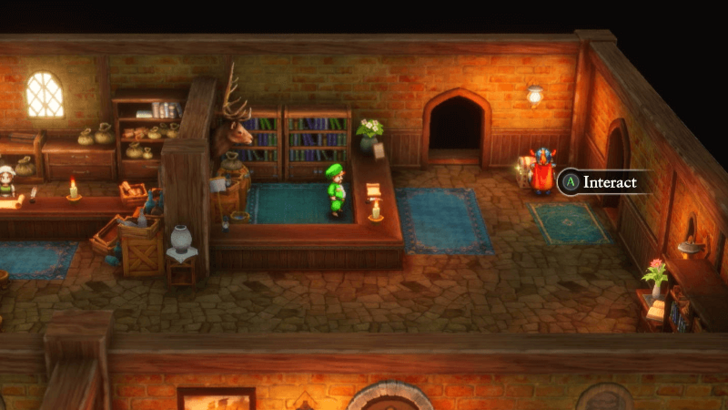
To claim your pre-order or bonus items, you'll need to go inside Tantegel's Inn and open the treasure chest. This is also the starting town of the game, so you can get these items before you fully set out on your journey.
Open Chest in Midenhall's Inn for Dragon Quest 2
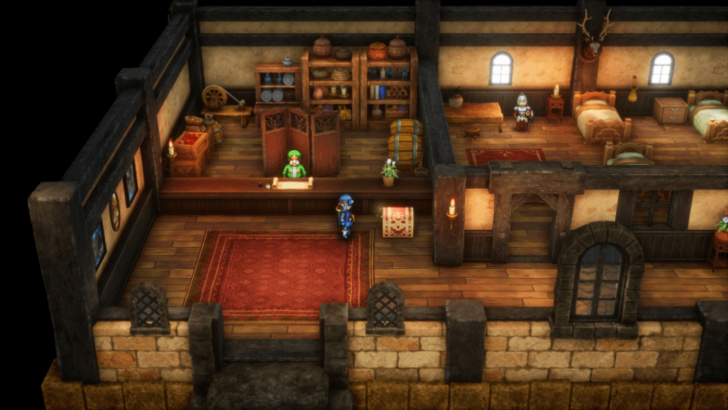
To claim your pre-order or bonus items, you'll need to go inside Midenhall's Inn and open the treasure chest. This is also the starting town of the game, so you can get these items before you fully set out on your journey.
List of Pre-Order Items
| DQ1 HD-2D Remake Pre-Order Bonuses | |
|---|---|
 |
|
| List of Bonus Items | |
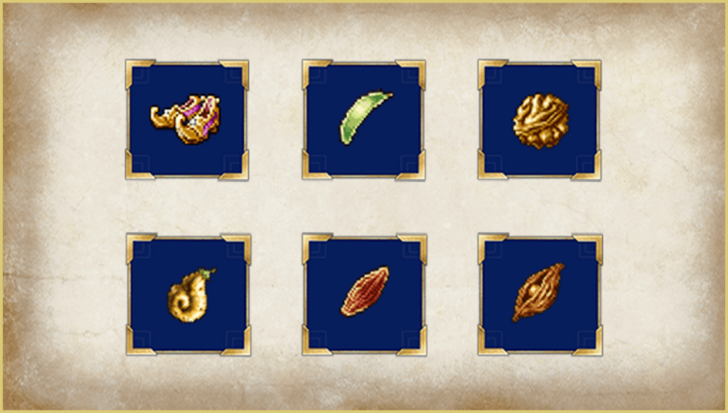
| ・Elevating Shoes x1 | ・Seed of Strength x3 |
| ・Seed of Defence x3 | ・Seed of Agility x3 |
| ・Seed of Life x3 | ・Seed of Magic x3 |
If you've pre-ordered either a digital or physical copy of this game, then you will get a pair of Elevating Shoes and a set of stat boosting Seeds at the beginning of the game.
| Seed Guides | |
|---|---|
| List of All Seeds (DQ1) | List of All Seeds (DQ2) |
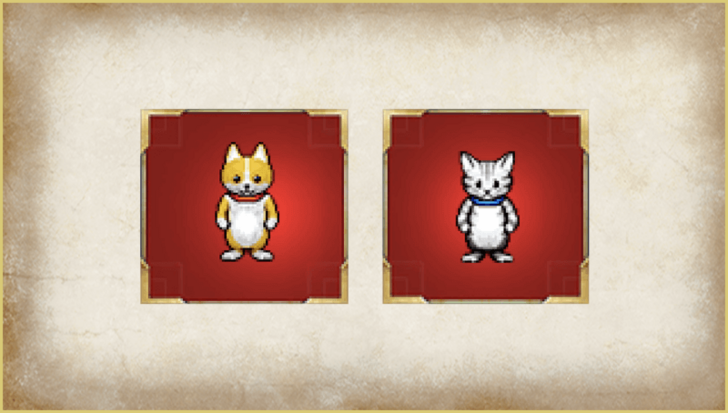
List of DQ3 Save Bonus Items
| DQ3 HD-2D Remake Save File Bonuses |
|---|
 |
| List of Bonus Items |
| ・Dog Suit x1 |
If you have a save file for the Dragon Quest 3 HD-2D Remake attached to the same account you're using for this game, then you will get a Dog Suit at the beginning of the game.
As a note, if you make a save for DQ3 after you start playing DQ1 or DQ2, you will still be able to get the suit when you check the chest at Tantegel's Inn / Midenhall's Inn.
| Item Guides | |
|---|---|
| List of All Items (DQ1) | List of All Items (DQ2) |
List of Collector's Edition Bonus Items
| DQ1 HD-2D Remake Collector's Edition Bonuses | |
|---|---|
 |
|
| List of Bonus Items | |
| ・Strength Ring x1 | ・Slime Earring x3 |
| ・Arriviste’s Vest x3 | ・Mad Cap x3 |
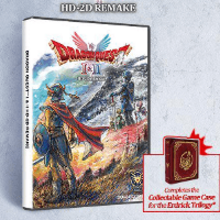
If you've purchased the Collector's Edition, you will get a Strength Ring, Slime Earring, Arriviste's Vest, and a Mad Cap at the beginning of the game. These are all strong pieces of equipment relative to the start of your journey, which can make the game too easy.
| Equipment Guides | |
|---|---|
| List of All Equipment (DQ1) | List of All Equipment (DQ2) |
How to Enter Pre-Order Bonus Code
PlayStation
| Steps | |
|---|---|
| 1 | 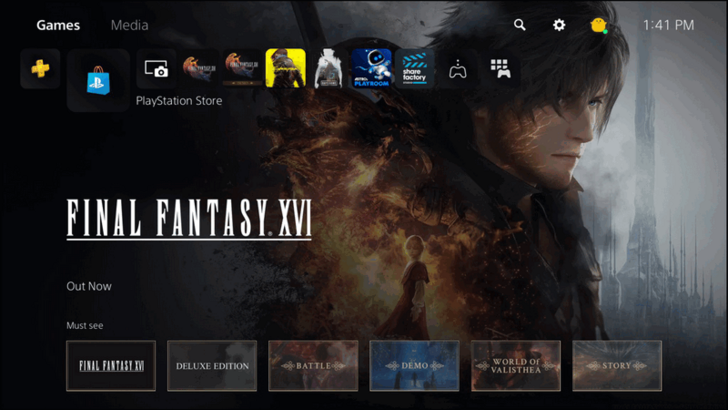 Open the PlayStation Store. |
| 2 | 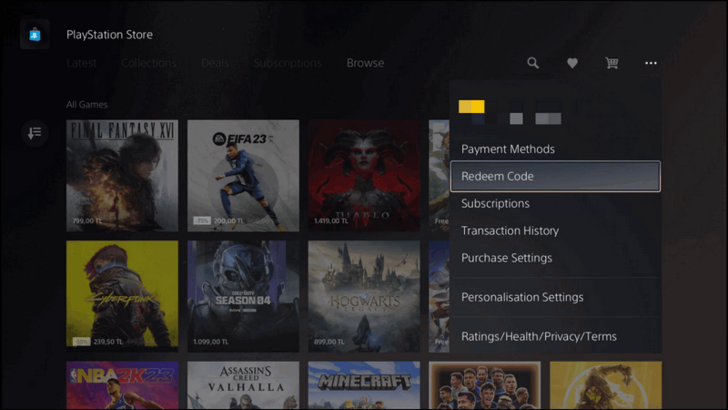 Select the three dotted icon in the PlayStation Store, then navigate to Redeem Code. |
| 3 |  Enter the 12-character code that came with the game and press Redeem. |
| 4 | The pre-order bonuses will be downloaded and will automatically be added to your game. |
Xbox
| Steps | |
|---|---|
| 1 |  Press the Xbox Button on your controller and navigate toward the Store. |
| 2 |  While on the Xbox Store, press the View Button on your controller to open the side bar, and select the Redeem tab. |
| 3 |  Enter the code and press Check Code to redeem your rewards! |
Switch
| Steps | |
|---|---|
| 1 | 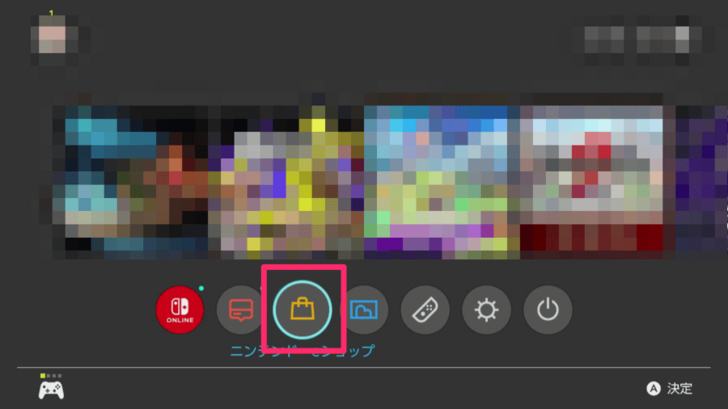 Launch the Nintendo E-Shop. |
| 2 | 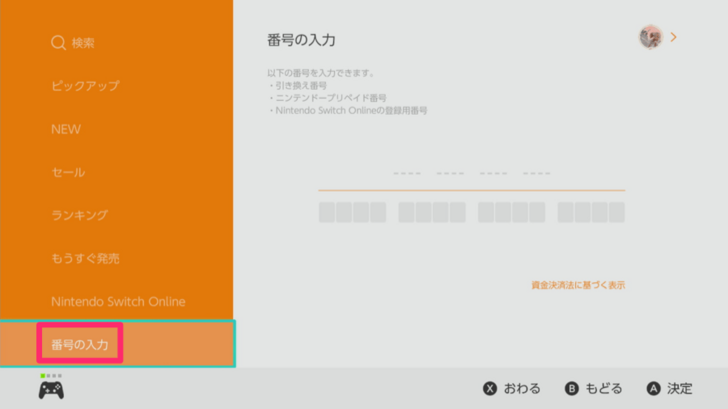 Navigate to the Enter Code option in the sidebar. |
| 3 | Enter the download code. |
Steam
| Steps | |
|---|---|
| 1 | Launch the Steam Client. |
| 2 | 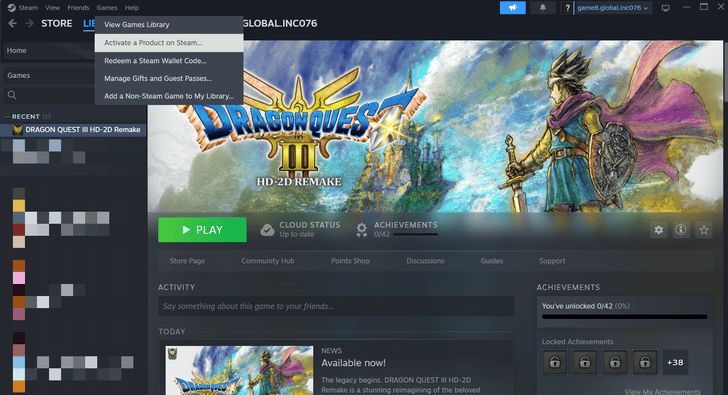 Navigate to "Games" at the top bar, and scroll down until "Activate a Product on Steam." |
| 3 | 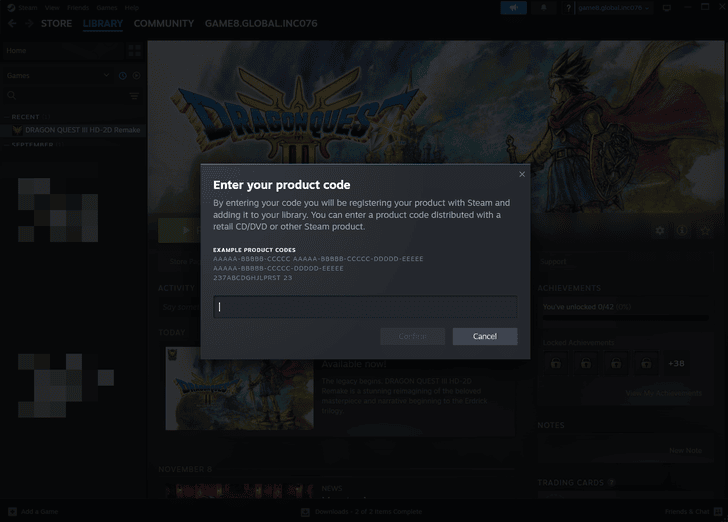 Input the code after following instructions. |
| 4 | After inputting the code, the pre-order bonuses will automatically be added to your game. |
Dragon Quest 1 HD-2D Remake (DQ1) Related Guides

All News and Events
-
![]()
Trophy Guide
Updated 11/1/2025
See a list of all trophies here and learn how to get Platinum in this guide.
-
![]()
Available Platforms and Consoles
Updated 11/23/2025
Learn about all platforms Dragon Quest 1 and 2 will be available on.
-
![]()
Collector's Edition Guide
Updated 10/30/2025
Learn all of the Collector's Edition physical and in-game contents as well as how to buy it.
-
![]()
Switch 2 Enhancements and Version Differences
Updated 10/29/2025
A guide on all Switch 2 enchancements and differences with Switch 1
-
![]()
How Long to Beat
Updated 10/31/2025
See how long each game takes to beat. Learn more here!
-
![]()
Preload Date and Guide
Updated 10/23/2025
Learn all preload information for Dragon Quest 1 and 2's platforms here!
-
![]()
New Features and DIfferences
Updated 11/2/2025
A guide to new features and version differences between the original and the remake.
-
![]()
How to Claim Bonus Items
Updated 10/30/2025
Learn how to claim pre-order and DQ3 save bonus items here!
-
![]()
Should You Play DQ3 Before 1 and 2?
Updated 11/23/2025
Find out if you need to beat DQ3 first before playing 1 and 2!



Comment



Author

How to Claim Pre-Order and Bonus Items

Rankings
- We could not find the message board you were looking for.
Gaming News

![Death Stranding 2: On The Beach [PC] Review | A Port That Delivers](https://img.game8.co/4447392/15310a0c9aa1b6843bb713b2ea216930.jpeg/show)



Popular Games

Genshin Impact Walkthrough & Guides Wiki
Umamusume: Pretty Derby Walkthrough & Guides Wiki
Crimson Desert Walkthrough & Guides Wiki
Monster Hunter Stories 3: Twisted Reflection Walkthrough & Guides Wiki
Honkai: Star Rail Walkthrough & Guides Wiki
Pokemon Pokopia Walkthrough & Guides Wiki
The Seven Deadly Sins: Origin Walkthrough & Guides Wiki
Wuthering Waves Walkthrough & Guides Wiki
Zenless Zone Zero Walkthrough & Guides Wiki
Arknights: Endfield Walkthrough & Guides Wiki










Recommended Games
Fire Emblem Heroes (FEH) Walkthrough & Guides Wiki
Diablo 4: Vessel of Hatred Walkthrough & Guides Wiki
Cyberpunk 2077: Ultimate Edition Walkthrough & Guides Wiki
Yu-Gi-Oh! Master Duel Walkthrough & Guides Wiki
Super Smash Bros. Ultimate Walkthrough & Guides Wiki
Pokemon Brilliant Diamond and Shining Pearl (BDSP) Walkthrough & Guides Wiki
Elden Ring Shadow of the Erdtree Walkthrough & Guides Wiki
Monster Hunter World Walkthrough & Guides Wiki
The Legend of Zelda: Tears of the Kingdom Walkthrough & Guides Wiki
Persona 3 Reload Walkthrough & Guides Wiki










All rights reserved
© ARMOR PROJECT/BIRD STUDIO/SPIKE CHUNSOFT/SQUARE ENIX
© SUGIYAMA KOBO ℗ SUGIYAMA KOBO
The copyrights of videos of games used in our content and other intellectual property rights belong to the provider of the game.
The contents we provide on this site were created personally by members of the Game8 editorial department.
We refuse the right to reuse or repost content taken without our permission such as data or images to other sites.