
Tips and Tricks: A Beginner's Guide to BO7
This is a beginner's guide to Call of Duty: Black Ops 7 (BO7). Learn the basics of the game, how to get started, and various tips and tricks to improve your game progression!
Beginner's Guide
| Beginner's Getting Started Guide |
|---|
|
|

Adjust Aim Sensitivity
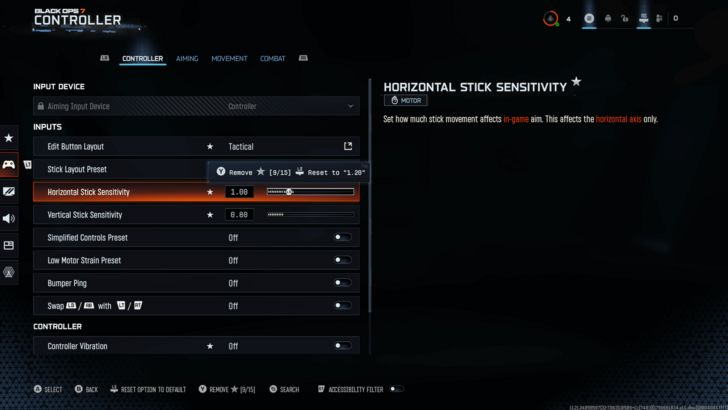
Access Mouse and Controller Sensitivity in the Settings menu.
Before entering a match, adjust your look and aim sensitivity to the settings that you're most comfortable with. For editing your mouse sensitivity, access the Keyboard & Mouse menu, and tweak the Mouse Sensitivity under the Mouse tab. For Controllers, select the Controller menu and tweak the Sensitivity Multiplier under the Aiming tab.
Lastly, do not forget to set your Aiming Input Device to the input you are going to use for the match!
Practice Shooting and Recoil Control
Gunfire kicks you away from your last shot as you hold down the trigger. Learn recoil control by understanding your gun's spray and recoil pattern, then adjust accordingly by moving your aim against the opposing motion (such as pushing your aim down as you fire).
Recoil control is improved by practice and muscle memory, but it is also made easier by unlocking and equipping attachments that affect the Handling and Accuracy stat of your gun.
Learn Omnimovement
Get familiar with Omnimovement in Black Ops 7 to maneuver quickly around enemies. Compared to previous Call of Duty titles, Black Ops 7 has expanded movement in several key mechanics: you can now sprint, slide, and dive in any direction other than the front.
Practice Omnimovement in the Training Course and make a habit of using Omnimovement to get around enemies and evade enemy fire.
Use Wall Jumps to Get Around the Map
Wall Jumping is a new movement mechanic introduced in Black Ops 7. It’s performed by jumping toward a wall and pressing jump again to bounce off it. You can wall jump up to three times in a row, allowing you to cross gaps and navigate gap parts of the map with ease.
Customize Loadout and Perks
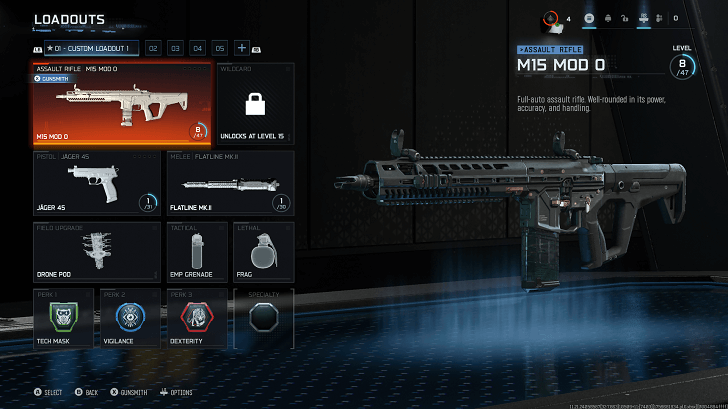
A Loadout consists of weapons, equipment, and perks, all of which are fully customizable to adapt to your preferred playstyle. In addition, attachments can be equipped on weapons to increase firepower, as well as improve accuracy, mobility, and range.
Remember, a good loadout setup can ultimately decide the outcome of a match.
Familiarize Yourself with the Game Modes
| Game Mode | Objective |
|---|---|
| Team Deathmatch | Eliminate enemy players on the other team and reach the score limit. |
| Domination | Capture and hold up to three flags to gain points for your team. |
| Hardpoint | Capture and hold the Hardpoint to earn points for your team. |
| Overload (New!) |
Secure the Overload device and bring it to the enemy base to get points. |
| Kill Confirmed | Eliminate enemies and capture their dog tags to earn points. |
During the Black Ops 7 beta, there are 5 team-based game modes available for 6v6—namely Team Deathmatch, Domination, Hardpoint, Overload, and Kill Confirmed.
Overload is a new fast-paced game mode in Black Ops 7, centered around continuous assaults on the enemy base to secure the Overload objective.
Get Familiar With the Maps
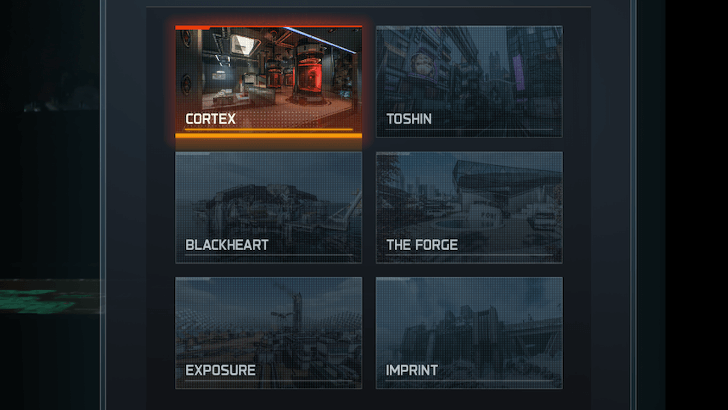
There are 6 maps maps so far for the duration of the beta, namely Cortex, Toshin, Blackheart, The Forge, Exposure, and Imprint.
Maps available for a multiplayer feature or playlist can be viewed by selecting the Info button beside it and checking the Maps tab on the right.
Grind XP for Ranks and Weapon Levels in Multiplayer
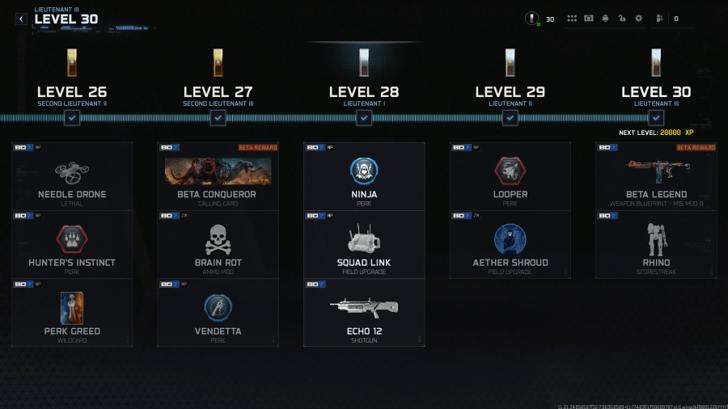
Once you have familiarized yourself with the basics, head into multiplayer and earn XP to increase your Rank and unlock new weapons, equipment, and perks for your loadout. You will also gain XP to level up weapons and unlock new attachments, blueprints, and weapon charms.
You can check general unlockables for each level by selecting the Menu at the top-right bar near your account. Look for the 'Progression' button with the star insignia icon to access the progression menu.
Earn Bonus XP by Doing Challenges
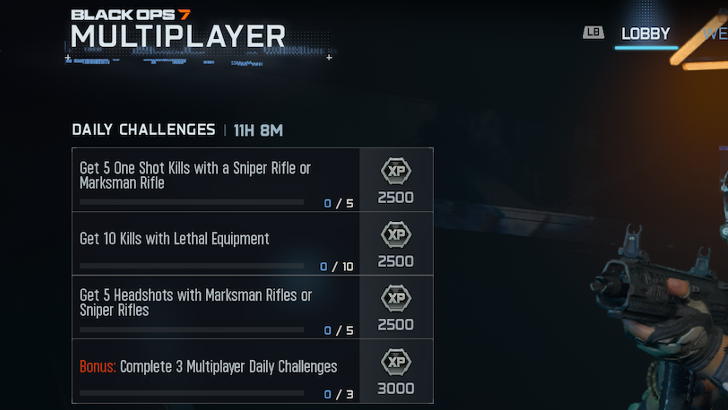
Aside from going into a fight, you can earn more XP by doing the Daily Challenges listed on the window at the left of the Lobby. A timer is indicated to show the next challenge reset.
Completing these Daily Challenges will reward XP and be marked as Completed with a green checkmark. You will also receive a large notification if you complete a Daily Challenge while in a match.
Check Weapon, Equipment, and Perk Unlockables via Loadout Menu
Unlockables for Loadout items, such as weapons and perks, can also be checked via the Loadout menu. Look for the items with the lock icon to see their unlock conditions. For weapon attachments, check for lock icons in the Gunsmith.
Combat Tips
| Combat Tips and Strategies |
|---|
|
|
Strafe While Shooting
Strafing while shooting will make you more difficult to hit as your enemies will have to adjust their aim. With strafing, you can also use it to your advantage to adjust your aim as you track and shoot a target.
Use Wall Jumps to Surprise Enemies
Make full use of the new wall jump mechanics to catch enemies off guard. This ability makes you unpredictable and hard to hit, causing opponents to miss and giving you the upper hand in gunfights.
Attack and Defend Objectives Together
Whether you are capturing a point in Domination or holding the ground in Hardpoint, sticking with your teammates gives great advantage to every member involved.
Support your teammates with Field Upgrades like Assault Packs and Trophy Systems, and flush out clusters of the opposing team with lethal equipment such as Frag Grenades.
Blind Enemies with Flashbangs
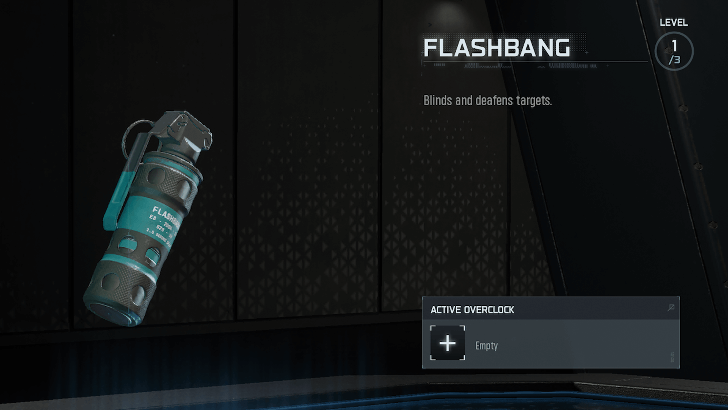
Flashbangs make a return to Black Ops 7 and are highly dependable on blinding enemies to let you go in for the kill. Take advantage of Flashbangs to also help you get out of tough situations.
Utilize the Body Shield Feature
The Body Shield returns in Black Ops 7, allowing you to hold an enemy as a shield. Doing so lets you temporarily block enemy fire from the front and reveal enemy positions on the minimap. Proximity Voice Chat, if enabled, is opened for both the victim and holder while in a Body Shield, allowing for some unique and personal interactions.
To initiate a Body Shield, get behind an enemy and tap the Execute button twice. While holding the body, you can aim and shoot your weapon. To dispose of the body, use Quick Kill or Execution, or wait for the timer to end. Getting killed will release the victim's body.
Players Can Call for Help if Used as a Body Shield
Players held as victims of a Body Shield can use the Call for Help button to alert teammates of the Body Shield's position in a match. Teammates will have to kill the holder to free the victim from the Body Shield.
All Tips and Tricks Guides
Call of Duty Black Ops 7 Related Guides

Black Ops 7 Guides
| BO7 Wiki Contents | |
|---|---|
 Zombies Zombies |
 Best Loadouts Best Loadouts |
 Co-op Campaign Co-op Campaign |
 Guns and Weapons Guns and Weapons |
 Camos Camos |
 Equipment Equipment |
 Attachments Attachments |
 Perks Perks |
 Operators Operators |
 Maps Maps |
 Tips and Tricks Tips and Tricks |
 Calling Cards Calling Cards |
 Redeem Codes Redeem Codes |
 Blueprints Blueprints |
 Seasons Seasons |
 Double XP Double XP |
 Achievements Achievements |
 Emblems Emblems
|
 News and Game Info News and Game Info |
|
Recommended Guides
| Best Guns Tier List | Build Code Sharing Board |
| All Dark Ops Challenges | List of Prestige Emblems |
Comment



Author

Tips and Tricks: A Beginner's Guide to BO7

Rankings
- We could not find the message board you were looking for.
Gaming News

![Star Savior Review [First Impressions] | Engaging, Entertaining, and Expensive](https://img.game8.co/4447603/8f500e9bf666bdb8adb1af478e9dfdbd.png/show)



Popular Games

Genshin Impact Walkthrough & Guides Wiki
Umamusume: Pretty Derby Walkthrough & Guides Wiki
Crimson Desert Walkthrough & Guides Wiki
Monster Hunter Stories 3: Twisted Reflection Walkthrough & Guides Wiki
Honkai: Star Rail Walkthrough & Guides Wiki
Pokemon Pokopia Walkthrough & Guides Wiki
The Seven Deadly Sins: Origin Walkthrough & Guides Wiki
Wuthering Waves Walkthrough & Guides Wiki
Zenless Zone Zero Walkthrough & Guides Wiki
Arknights: Endfield Walkthrough & Guides Wiki










Recommended Games
Fire Emblem Heroes (FEH) Walkthrough & Guides Wiki
Diablo 4: Vessel of Hatred Walkthrough & Guides Wiki
Cyberpunk 2077: Ultimate Edition Walkthrough & Guides Wiki
Yu-Gi-Oh! Master Duel Walkthrough & Guides Wiki
Super Smash Bros. Ultimate Walkthrough & Guides Wiki
Pokemon Brilliant Diamond and Shining Pearl (BDSP) Walkthrough & Guides Wiki
Elden Ring Shadow of the Erdtree Walkthrough & Guides Wiki
Monster Hunter World Walkthrough & Guides Wiki
The Legend of Zelda: Tears of the Kingdom Walkthrough & Guides Wiki
Persona 3 Reload Walkthrough & Guides Wiki










All rights reserved
©/TM/® 2025 Activision Publishing, Inc.
The copyrights of videos of games used in our content and other intellectual property rights belong to the provider of the game.
The contents we provide on this site were created personally by members of the Game8 editorial department.
We refuse the right to reuse or repost content taken without our permission such as data or images to other sites.