
How to Customize Weapons
★ Disclaimer: Our guides were written before the Rearmament update, so some information may be outdated. We appreciate your support!
★ News: Crossplay | Game Pass | Roadmap
★ Best Settings | Teams | Weapons
┗ Best Bonus Abilities | XP Farm | Difficulty
Customize weapons in the armory in Killing Floor 3 (KF3). See how to customize weapons and how to equip custom weapons here!
List of Contents
How to Customize Weapons
Attach Mods
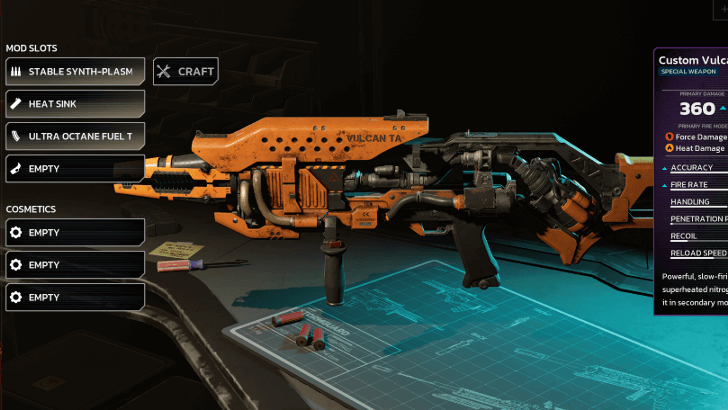
To customize a weapon, select it in the armory and press Select Loadout. Players can attach Mods to weapons, modifying its stats but raising its cost.
Each weapon can have different slots available for customization. While some weapons have identical mods available, these do not carry over and must be crafted for each weapon the player would like it attached to.
Equip Cosmetics
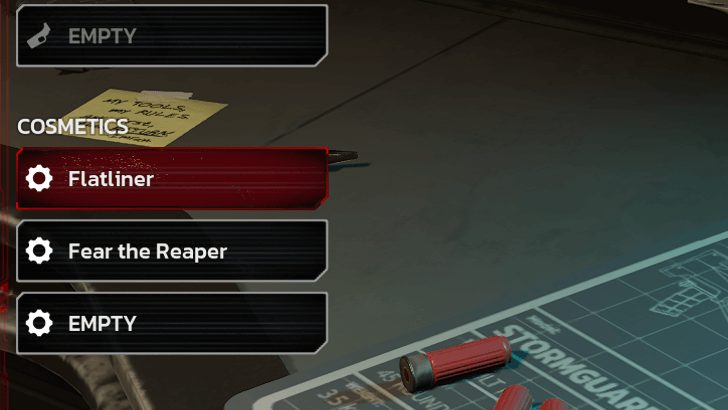
Cosmetics such as skins and trinkets can be applied to the weapon as well. Equip these directly below the mods to change the weapon's appearance.
Rename Weapons
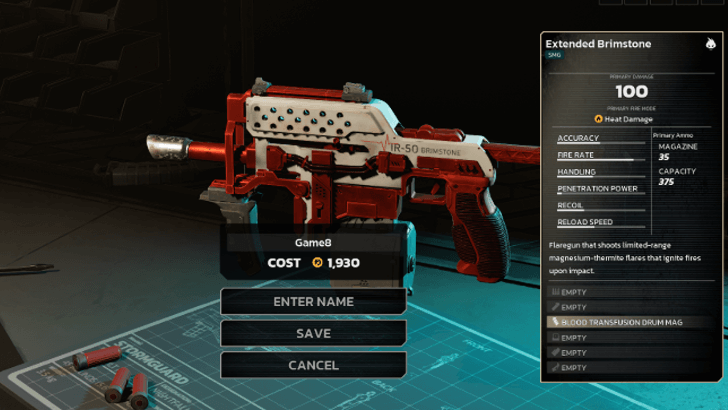
Players can rename the loadout to label the weapon customization.
How to Equip Custom Weapons
Equip in Startup or Purchase From Trader
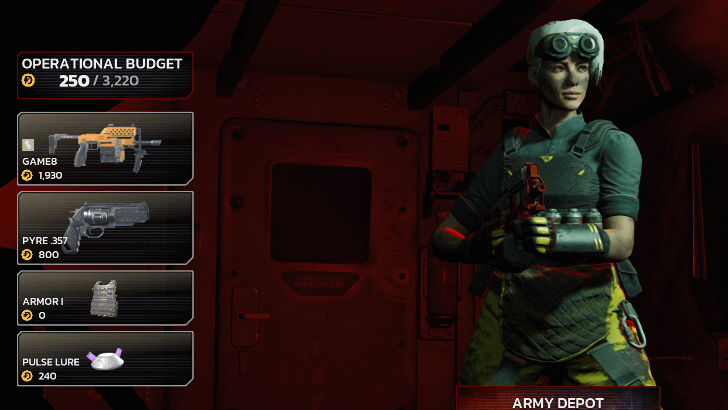
Custom weapons can be equipped immediately before the mission starts if their Operational Budget is sufficient. Otherwise, players can access their custom weapons by purchasing them from the Trader between enemy waves.
How to Increase Operational Budget
Killing Floor 3 Related Guides
Beginner's Guide: Tips and Tricks
All Tips and Tricks Guides
Comment



Author
How to Customize Weapons

Rankings
- We could not find the message board you were looking for.
Gaming News

![Star Savior Review [First Impressions] | Engaging, Entertaining, and Expensive](https://img.game8.co/4447603/8f500e9bf666bdb8adb1af478e9dfdbd.png/show)



Popular Games

Genshin Impact Walkthrough & Guides Wiki
Umamusume: Pretty Derby Walkthrough & Guides Wiki
Crimson Desert Walkthrough & Guides Wiki
Monster Hunter Stories 3: Twisted Reflection Walkthrough & Guides Wiki
Honkai: Star Rail Walkthrough & Guides Wiki
Pokemon Pokopia Walkthrough & Guides Wiki
The Seven Deadly Sins: Origin Walkthrough & Guides Wiki
Wuthering Waves Walkthrough & Guides Wiki
Zenless Zone Zero Walkthrough & Guides Wiki
Arknights: Endfield Walkthrough & Guides Wiki










Recommended Games
Fire Emblem Heroes (FEH) Walkthrough & Guides Wiki
Diablo 4: Vessel of Hatred Walkthrough & Guides Wiki
Cyberpunk 2077: Ultimate Edition Walkthrough & Guides Wiki
Yu-Gi-Oh! Master Duel Walkthrough & Guides Wiki
Super Smash Bros. Ultimate Walkthrough & Guides Wiki
Pokemon Brilliant Diamond and Shining Pearl (BDSP) Walkthrough & Guides Wiki
Elden Ring Shadow of the Erdtree Walkthrough & Guides Wiki
Monster Hunter World Walkthrough & Guides Wiki
The Legend of Zelda: Tears of the Kingdom Walkthrough & Guides Wiki
Persona 3 Reload Walkthrough & Guides Wiki










All rights reserved
Killing Floor© 2009-2025 Tripwire Interactive. Unreal® is a trademark or registered trademark of Epic Games, Inc. in the United States of America and elsewhere. Unreal® Engine, Copyright 1998-2025, Epic Games, Inc. All rights reserved.
The copyrights of videos of games used in our content and other intellectual property rights belong to the provider of the game.
The contents we provide on this site were created personally by members of the Game8 editorial department.
We refuse the right to reuse or repost content taken without our permission such as data or images to other sites.