
Profile Guide: How to Customize my Player Card?
The Game8 Black Beacon Team has ended coverage as of May 21, 2025. Information on certain pages may not be up-to-date. Thank you for your continued support!
Customize your Player Card in Black Beacon to showcase your characters and achievements. This guide will help you customize your Player Card and explain how to view other players' cards as well.
List of Contents
How to Customize Player Card
View Seer Profile and Set Avatar and Other Information
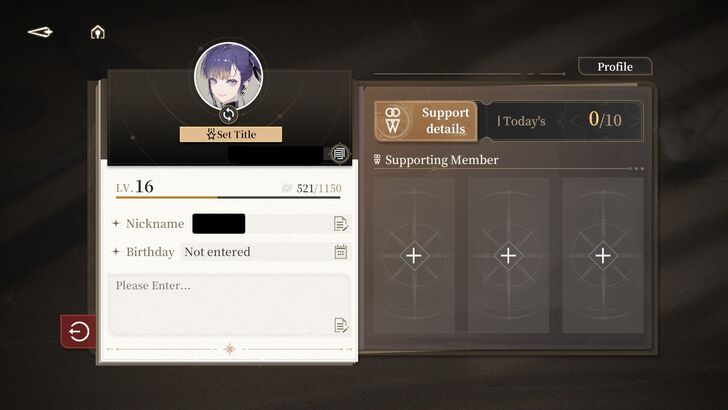
The Player Card contains your player information, such as your User ID, Nickname, Titles, and more. You can also customize it based on your preferred design and details.
| 1 | 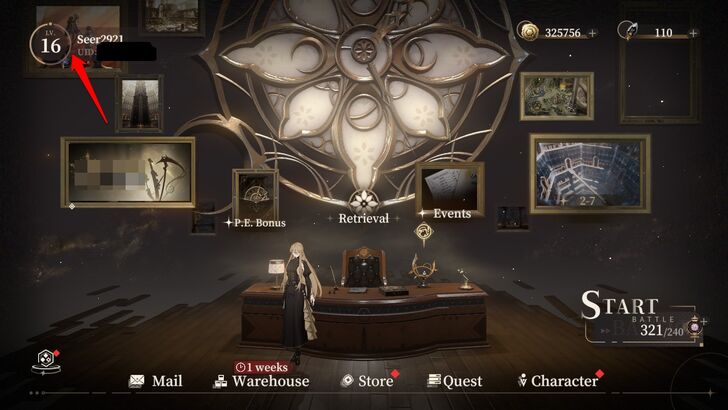 |
|---|---|
| 2 | 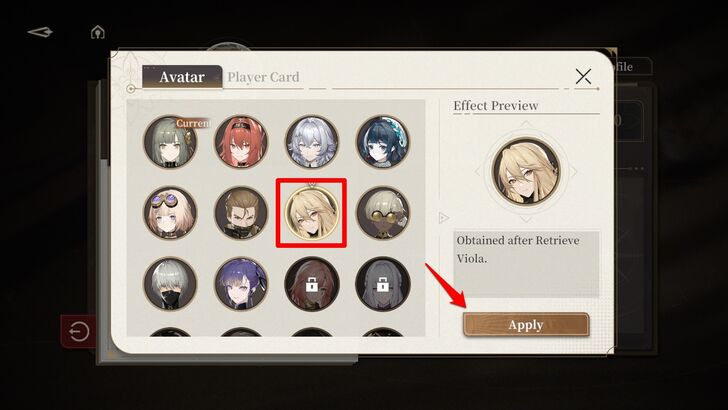 The Seer profile can be viewed here, and the first thing you can change is the Seer Avatar. Tap Zero's avatar, select a new one, and press "Apply" to update your avatar. Avatars can be unlocked by obtaining new characters. |
| 3 | 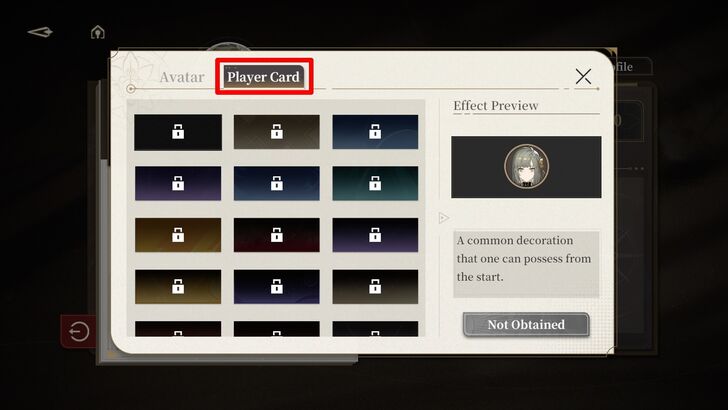 After that, tap "Player Card" to change the avatar background. It can be set similarly to the avatar, but you must unlock specific achievements to access more backgrounds. |
| 4 | 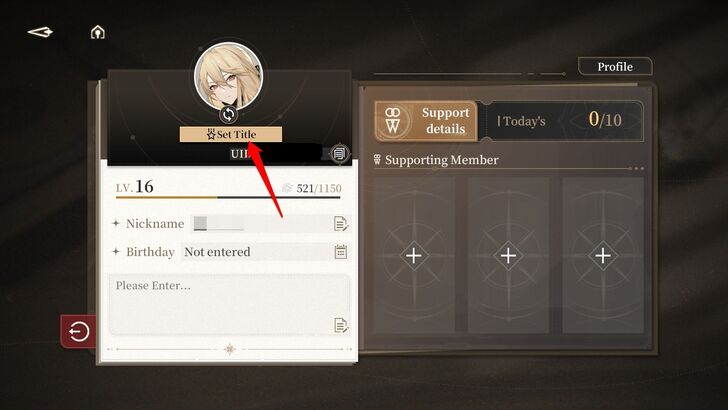 Return to your profile and tap "Set Title." You must complete achievements to unlock new titles. |
| 5 | 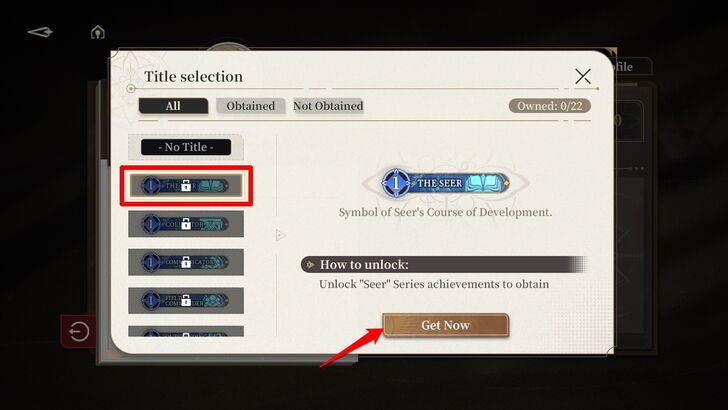 Once you have selected a title, tap "Confirm" to save it. If you don't have any title yet, view locked titles and press "Get Now" to learn how to unlock them. |
| 6 | 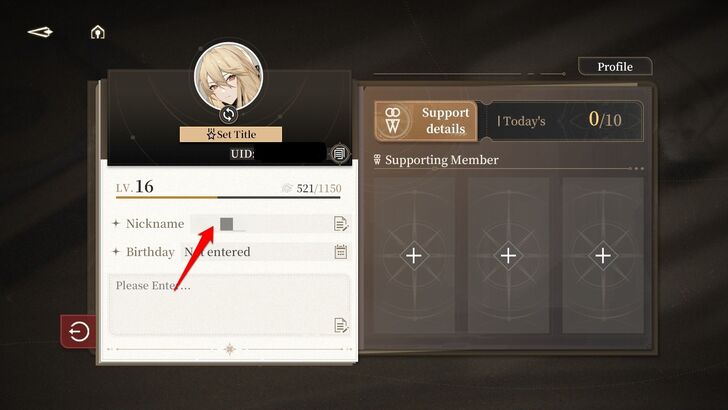 After setting the title, tap "Nickname" to change your Seer name. Keep in mind that changing Nickname will consume 1 Rename Card. |
| 7 | 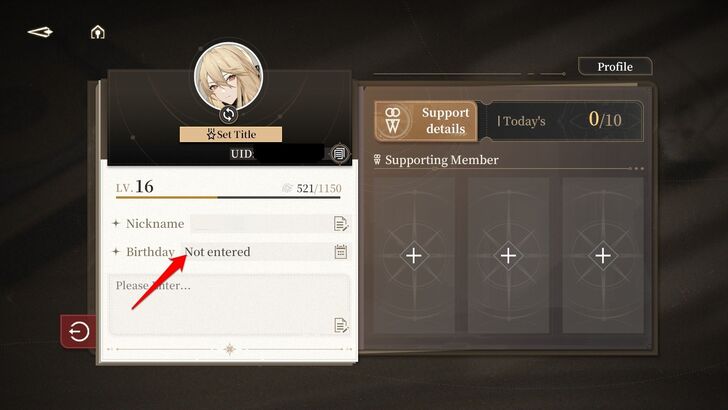 Once done, set your Seer's Birthday. Tap "Birthday" and select your preferred month and date. |
| 8 | 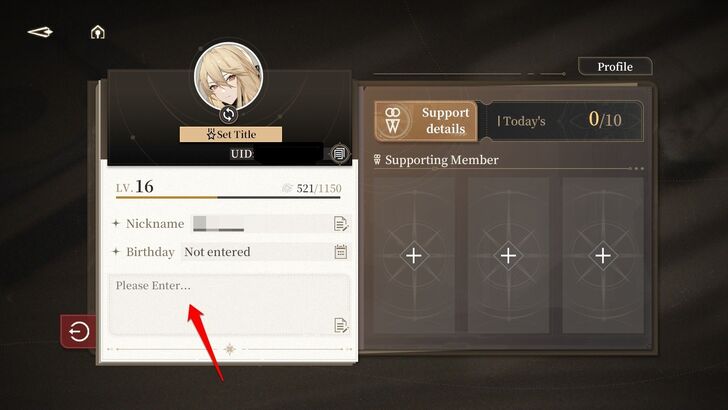 To enter a new message, select the text box under the Seer's Birthday. Please avoid profanity and keep your message respectful. The text box is limited to 15 alphanumeric characters. |
Change Character Display
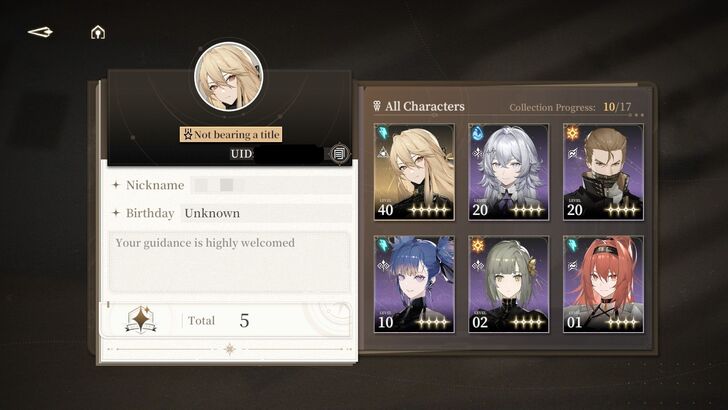
Your Player Card can also be customized by changing the number of appearing characters.
| 1 | 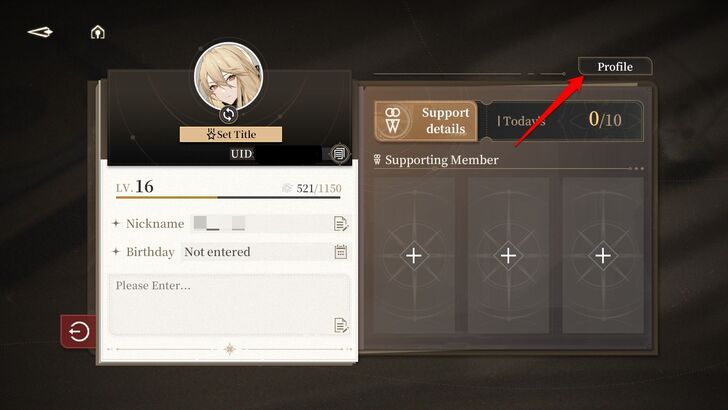 |
|---|---|
| 2 | 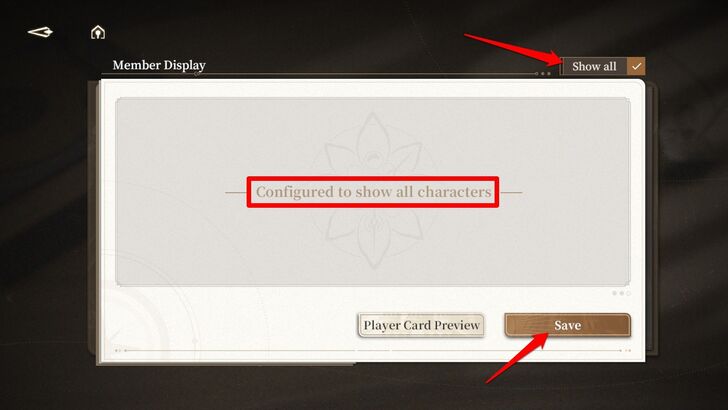 At the top right of the screen, you can choose to display all your obtained characters or select a limited number. Press "Show All" to display all your characters on your Player Card, then press "Save." |
| 3 | 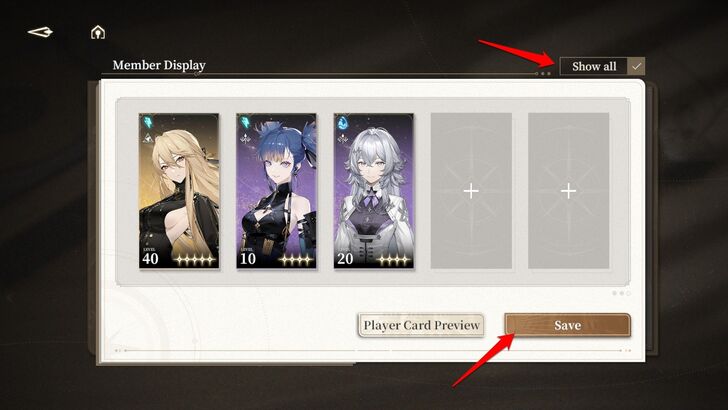 If you want to display only a few characters on your Player Card, deselect "Show All" and assign the characters you want to appear. Once done, press "Save." The maximum number of characters is five, and you can also choose not to display any characters at all. |
| 4 | 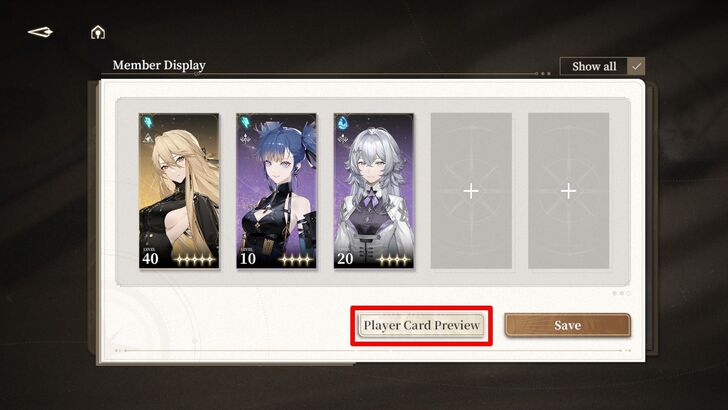 Tap "Player Card Preview" to see how your Player Card will look after selecting your characters. |
How to Check Other Player Card?
Review Other Player Cards Through the Friend Menu
Reviewing other players' player cards can be simply be done by visiting the Friend menu.
| 1 | 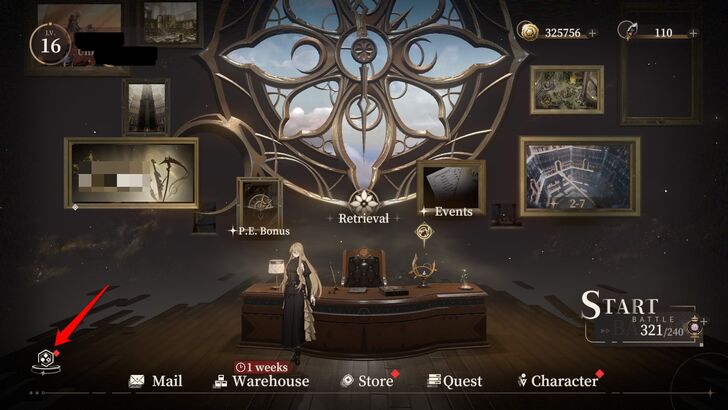 |
|---|---|
| 2 | 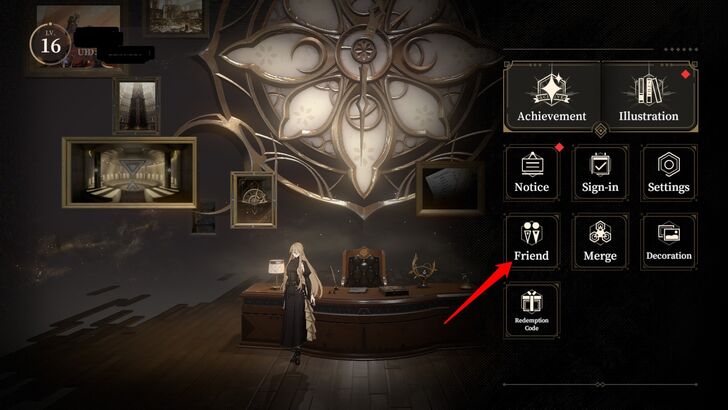 Select "Friend" among the options. Make sure you finished Main Story Chapter 1-9 to access this feature. |
| 3 | 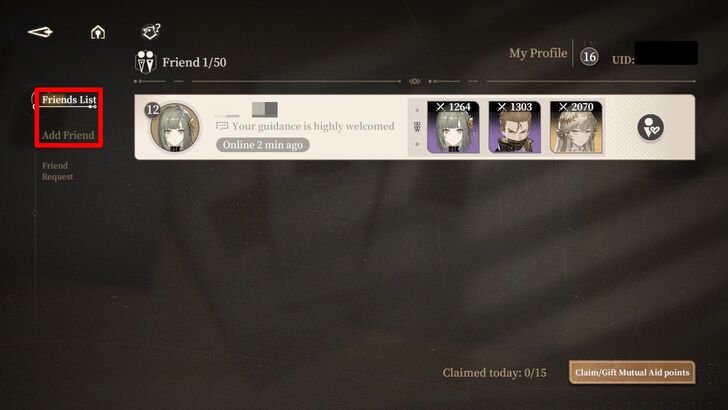 Select a profile either from the "Friends List" or "Add Friend Option." |
| 4 | 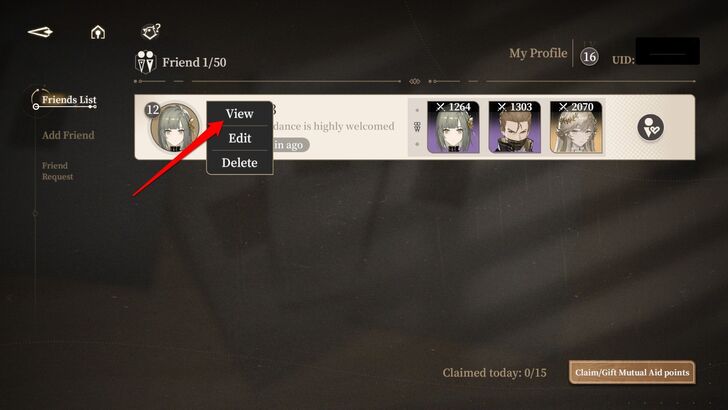 Tap on a player's icon and select "View." |
| 5 | 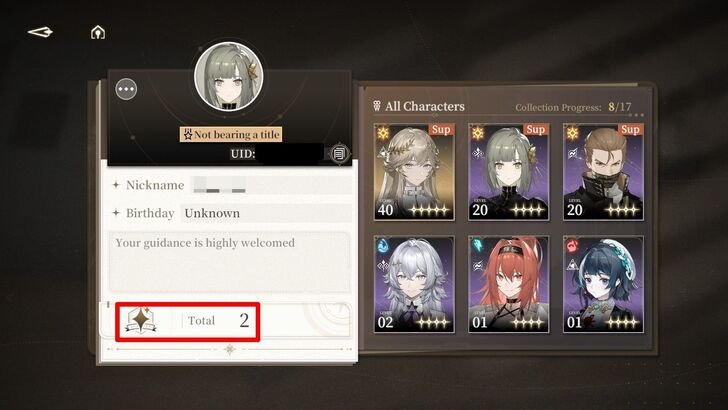 Here, you can see their Player Cards, including the total number of Achievements they have unlocked. |
Why Customize Player Card?
Increase the Chance of Having a Friend
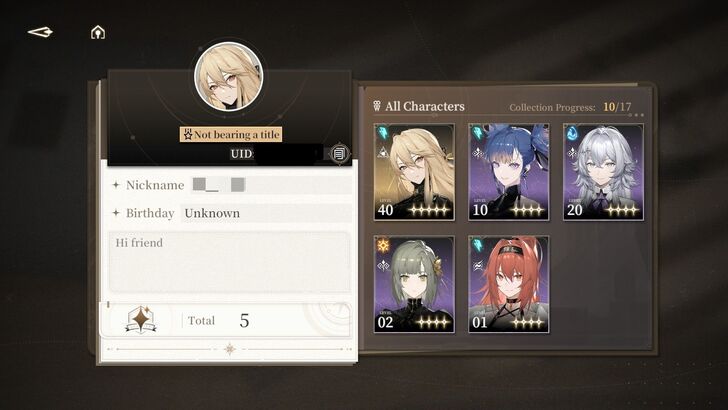
You can use the text box to set a message for viewers of your Player Card, increasing your chances of making friends in Black Beacon. For example, you can write a short message stating that you need high-level supports for your party or simply express that you're looking for friends.
Adding a message helps with communication between players. However, please be mindful of what you enter in the text box.
To Show Obtained Characters and Unlocked Achievements
If you're proud of your achievements and the number of characters you've collected, you can showcase them through your Player Card. Just be sure to customize it so other players can see your accomplishments in Black Beacon.
Black Beacon Related Guides
All Tips and Tricks Guides
 Beginner's Guide: Tips and Tricks for New Players
Comment



Author

Profile Guide: How to Customize my Player Card?
Rankings
Gaming News




![Monster Hunter Stories 3 Review [First Impressions] | Simply Rejuvenating](https://img.game8.co/4438641/2a31b7702bd70e78ec8efd24661dacda.jpeg/thumb)
Popular Games

Genshin Impact Walkthrough & Guides Wiki
Honkai: Star Rail Walkthrough & Guides Wiki
Umamusume: Pretty Derby Walkthrough & Guides Wiki
Pokemon Pokopia Walkthrough & Guides Wiki
Resident Evil Requiem (RE9) Walkthrough & Guides Wiki
Monster Hunter Wilds Walkthrough & Guides Wiki
Wuthering Waves Walkthrough & Guides Wiki
Arknights: Endfield Walkthrough & Guides Wiki
Pokemon FireRed and LeafGreen (FRLG) Walkthrough & Guides Wiki
Pokemon TCG Pocket (PTCGP) Strategies & Guides Wiki










Recommended Games
Diablo 4: Vessel of Hatred Walkthrough & Guides Wiki
Cyberpunk 2077: Ultimate Edition Walkthrough & Guides Wiki
Fire Emblem Heroes (FEH) Walkthrough & Guides Wiki
Yu-Gi-Oh! Master Duel Walkthrough & Guides Wiki
Super Smash Bros. Ultimate Walkthrough & Guides Wiki
Pokemon Brilliant Diamond and Shining Pearl (BDSP) Walkthrough & Guides Wiki
Elden Ring Shadow of the Erdtree Walkthrough & Guides Wiki
Monster Hunter World Walkthrough & Guides Wiki
The Legend of Zelda: Tears of the Kingdom Walkthrough & Guides Wiki
Persona 3 Reload Walkthrough & Guides Wiki










All rights reserved
Game Copyright©Glohow Holdings Pte. Ltd. & MINGZHOU Technology Co., Ltd. All Rights Reserved
The content we provide on this site were created personally by members of the Game8 editorial department.
We refuse the right to reuse or repost content taken without our permission such as data or images to other sites.
©Glohow Holdings Pte. Ltd. & MINGZHOU Technology Co., Ltd (Provider)