
Affection Guide: How Do I Raise My Character's Affection
The Game8 Black Beacon Team has ended coverage as of May 21, 2025. Information on certain pages may not be up-to-date. Thank you for your continued support!
Raising your characters' Affection can give you even more rewards. Find out how to raise affection, the rewards for doing so, and more!
List of Contents
How to Raise Character Affection
Clear Main Story Stage 1-4 First
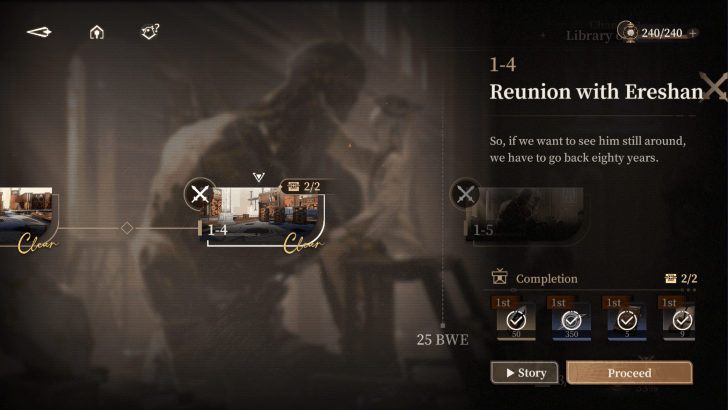
First and foremost, the Character Affection Menu is only accessible when you have cleared Stage 1-4 in the Main Story.
Once you have cleared this stage, this menu can now be accessed and will not be locked.
Get Gifts From Progression or the Friendship Store
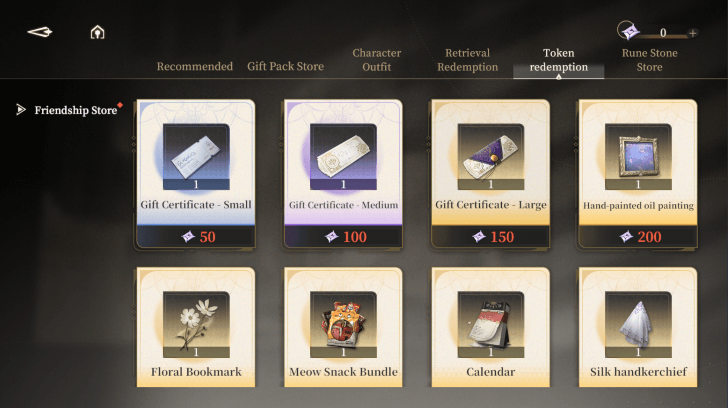
To raise a character's affection, you have to either buy Gifts from the Friendship Store using Mutual Aid Points or obtain Gift Certificates from raising your Seer Level.
It's important to note that for purchasable gifts, each character has a preferred gift. Knowing what gift to give is vital to get the most amount of points for the affection meter and save Mutual Aid Points.
Give Gifts in the Character Affection Menu
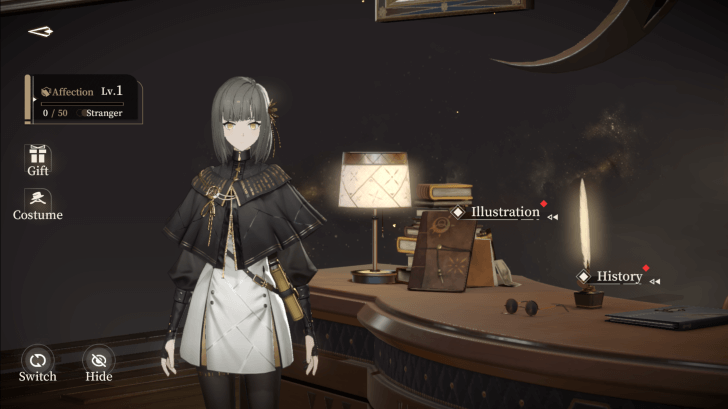
After obtaining Gifts from progressing through the game, you can now give them to your characters to raise their Affection Level. Take note that you can only give Gifts to characters you have retrieved, despite having tried them in the Main Story as Trial Characters. To check, tap the Characters tab in the Home Screen.
| 1 | 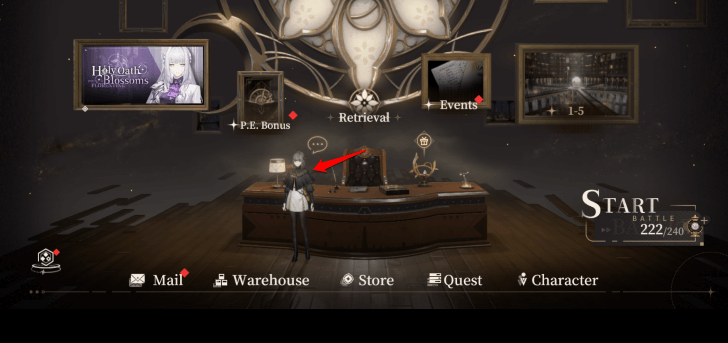 Click on the character in the Home Screen. Zero will be standing in this spot by default. |
|---|---|
| 2 | 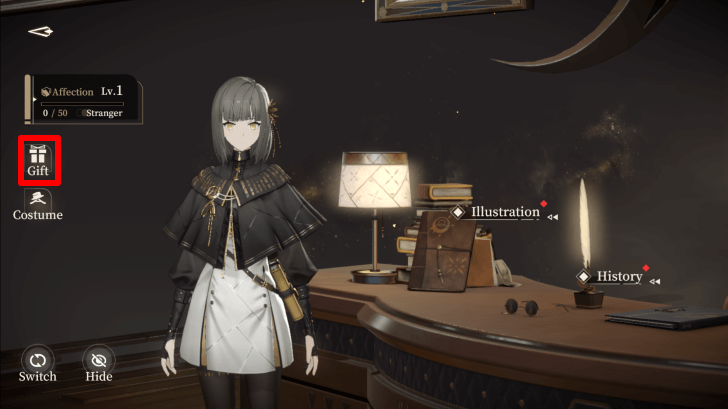 Click on the Gift icon to open the Gifts menu. Any Gift Certificate or Gift Items bought from the Friendship Store will show up here. |
| 3 | 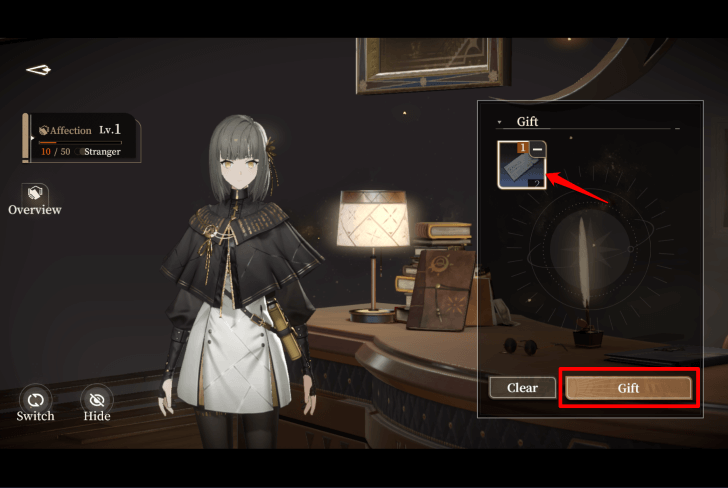 After selecting the specific gifts to give to that character, click on the Gift button on the lower right. |
| 4 | 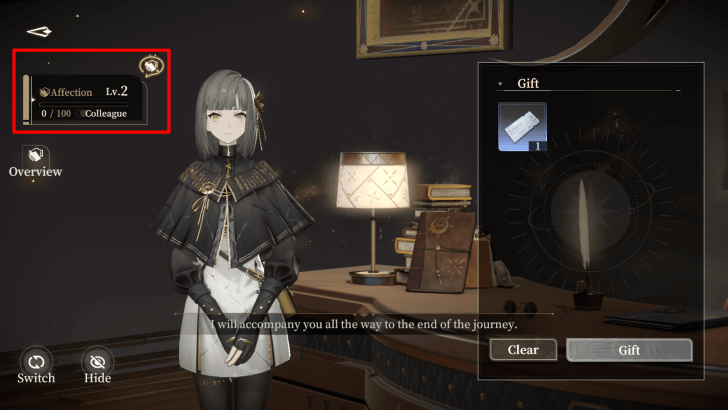 You can find the Affection Level of each character on the upper left side of this screen. |
How Do I Switch Characters?
Switch Characters in the Character Affection Menu
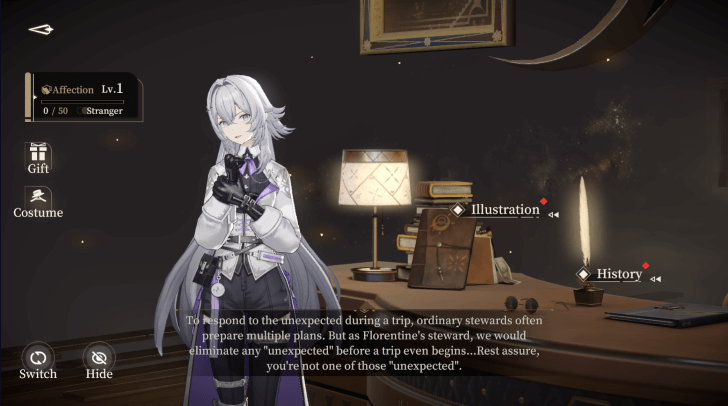
It's important to remember that the Affection Level of your characters are independent of each other. This means you will have to specifically choose which character's Affection you want to raise, especially since Gifts and Gift Certificates are relatively rare especially early on in the game.
| 1 | Click on the character in the Settlement Screen. Zero will be standing in this spot by default. |
|---|---|
| 2 | 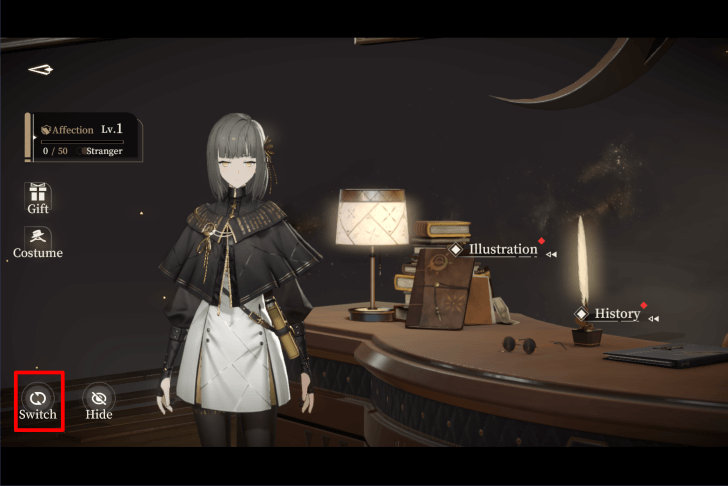 Tap on the Switch option placed on the lower left side of the screen. This will display all of the unique characters that you have obtained through progression or Retrieval. |
| 3 | 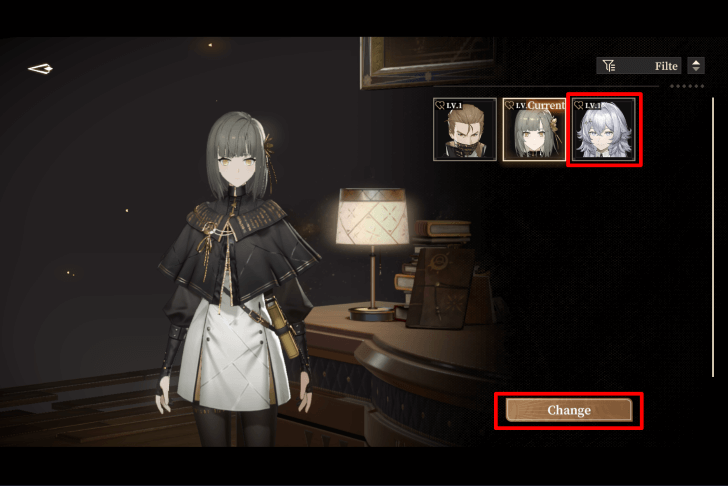 After selecting the character that you want, tap the Change button on the lower right side of the screen to swap to your preferred character. |
| 4 | 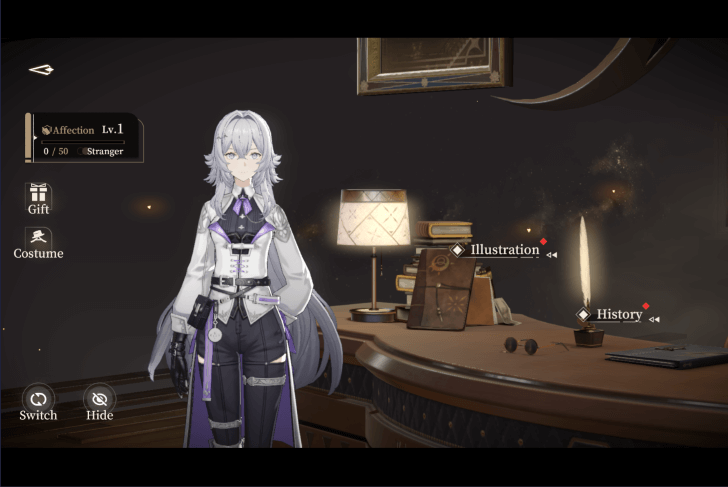 Your chosen character will now be displayed along with their Affection Level. They will also be the character that greets you whenever you open the game. |
What Do I Get For Raising Character Affection?
Various Upgrade Currency and Costumes
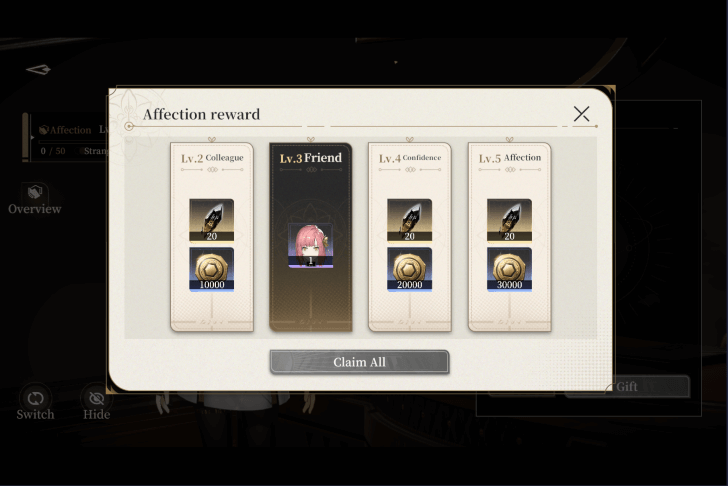
Each character will give a total 60 Soul Shards, 60000 Orelium, and a Costume upon maxing out their Affection Level.
More Character Stories
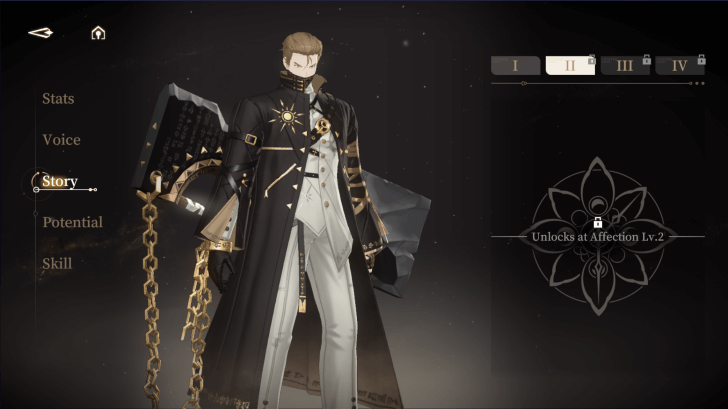
Aside from Zero and Ereshan, increasing the Affection Level of the other characters also rewards you with a chapter of their Character Story up until the max level of 5. The Character Stories are lore-filled explanations of each character's background, past, and more.
Black Beacon Related Guides

All Tips and Tricks Guides
 Beginner's Guide: Tips and Tricks for New Players
Comment



Author

Affection Guide: How Do I Raise My Character's Affection
Rankings
Gaming News




![Monster Hunter Stories 3 Review [First Impressions] | Simply Rejuvenating](https://img.game8.co/4438641/2a31b7702bd70e78ec8efd24661dacda.jpeg/thumb)
Popular Games

Genshin Impact Walkthrough & Guides Wiki
Honkai: Star Rail Walkthrough & Guides Wiki
Umamusume: Pretty Derby Walkthrough & Guides Wiki
Pokemon Pokopia Walkthrough & Guides Wiki
Resident Evil Requiem (RE9) Walkthrough & Guides Wiki
Monster Hunter Wilds Walkthrough & Guides Wiki
Wuthering Waves Walkthrough & Guides Wiki
Arknights: Endfield Walkthrough & Guides Wiki
Pokemon FireRed and LeafGreen (FRLG) Walkthrough & Guides Wiki
Pokemon TCG Pocket (PTCGP) Strategies & Guides Wiki










Recommended Games
Diablo 4: Vessel of Hatred Walkthrough & Guides Wiki
Cyberpunk 2077: Ultimate Edition Walkthrough & Guides Wiki
Fire Emblem Heroes (FEH) Walkthrough & Guides Wiki
Yu-Gi-Oh! Master Duel Walkthrough & Guides Wiki
Super Smash Bros. Ultimate Walkthrough & Guides Wiki
Pokemon Brilliant Diamond and Shining Pearl (BDSP) Walkthrough & Guides Wiki
Elden Ring Shadow of the Erdtree Walkthrough & Guides Wiki
Monster Hunter World Walkthrough & Guides Wiki
The Legend of Zelda: Tears of the Kingdom Walkthrough & Guides Wiki
Persona 3 Reload Walkthrough & Guides Wiki










All rights reserved
Game Copyright©Glohow Holdings Pte. Ltd. & MINGZHOU Technology Co., Ltd. All Rights Reserved
The content we provide on this site were created personally by members of the Game8 editorial department.
We refuse the right to reuse or repost content taken without our permission such as data or images to other sites.
©Glohow Holdings Pte. Ltd. & MINGZHOU Technology Co., Ltd (Provider)