
How to Switch Characters
The Game8 Black Beacon Team has ended coverage as of May 21, 2025. Information on certain pages may not be up-to-date. Thank you for your continued support!
Switching characters in Black Beacon allows you to swap between three party members. This guide will teach you how to switch characters and determine the best time to use this mechanic.
How to Switch Characters
Tap Character Icons at the Top Right of the Screen
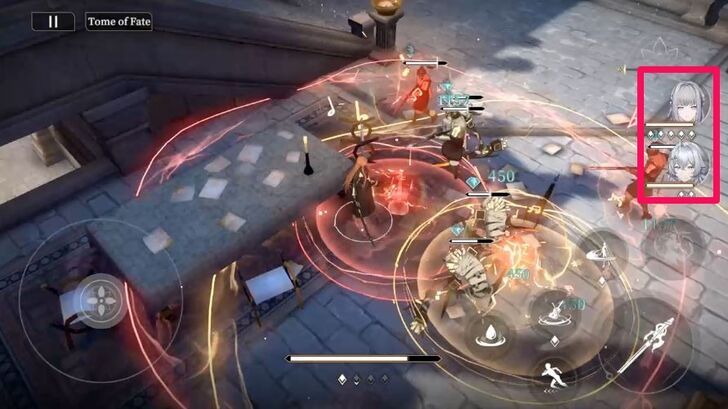
You can switch characters during a mission by simply pressing their character icons at the top right of the screen. Switching characters is crucial for disrupting enemy attacks, dealing more damage, or healing your main attacker. It also helps queue character ultimate skills, allowing you to cast them simultaneously for a burst of high damage.
There are no restrictions on switching characters, so you can swap them freely at any time. However, it’s best to time your switches based on the combat situation.
When Should You Switch Characters?
Interrupt Enemy's Killing Move
Switched-in characters can interrupt an enemy's Killing Move, indicated by a yellow flash, through Entrance Attack. Your character will automatically execute this attack when switched into battle, disrupting the enemy's Ultimate Skill and allowing you to deal damage. However, this does not prevent other enemies from attacking you, so it's best to know when to avoid Killing Moves or disrupt them by switching.
Heal Low-HP Characters
If your carry is low on health, you can switch to a healer character to gradually restore their HP. This is especially useful during long and difficult missions, where a healer is needed to sustain the party. Additionally, characters in the Backline passively restore Vigor, which is required to cast skills.
For example, Asti used her Spinning Umbrella and Sharp Umbrella to heal benched characters like Viola. When healers are in combat, they are useful for replenishing other party members' HP.
Execute Combo Skills Automatically
When you activated Combo Burst Phase 2: Moment of Opulence, your backline characters can automatically cast their Combo Skills through switching. This can only occur once per activation.
This is useful for casting skills that require charging or activating passive abilities, like Asti's Rainfall Zone or Ninsar's Me's Blessing.
Lowering Enemy's Tenacity
Switching characters is also helpful for triggering Elemental Overload and reducing an enemy's Tenacity, represented by a yellow bar beneath the enemy's HP bar. Elemental Overload occurs when you inflict two different Elemental Anomalies or status effects on the enemy, dealing a quick burst of damage to the enemy's HP and Tenacity bar.
For this example, Darius was afflicted with Electrocuted and Burning, dealing high damage and further increasing the damage he took after a short period of time. Darius was also stunned for a brief moment after his Tenacity was lowered by one level.
Chaining Your Characters' Ultimate Skills
Ultimate skills can be cast simultaneously by swapping between characters, allowing them to fill up their Ultimate Skill meters. When an Ultimate is ready, a skill icon will appear beside the character icons at the top right of the screen. In this case, you can switch to that character automatically by tapping his or her ultimate skill icon.
This strategy is particularly useful when your party consists of a hard carry, a buffer, and a debuffer. You can start by either buffing your team or debuffing enemies. After casting those two, swap to the hard carry to maximize its Ultimate’s damage.
Black Beacon Related Guides
All Tips and Tricks Guides
 Beginner's Guide: Tips and Tricks for New Players
Comment



Author

How to Switch Characters
Rankings
- We could not find the message board you were looking for.
Gaming News




![Monster Hunter Stories 3 Review [First Impressions] | Simply Rejuvenating](https://img.game8.co/4438641/2a31b7702bd70e78ec8efd24661dacda.jpeg/thumb)
Popular Games

Genshin Impact Walkthrough & Guides Wiki
Honkai: Star Rail Walkthrough & Guides Wiki
Umamusume: Pretty Derby Walkthrough & Guides Wiki
Pokemon Pokopia Walkthrough & Guides Wiki
Resident Evil Requiem (RE9) Walkthrough & Guides Wiki
Monster Hunter Wilds Walkthrough & Guides Wiki
Wuthering Waves Walkthrough & Guides Wiki
Arknights: Endfield Walkthrough & Guides Wiki
Pokemon FireRed and LeafGreen (FRLG) Walkthrough & Guides Wiki
Pokemon TCG Pocket (PTCGP) Strategies & Guides Wiki










Recommended Games
Diablo 4: Vessel of Hatred Walkthrough & Guides Wiki
Cyberpunk 2077: Ultimate Edition Walkthrough & Guides Wiki
Fire Emblem Heroes (FEH) Walkthrough & Guides Wiki
Yu-Gi-Oh! Master Duel Walkthrough & Guides Wiki
Super Smash Bros. Ultimate Walkthrough & Guides Wiki
Pokemon Brilliant Diamond and Shining Pearl (BDSP) Walkthrough & Guides Wiki
Elden Ring Shadow of the Erdtree Walkthrough & Guides Wiki
Monster Hunter World Walkthrough & Guides Wiki
The Legend of Zelda: Tears of the Kingdom Walkthrough & Guides Wiki
Persona 3 Reload Walkthrough & Guides Wiki










All rights reserved
Game Copyright©Glohow Holdings Pte. Ltd. & MINGZHOU Technology Co., Ltd. All Rights Reserved
The content we provide on this site were created personally by members of the Game8 editorial department.
We refuse the right to reuse or repost content taken without our permission such as data or images to other sites.
©Glohow Holdings Pte. Ltd. & MINGZHOU Technology Co., Ltd (Provider)