
Account Linking Guide
The Game8 Black Beacon Team has ended coverage as of May 21, 2025. Information on certain pages may not be up-to-date. Thank you for your continued support!
Learn how to link your Black Beacon account to Google, Facebook, or Apple to keep your progress safe and secure. This guide walks you through each step, ensuring you don’t lose your guest account data.
List of Contents
Account Linking Guide
Go to the Settings Menu
| 1 | 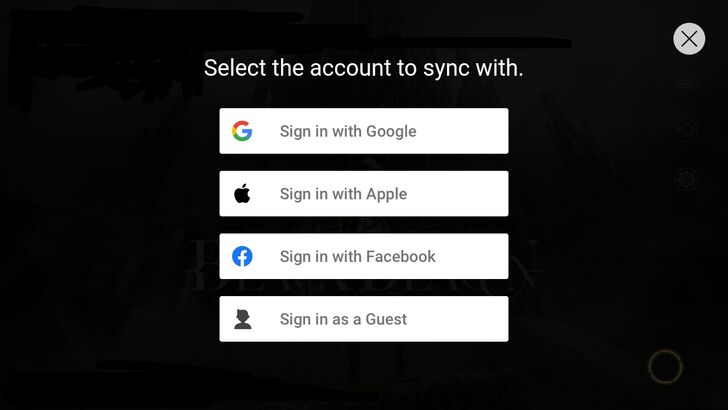 When starting a new game, you can already pick and choose what kind of account you want to link your Black Beacon account with - either Google, Apple, or Facebook. But for the purposes of this guide, let's assume that you signed in as a guest. |
|---|---|
| 2 |  Play the game as normal. Or, if you're rerolling, play until you've collected enough resources to pull from the retrieval pools you want to pull from. |
| 3 | 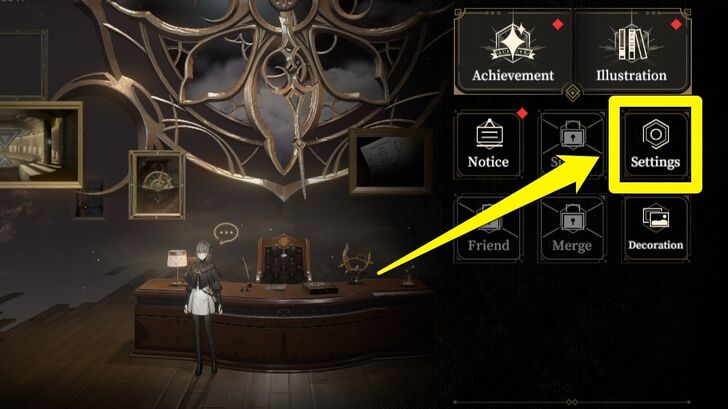 At the Home Screen, go to the Settings menu, which can be accessed by tapping the small pentagon-shaped button on the lower left-hand corner. |
| 4 | 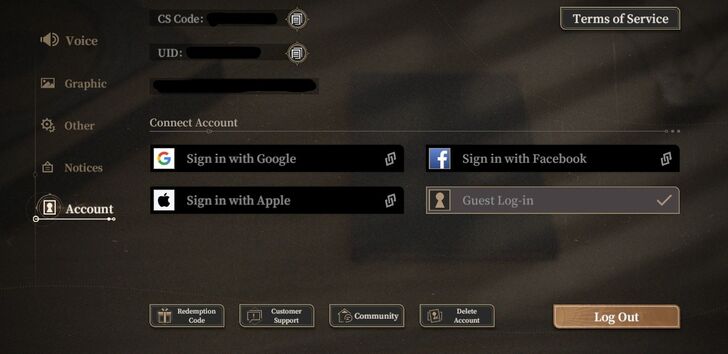 Go to the Account tab and you will see three options to link your guest account to - Google, Apple, and Facebook. Pick one. |
| 5 | 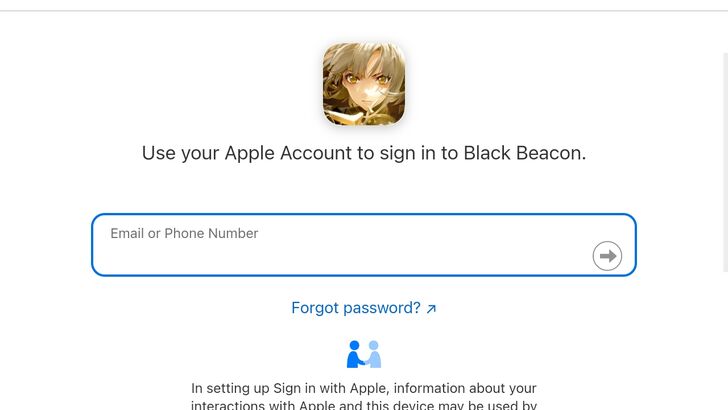 The game will then ask you to sign in with your preferred account. This account will be linked to your Black Beacon account. |
| 6 | 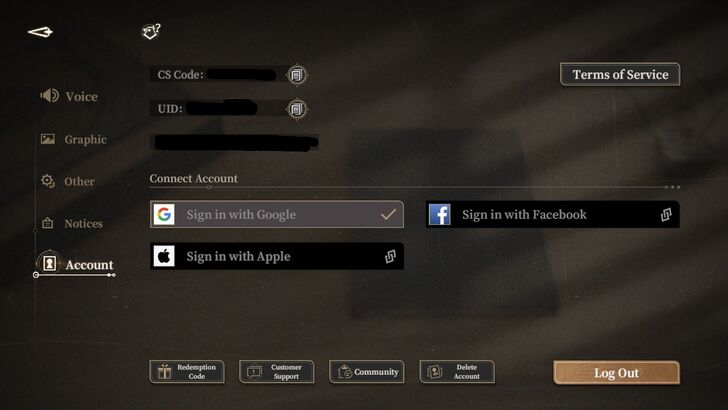 Your account is now linked. When you sign out and sign in again, you will only need to use the account you linked your game to in order to sign in. |
Uses of Account Linking
Avoid Losing Your Guest Account
A Guest Account in Black Beacon is deleted once you log out of it without linking it to an account. If you've been rerolling your account, got a character you liked, and signed out by linking it to a Google/Apple/Facebook account, you will lose that guest account forever.
If you are using a Guest Account to play Black Beacon, it is highly recommended that you link it to Google/Apple/Facebook as soon as possible to avoid losing your account data.
Black Beacon Related Guides

All Tips and Tricks Guides
 Beginner's Guide: Tips and Tricks for New Players
Comment



Author

Account Linking Guide
Rankings
Gaming News




![Monster Hunter Stories 3 Review [First Impressions] | Simply Rejuvenating](https://img.game8.co/4438641/2a31b7702bd70e78ec8efd24661dacda.jpeg/thumb)
Popular Games

Genshin Impact Walkthrough & Guides Wiki
Honkai: Star Rail Walkthrough & Guides Wiki
Umamusume: Pretty Derby Walkthrough & Guides Wiki
Pokemon Pokopia Walkthrough & Guides Wiki
Resident Evil Requiem (RE9) Walkthrough & Guides Wiki
Monster Hunter Wilds Walkthrough & Guides Wiki
Wuthering Waves Walkthrough & Guides Wiki
Arknights: Endfield Walkthrough & Guides Wiki
Pokemon FireRed and LeafGreen (FRLG) Walkthrough & Guides Wiki
Pokemon TCG Pocket (PTCGP) Strategies & Guides Wiki










Recommended Games
Diablo 4: Vessel of Hatred Walkthrough & Guides Wiki
Cyberpunk 2077: Ultimate Edition Walkthrough & Guides Wiki
Fire Emblem Heroes (FEH) Walkthrough & Guides Wiki
Yu-Gi-Oh! Master Duel Walkthrough & Guides Wiki
Super Smash Bros. Ultimate Walkthrough & Guides Wiki
Pokemon Brilliant Diamond and Shining Pearl (BDSP) Walkthrough & Guides Wiki
Elden Ring Shadow of the Erdtree Walkthrough & Guides Wiki
Monster Hunter World Walkthrough & Guides Wiki
The Legend of Zelda: Tears of the Kingdom Walkthrough & Guides Wiki
Persona 3 Reload Walkthrough & Guides Wiki










All rights reserved
Game Copyright©Glohow Holdings Pte. Ltd. & MINGZHOU Technology Co., Ltd. All Rights Reserved
The content we provide on this site were created personally by members of the Game8 editorial department.
We refuse the right to reuse or repost content taken without our permission such as data or images to other sites.
©Glohow Holdings Pte. Ltd. & MINGZHOU Technology Co., Ltd (Provider)