
How to Change Party Members
The Game8 Black Beacon Team has ended coverage as of May 21, 2025. Information on certain pages may not be up-to-date. Thank you for your continued support!
Changing party members in Black Beacon helps create well-synergized teams capable of handling various missions and stronger enemies. Learn more about how to change party members and why it is important in the game.
List of Contents
How to Change Party Members
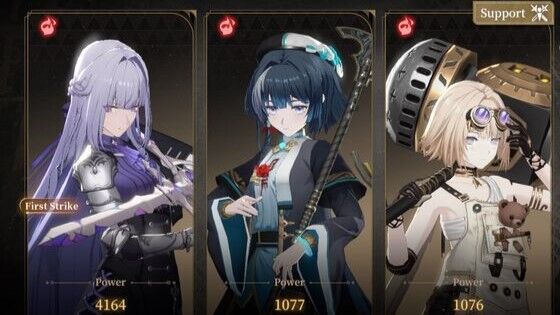
Changing team members is important because it allows you to maximize survivability and enhance your team's combat performance depending on your mission.
For example, you might need nimble characters against slow-moving enemies or take advantage of an enemy’s elemental weakness. Up to three characters can be assigned to a team, and you can swap them to your advantage.
| 1 | 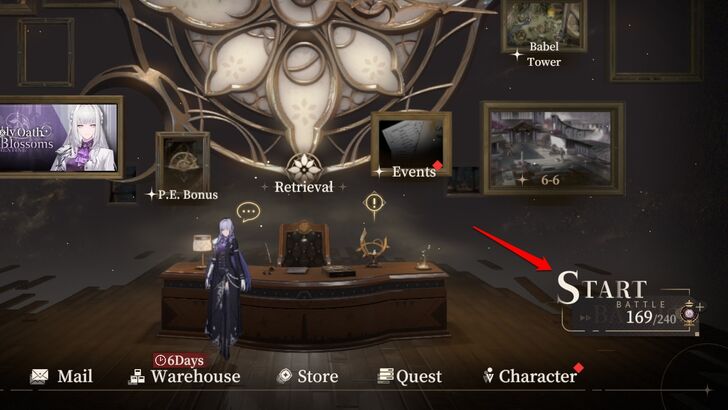 From the home screen, select Start Battle to view different missions or the large picture frame beside the "Events" option, which will directly lead you to Story Mode. |
|---|---|
| 2 | 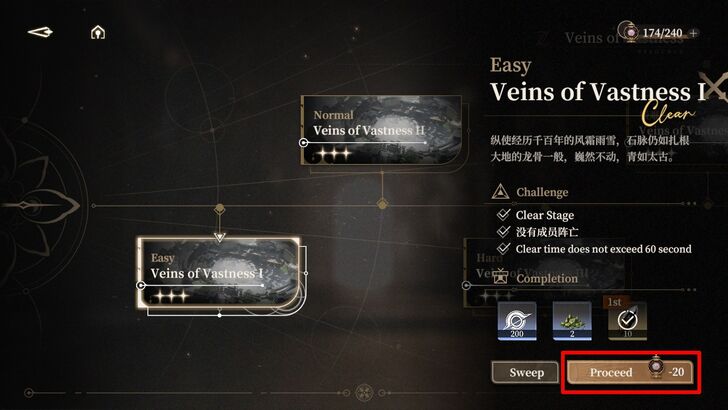 Select a particular mission, then press Proceed. |
| 3 | 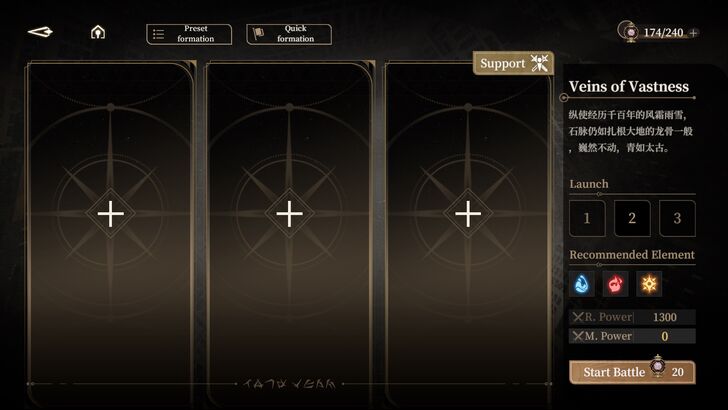 From here, you can choose between manually changing team members or using Preset Formation or Quick Formation. |
Manual Formation
Manual Formation allows you to manually set characters on the team loadout screen. In this process, you also have the option to level up characters and their weapons to maximize their combat potential before starting a mission.
| 1 | 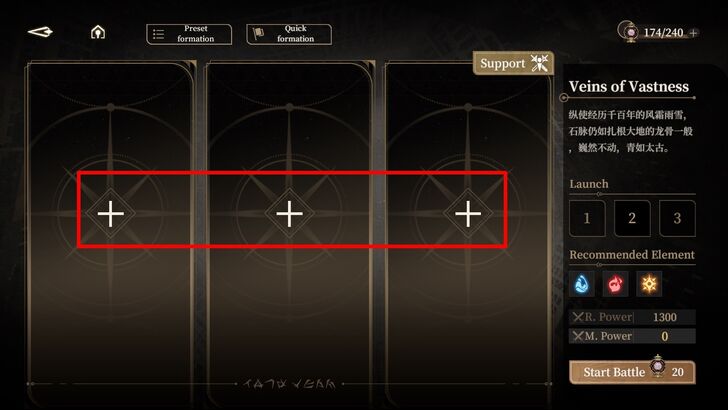 Select an empty slot with the "+" icon or an existing team member and choose another character from your roster. |
|---|---|
| 2 | 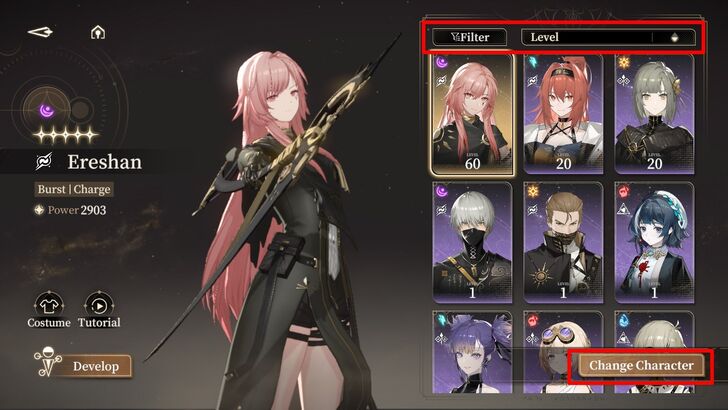 Once you have selected a preferred member for your team, press Change Character, and they will be automatically added to your team. You can also level up your characters and their weapons, change their skins, or familiarize yourself with their combat capabilities in "Tutorial" in this screen. Pressing Filter, allows you to choose the best unit for your team. |
| 3 | 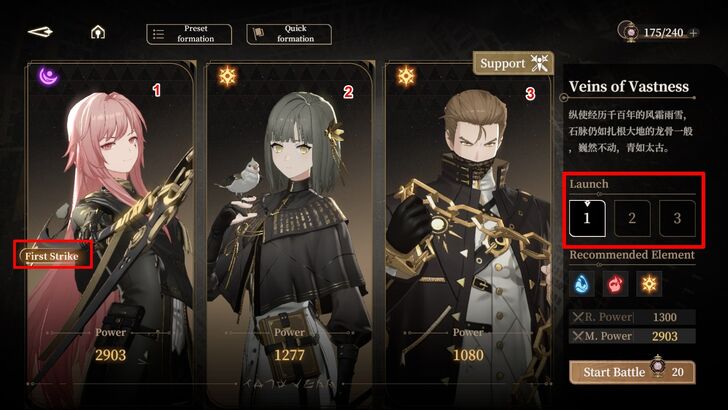 The leftmost character in the team is the default First Strike option, determining who you control first in the mission. You can change this under Launch (center-right of the screen) by selecting 1, 2, or 3, which correspond to your current loadout: right-side character (1), center character (2), and left-side character (3). |
Preset Formation
In Preset Formation, you can save your current team. You can store up to 10 team presets, allowing you to set up teams based on your preferences and quickly use them depending on the mission.
| 1 | 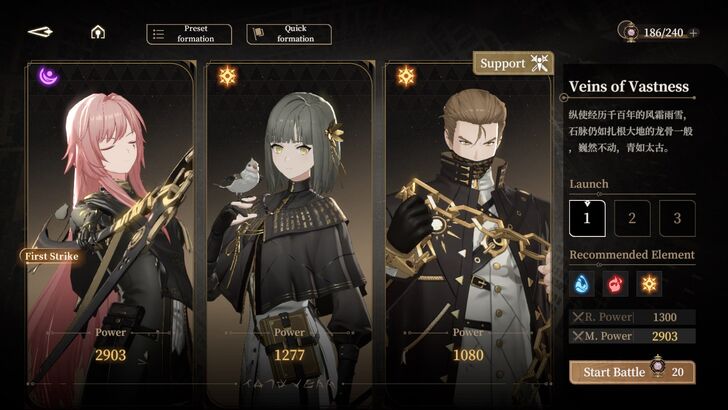 To do this, first follow the manual formation process until you have selected your preferred characters for the team. |
|---|---|
| 2 | 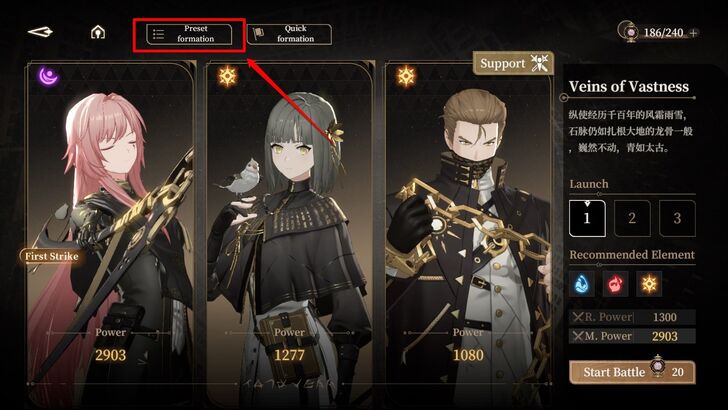 Once you have selected the team members, select Preset Formation at the top left corner of the screen. |
| 3 | 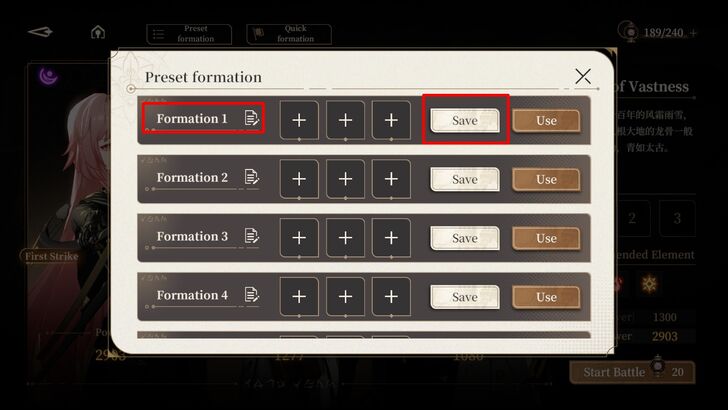 This will open a list of 10 team formations, which you can set and edit based on your preference. For this guide, press Save on team "No. 1." |
| 4 | 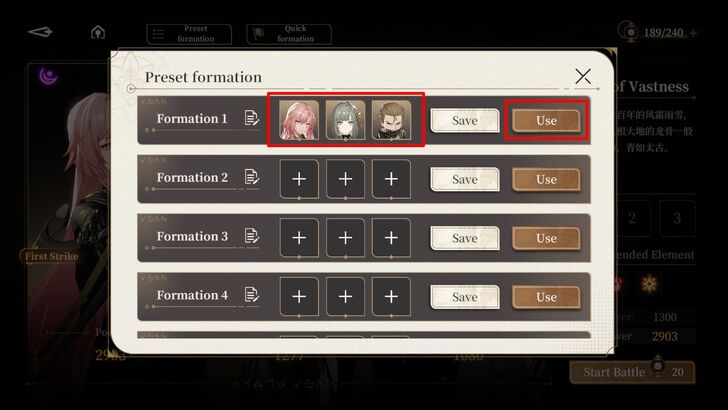 After this, select Use to set this team as the current team loadout. |
| 5 | 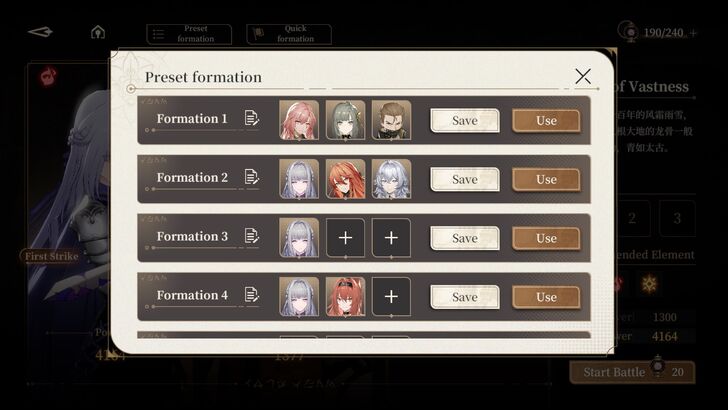 If you want to add more team presets, follow the manual formation process and repeat steps 1–2. You can even save two-character, one-character, or zero-character teams. |
Quick Formation
Quick Formation allows you to instantly set characters in your current team loadout. This is useful when you have already upgraded characters and their weapons, set their skins, or mastered their combat abilities.
| 1 | 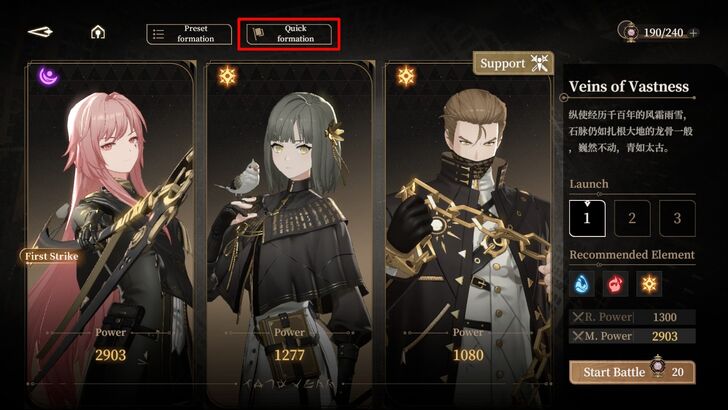 To do this, select Quick Formation, located next to the Preset Formation button. |
|---|---|
| 2 | 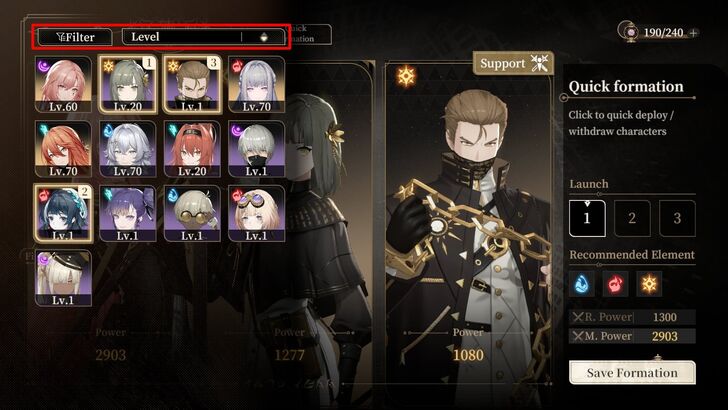 Once there, your current characters will appear, and you can simply press their icons to assign them to the team. You can also press Level and sort the character list based various Filters. In this guide, we set Zero to 1, Ming to 2, and Shamash to 3. |
| 3 | 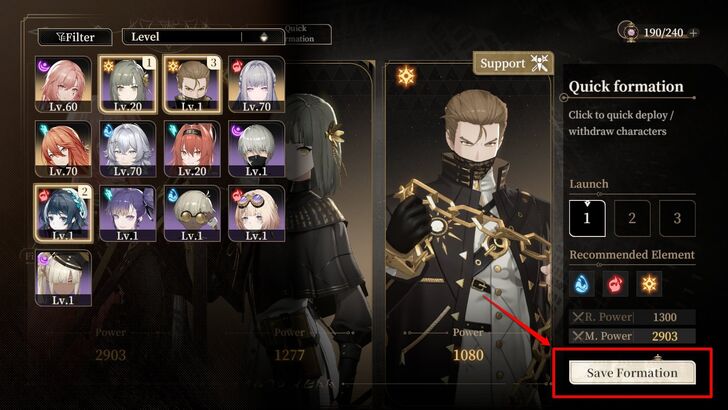 After selecting the characters you want to assign to the current team loadout, press Save Formation. This will assign them to the current team loadout. |
| 4 | 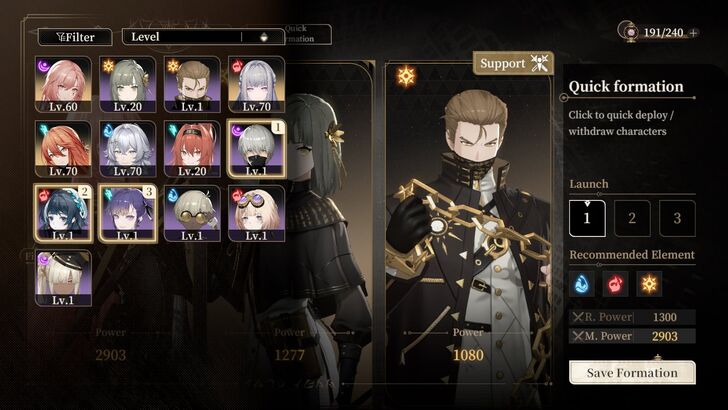 If you want to remove or change a particular team member, just press their icon and select another one from the roster, and then press Save Formation. |
Why Is It Important to Change Party Members?
Exploit Enemy's Elemental Weakness
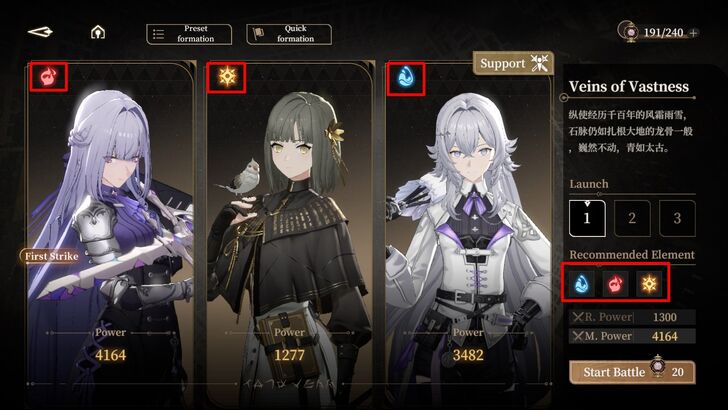
Enemies have different elemental weaknesses, and it is important to use them to your advantage, as some missions and game modes are more difficult than Story Mode. The team loadout screen provides useful information about elemental weaknesses.
Upon selecting a mission, locate Recommended Element. Below it, you will find element icons indicating which elements work best for the upcoming mission. If you set team members with the recommended elemental alignment, they will deal more damage to enemies in that mission.
Follow A Mission's Recommended Power Level
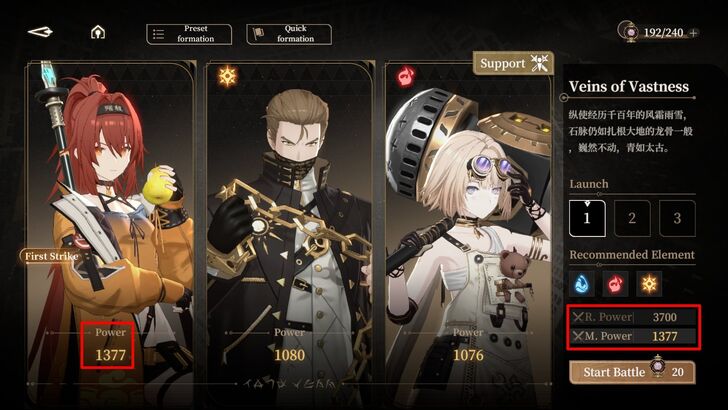
Every mission has a "Recommended Power" level in Black Beacon, and it is important to check if your selected team members have enough damage and defense against enemies in a particular mission. You can find the recommended and current power displayed above the Start button.
R. Power stands for Recommended Power, indicating the power level needed to complete a mission. Meanwhile, M. Power stands for Maximum Power, representing your team's current highest power value.
If your M. Power is higher than the R. Power, you can expect a fair battle. The game does not prevent you from taking on missions with a higher R. Power, but you should be prepared for a challenge.
Create Optimal Team Setup
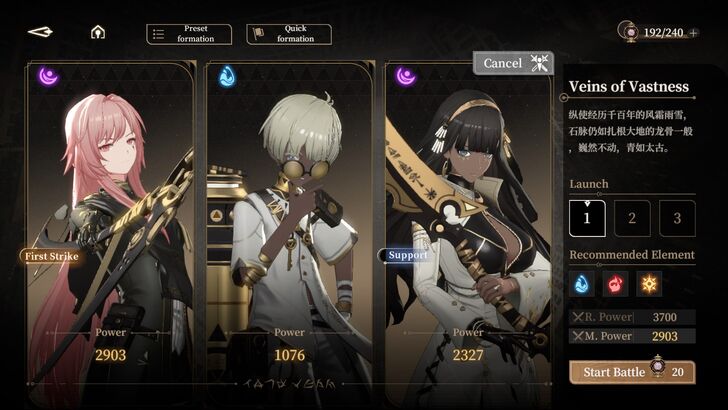
Changing party members is essential for creating an optimal team setup, giving your party a much-needed combat boost if you successfully assign well-synergized characters. For example, Ereshan pairs well with Nanna and Enki, as they inflict Erosion damage on enemies. You can also consider adding a sustain healer like Asti to keep your squishy but high-damage characters alive, especially during long and difficult missions.
Understanding which characters work well together is key to achieving a quick and decisive victory, particularly against Elite mobs or bosses.
Black Beacon Related Guides
All Tips and Tricks Guides
 Beginner's Guide: Tips and Tricks for New Players
Comment



Author

How to Change Party Members
Rankings
Gaming News



![Monster Hunter Stories 3 Review [First Impressions] | Simply Rejuvenating](https://img.game8.co/4438641/2a31b7702bd70e78ec8efd24661dacda.jpeg/thumb)
Popular Games

Genshin Impact Walkthrough & Guides Wiki
Honkai: Star Rail Walkthrough & Guides Wiki
Umamusume: Pretty Derby Walkthrough & Guides Wiki
Pokemon Pokopia Walkthrough & Guides Wiki
Resident Evil Requiem (RE9) Walkthrough & Guides Wiki
Monster Hunter Wilds Walkthrough & Guides Wiki
Wuthering Waves Walkthrough & Guides Wiki
Arknights: Endfield Walkthrough & Guides Wiki
Pokemon FireRed and LeafGreen (FRLG) Walkthrough & Guides Wiki
Pokemon TCG Pocket (PTCGP) Strategies & Guides Wiki










Recommended Games
Diablo 4: Vessel of Hatred Walkthrough & Guides Wiki
Cyberpunk 2077: Ultimate Edition Walkthrough & Guides Wiki
Fire Emblem Heroes (FEH) Walkthrough & Guides Wiki
Yu-Gi-Oh! Master Duel Walkthrough & Guides Wiki
Super Smash Bros. Ultimate Walkthrough & Guides Wiki
Pokemon Brilliant Diamond and Shining Pearl (BDSP) Walkthrough & Guides Wiki
Elden Ring Shadow of the Erdtree Walkthrough & Guides Wiki
Monster Hunter World Walkthrough & Guides Wiki
The Legend of Zelda: Tears of the Kingdom Walkthrough & Guides Wiki
Persona 3 Reload Walkthrough & Guides Wiki










All rights reserved
Game Copyright©Glohow Holdings Pte. Ltd. & MINGZHOU Technology Co., Ltd. All Rights Reserved
The content we provide on this site were created personally by members of the Game8 editorial department.
We refuse the right to reuse or repost content taken without our permission such as data or images to other sites.
©Glohow Holdings Pte. Ltd. & MINGZHOU Technology Co., Ltd (Provider)