
Combo Burst Explained
The Game8 Black Beacon Team has ended coverage as of May 21, 2025. Information on certain pages may not be up-to-date. Thank you for your continued support!
Black Beacon allows characters to go all out with the Combo Burst mechanic. Learn what the Combo Burst mechanic is, how to use it, and when to use Combo Burst in our guide.
Combo Burst Explained
Combo Burst Mode Increases Character Speed and Vigor Restoration
| 1 | Whenever your character hits an enemy or uses a skill, their Combo Burst meter gets charged up. |
|---|---|
| 2 | Once it's full, tap the Combo Burst button near the center of the screen. You will know that Combo Burst mode is on when the meter on the upper right-hand corner has begun winding backward. |
Two Stages of Combo Burst
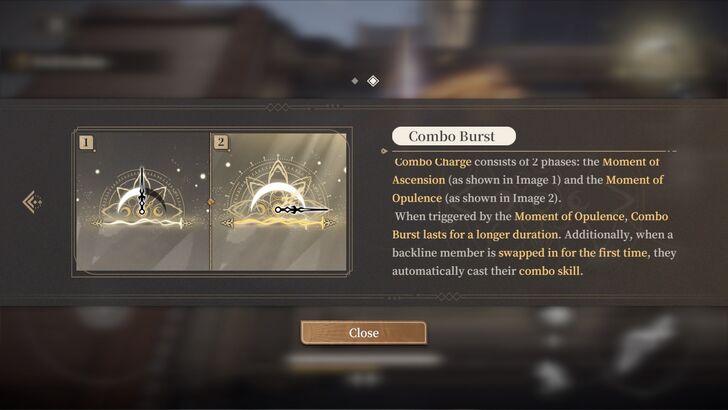
Combo Burst consists of two phases: Moment of Ascension and Moment of Opulence. These phases provide bonus movement speed, faster Vigor generation, and other benefits, with the second phase lasting longer than the first.
While there are two phases, you can choose to skip Phase 1 and keep building points to trigger Phase 2 directly. However, it's often more beneficial to activate Phase 1 first, as it helps you accumulate points for Phase 2 more quickly.
Combo Burst Phase 1: Moment of Ascension
Moment of Ascension is the first phase of the Combo Burst. In this mode, your frontline character will gain 20% movement speed and increased Vigor restoration.
| 1 | Attack enemies to fill up the Combo meter. In Phase 1, your Combo gauge does not emit a glow. |
|---|---|
| 2 | Once full, the Combo meter will expand its petals and radiate a glow , indicating that it is ready to use. |
| 3 | Tap the Combo Burst button to activate its first phase, granting your entire team a 20% movement speed and rapid Vigor restoration. Be sure to land as many attacks as possible, as it will help accumulate the Combo points for Phase 2. |
Combo Burst Phase 2: Moment of Opulence
Combo Burst Phase 2 is called Moment of Opulence. Aside from the usual bonus that Combo Burst provides, its second phase has longer duration.
Switching in characters for the first time during this phase allows them to automatically trigger their Combo skills. For example, Ninsar will automatically cast her second skill once you switch her in during this phase.
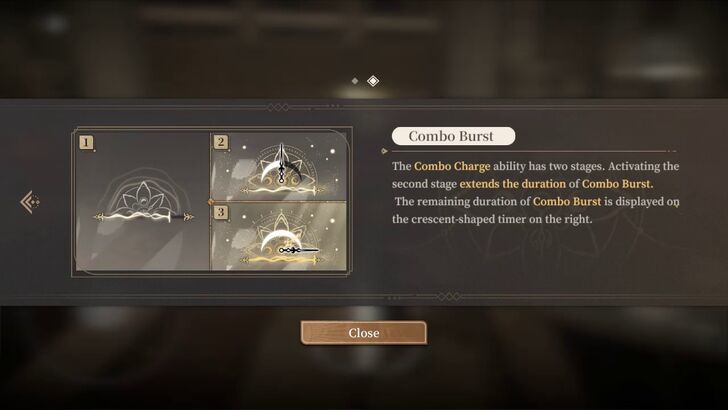
| 1 | Once you activate Phase 1 or build up enough points for it, your attacks will start filling the Combo meter for Phase 2. The Combo meter now radiates a glow while accumulating points. |
|---|---|
| 2 | After accumulating enough Combo Points for Phase 2, the meter will glow more intensely, and the flower petals changes its appearance. |
| 3 | Tap the Combo Burst button to activate Phase 2. This time, the duration lasts longer, and switching backline characters to the frontline will automatically cast their combo skills. Keep in mind that backline characters can only do this once per activation of Phase 2. |
How to Use Combo Burst
Use Combo Burst in the Heat of Battle
You trigger Combo Burst mode by tapping the Combo Burst button. Keep attacking enemies to quickly accumulate Combo Points needed to trigger Combo Burst mode.
When to Use Combo Burst
When You Want to Use Skills Successively
Combo Burst mode allows for near-continuous usage of a character's skills, which is useful to maintain their skill rotation and deal damage consistently.
For example, in Combo Burst mode, Zero will be able to use her Falling Feather, Winged Radiant Blade, and Phantom Wing skills successively without having to gather Vigor to use each other skills. This allows for a nearly perfect skill rotation and maximum damage versus foes.
To Automatically Cast Combo Skills
Phase 1 allows your frontline character to automatically cast their Combo Skills. However, Phase 2 offers a stronger version that allows your backline characters to instantly cast their Combo Skills when switched to the frontlines. For example, you won't need to charge Ereshan's second skill to trigger her powerful passive ability if she's brought into battle during Phase 2.
Black Beacon Related Guides
All Tips and Tricks Guides
 Beginner's Guide: Tips and Tricks for New Players
Comment



Author

Combo Burst Explained
Rankings
- We could not find the message board you were looking for.
Gaming News




![Monster Hunter Stories 3 Review [First Impressions] | Simply Rejuvenating](https://img.game8.co/4438641/2a31b7702bd70e78ec8efd24661dacda.jpeg/thumb)
Popular Games

Genshin Impact Walkthrough & Guides Wiki
Honkai: Star Rail Walkthrough & Guides Wiki
Umamusume: Pretty Derby Walkthrough & Guides Wiki
Pokemon Pokopia Walkthrough & Guides Wiki
Resident Evil Requiem (RE9) Walkthrough & Guides Wiki
Monster Hunter Wilds Walkthrough & Guides Wiki
Wuthering Waves Walkthrough & Guides Wiki
Arknights: Endfield Walkthrough & Guides Wiki
Pokemon FireRed and LeafGreen (FRLG) Walkthrough & Guides Wiki
Pokemon TCG Pocket (PTCGP) Strategies & Guides Wiki










Recommended Games
Diablo 4: Vessel of Hatred Walkthrough & Guides Wiki
Cyberpunk 2077: Ultimate Edition Walkthrough & Guides Wiki
Fire Emblem Heroes (FEH) Walkthrough & Guides Wiki
Yu-Gi-Oh! Master Duel Walkthrough & Guides Wiki
Super Smash Bros. Ultimate Walkthrough & Guides Wiki
Pokemon Brilliant Diamond and Shining Pearl (BDSP) Walkthrough & Guides Wiki
Elden Ring Shadow of the Erdtree Walkthrough & Guides Wiki
Monster Hunter World Walkthrough & Guides Wiki
The Legend of Zelda: Tears of the Kingdom Walkthrough & Guides Wiki
Persona 3 Reload Walkthrough & Guides Wiki










All rights reserved
Game Copyright©Glohow Holdings Pte. Ltd. & MINGZHOU Technology Co., Ltd. All Rights Reserved
The content we provide on this site were created personally by members of the Game8 editorial department.
We refuse the right to reuse or repost content taken without our permission such as data or images to other sites.
©Glohow Holdings Pte. Ltd. & MINGZHOU Technology Co., Ltd (Provider)