
Hytale Console Commands List
★ Best Weapons Tier List
☆ Best and Recommended Settings
★ Spawn Items Using Item IDs!
☆ Multiplayer Guide
★ Best Fuel for Furnace
☆ All Ore Locations
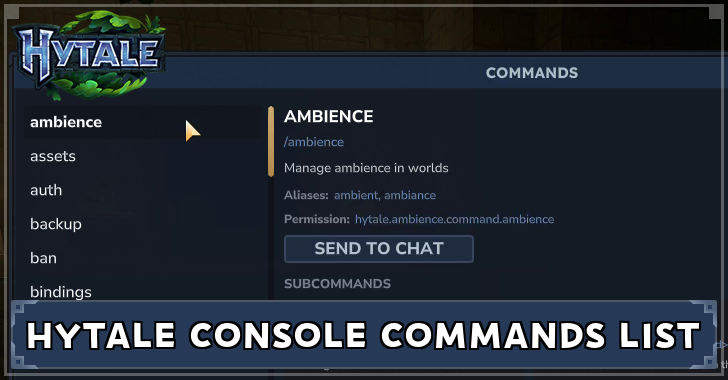
Console Commands allow you to alter gameplay, use cheats, and access server commands in Hytale. Learn more about console commands, how to use them, and what recommended console commands you should use in severs!
List of Console Commands
| Console Commands List |
|---|
|
|

Server Admin Commands
| Command | Effect |
|---|---|
| /auth | Manage server authentication
Subcommands: /auth status /auth login /auth select /auth logout /auth cancel /auth persistence |
| /gamemode (gamemode) | Change player game mode |
| /heal | Heals up to your max stamina and health |
| /help | Display command help |
| /inventory | Manage player inventories |
| /op | Commands for managing operator permissions
Subcommands: /op self /op add (player) /op remove (player) |
| /spawning | Commands related to NPC spawning |
| /stop [--options] | Stop the server |
These commands are mostly tied to your role as an admin once you've been granted access to the OP permissions group.
Multiplayer Commands
| Command | Effect |
|---|---|
| /ban (username) [--options] | Ban a player |
| /hide | Hide and show players from/to other players |
| /kick (player) | Kick a player |
| /kill | Kill and respawns the player |
| /maxplayers [--options] | Set the max player count |
| /refer (host) (port) [--options] | Refer a player to another server for testing |
| /tp | Teleport a player to a location |
| /unban (player) | Unban a player |
These commands involve the access to the multiplayer feature of the game, enabling you to interact with other players in the server.
World Creation Commands
| Command | Effect |
|---|---|
| /block | Block-related commands
Subcommands: /block set /block setticking /blockselect [--options] /blockset [--options] /blockspawner |
| /buildertoolslegend [--options] | Show or hide the builder tools legend HUD component |
| /chunk | Commands related to chunks |
| editprefab | The commands for editing prefabs and creating new ones |
| /prefab | Prefab commands |
| /prefabspawner | View and edit properties on a prefab spawner block |
| /weather | Manage weather in worlds |
| /world | World-related commands |
| /worldgen | World generation configuration commands |
| /worldmap | Manage world map settings |
| /worldpath | Commands for managing world paths |
These commands grant you access to how you can build or adjust the world your currently inhabiting through specific parameters and conditions of your choice.
General Commands
| Command | Effect |
|---|---|
| /ambience | Manage ambience in worlds
Subcommands: /ambience emitter /ambience setmusic /ambience clear |
| /assets | Commands related to assets
Subcommands: /assets tag /assets duplicates /assets longest |
| /auth | Manage server authentication
Subcommands: /auth status /auth login /auth select /auth logout /auth cancel /auth persistence |
| /backup | Run a backup of the universe |
| /bindings | Bindings |
| /camshake | Commands for manipulating camera effects |
| /checkpoint | Commands related to the parkour system |
| /clearblocks | Set all blocks in your selection to Empty, or all blocks within a specified area |
| /clearedithistory | Clear clipboard history |
| /clearentities | server.commands.clearEntities.desc |
| /commands | Commands related to... commands |
| /contractselection (distance) [--options] | Make your selection smaller in all directions, or by the specified amount in a direction |
| /convertprefabs [--options] | Convert prefabs to the latest format |
| /copy [--options] | Copy the contents of your selection in the world, storing them in your clipboard to paste |
| /cursethis | Curses the item held in your hand |
| /cut [--options] | Cut the contents of your selection from the world, storing them in your clipboard to paste |
| /damage [--options] | Damages the player |
| /debug | Debug commands |
| /debugplayerposition | Perhaps help with debugging your player position (for client desync) |
| /delete | Sets the current selection to empty/delete things |
| /deselect | Clear your current selection |
| /desyncdamage | Toggle desync damage mode for testing purposes |
| /droplist (droplist) [--options] | Simulate the drops for a given droplist |
| /echo (message) | Echos the text you input to the user |
| /editline (start) (end) (material) [--options] | Draw a line of blocks between two points |
| /emote (emote) | Play an emote |
| /entity | Prefix for entity related commands |
| /environment (environment) | Sets the environment in the selected area |
| /eventtitle [--options] | Show an event title to all players on the server (for testing purposes) |
| /expand [--options] | Expand your selection in all directions, or by the specified amount in a direction |
| /extendface | Extend the target face |
| /fillblocks (pattern) | Fill all air within your selection with the specified block types |
| /fillsignature | Fills your signature energy |
| /flip | Flip the blocks in your clipboard |
| /fluid | Fluid debug commands |
| /fragment | Commands for when you're inside a portal fragment |
| /give (item) [--options] | Gives an item to a player |
| /gmask | Sets the global block mask |
| /hitbox | Return the hitbox data for the given hitbox id |
| /hitboxcollision | Commands to add/remove a HitboxCollision component to an entity/yourself |
| /hitdetection | Toggles visual debug |
| /hollow [--options] | Sets the material on the inside of the selection, excluding walls of the set thickness |
| /hotbar (hotbatSlot) [--options] | Set your hotbar to a previously saved value |
| /hub | Return to the Cosmos of Creativity hub |
| /hudtest [--options] | Hides the hotbar to test if the HudManager systems are working properly |
| /importimage | Open the image to blocks import tool |
| /importbj | Open the OBJ to voxel import tool |
| /instances | Commands that work with world instances |
| /interaction | Interaction execution commands |
| /itemstate (state) | Set the state of the item currently held |
| /landiscovery [--options] | Enable or disable lan discovery |
| /lang | Internationalization related commands |
| /leave | Leave the Fragment world you're in |
| /lightning | Commands for managing world lightning |
| /log (loggers) [--options] | Set various log levels |
| /memories | Memories commands |
| /messagetest | Test sending messages with nested translated parameter messages |
| /model | Opens the model selection page |
| /mount | Commands relating to mounting entities/blocks |
| /move [--options] | Move your selection and its contents by the specified amount in the direction you're looking, or in a specified direction |
| /neardeath | Set your health to 1 |
| /network | Commands for network-specific utilities |
| /networkchunksending (sendNetworkchunks) | Stop sending chunks over the network |
| /noon | Sets the time to noon and pauses |
| /notify | Send a notification to all players across all worlds |
| /npc | Commands relating to NPCs |
| /objective | Commands related to objectives |
| /packetstats (packet) [--options] | Display packet statistics for a specific packet |
| /packs | Commands related to asset packs |
| /particle | Commands related to particle systems |
| /paste | Paste the contents of your clipboards |
| /path | Commands for managing NPC control paths |
| /perm | Permissions |
| /pidcheck [--options] | Check if a PID is running |
| /ping [--options] | Network ping information |
| /play | Toggle server access for play modes |
| /player | Commands related to players |
| /plugin | Plugin management commands |
| /pos1 [--options] | Set the first position of your selection |
| /pos2 [--options] | Set the second position of your selection |
| /recipe | Commands for managing player recipes |
| /redo | Redo last challenge |
| /repairfillers | Repair filler blocks in selection |
| /replace (to) [--options] | Replace a selection from specified block(s) with a block. |
| /repulsion | Commands to add/remove a Repulsion component to an entity/yourself |
| /reputation | Commands for handling reputation |
| /resetrotation | Resets camera rotation to default (pitch=0, yaw=0, roll=0) |
| /rotate | Rotate your clipboard |
| /say | Announce a message to the whole server |
| /scriptedbrushes | Scripted brushes related commands |
| /selectchunk | Select a chunk |
| /selectchunksection | Select a chunk selection |
| /selectionhistory (enabled) | Record selection box changes in the undo/redo history |
| /server | Server-related commands |
| /setblocks (pattern) | Set all blocks in your selection to the specified blocktype |
| /setticking (ticking) [--options] | Set if a world should be ticking |
| /settimeandgohome (timeOfDay) | Sets the time of day and teleports the user |
| /settoolhistorysize (historyLength) | Set the amount of historical builder tool actions that can be stored in history |
| /shift [--options] | Shift selection |
| /sleep | Manage sleep-related settings |
| /sound | Commands for playing sound events |
| /spawn [--options] | Teleport to the world spawn |
| /spawnblock (block) (position) [--options] | Spawn a block entity |
| /spawnitem (item) [--options] | Spawn an item |
| /stack [--options] | Stack selection |
| /stash [--options] | Get a droplist for the Chest you're looking at |
| /stresstest | Stress erver testing |
| /submerge (fluid-item) | Submerges the selection with a fluid. Use 'Empty' to unsubmerge the section |
| /sudo (player) | Run a command as another player |
| /tagpattern (tagPattern) (blockType) | Test whether a specified block matches a specified tag pattern |
| /time [--options] | Get the world time |
| /tint (color) | Tints the selection with the specified color |
| /toggleblock placementoverride | Toggles allowing you to break the rules of block placement |
| /toggletmptags | Toggles displaying [TMP] tags on temporary strings |
| /undo | Undo last change |
| /unstuck | Teleport to the top of the world at your current position |
| /update | Commands for updating assets and prefabs via git |
| /updateselection (xMin) (yMin) (zMIn) (xMax) (yMax) (zMax) | Update selection |
| /validatecpb [--options] | Validate CPB (Compressed Prefab Buffer) files |
| /version | Displays version information about the currently running server |
| /viewport [--options] | Establishes a worldgen viewport on the selected region |
| /voidevent | Void-event related commands (for portal fragments) |
| /wait (time) [--options] | Waits a specified amount of time before completing asynchronously |
| /wall (pattern) [--options] | Sets the material on the walls of your selection with the specified thickness |
| /warp | Warp commands |
| /whitelist | Modify the whitelist |
| /who | List who is on the server |
The list above shows the general commands that you can utilize when playing, with commands varying from choosing UI preferences or performing debugging tasks.
Recommended Console Commands
Technical Commands For Convenience
| Command | Effect |
|---|---|
| /weather | Manage weather in worlds |
| /backup | Run a backup of the universe |
| /unstuck | Teleport to the top of the world at your current position |
| /redo | Redo last challenge |
| /whereami | Prints the current location of a player |
| /whoami | Prints your player information |
The commands listed above provide convenience that can help you better navigate the game. These commands enable you to adjust certain conditions that can fit your preference.
Console Commands For Game Exploits
| Command | Effect |
|---|---|
| /op | Commands for managing operator permissions
Subcommands: /op self /op add (player) /op remove (player) |
| /give (item) [--options] | Gives an item to a player |
| /heal | Heals up to your max stamina and health |
The /op self command gives you admin privileges to the server, enabling you to use commands or cheats that can grant you conveniences when playing the game.
The /heal command provides great utility for providing recovery to both your health and stamina, removing the necessity to use restorative items
Items can also be easily acquired by using the /give item command, providing you access to items that are hard to come by.
How to Use Console Commands
Gain Access to OP Permission Group
You will first need to gain access to the OP permission group of the server you are currently inhabiting, which can be either a server of your own or from another player.
This can be accomplished by typing /op self, enabling you to acquire managing operator permissions.
Press / to Automatically Input Command
Once you've gained access to the OP permission group, simply type / on your keyboard which should be followed by the command of your choosing. Do note that you'll need to specify some parameters for some of the commands.
Hytale Related Guides

Recommended Guides
| Best Guides | |
|---|---|
| Best Weapons Tier List | Best Fuel |
| Best Base Locations | Best Food |
| Best Hytale Servers | - |
| Recommended Guides | |
| Console Commands List | List of Item IDs |
| Forgotten Temple Guide | Endgame Guide |
| Guides for Starting Out | |
| Best Things to Craft First | Best Settings |
| Game Modes Explained | - |
Hytale Wiki
| Hytale Wiki Contents | |
|---|---|
 Walkthrough Walkthrough |
 Materials Materials |
 Bosses Bosses |
 Crafting Recipes Crafting Recipes |
 Tips and Tricks Tips and Tricks |
 Weapons Weapons |
 Armor Armor |
 Memories Memories |
 Map, Zones, and Biomes Map, Zones, and Biomes |
 Mobs Mobs |
 Bugs and Errors Bugs and Errors |
 News and Updates News and Updates |
Comment



Author

Hytale Console Commands List

Rankings
- We could not find the message board you were looking for.
Gaming News

![Star Savior Review [First Impressions] | Engaging, Entertaining, and Expensive](https://img.game8.co/4447603/8f500e9bf666bdb8adb1af478e9dfdbd.png/show)



Popular Games

Genshin Impact Walkthrough & Guides Wiki
Umamusume: Pretty Derby Walkthrough & Guides Wiki
Crimson Desert Walkthrough & Guides Wiki
Monster Hunter Stories 3: Twisted Reflection Walkthrough & Guides Wiki
Honkai: Star Rail Walkthrough & Guides Wiki
Pokemon Pokopia Walkthrough & Guides Wiki
The Seven Deadly Sins: Origin Walkthrough & Guides Wiki
Wuthering Waves Walkthrough & Guides Wiki
Zenless Zone Zero Walkthrough & Guides Wiki
Arknights: Endfield Walkthrough & Guides Wiki










Recommended Games
Fire Emblem Heroes (FEH) Walkthrough & Guides Wiki
Diablo 4: Vessel of Hatred Walkthrough & Guides Wiki
Cyberpunk 2077: Ultimate Edition Walkthrough & Guides Wiki
Yu-Gi-Oh! Master Duel Walkthrough & Guides Wiki
Super Smash Bros. Ultimate Walkthrough & Guides Wiki
Pokemon Brilliant Diamond and Shining Pearl (BDSP) Walkthrough & Guides Wiki
Elden Ring Shadow of the Erdtree Walkthrough & Guides Wiki
Monster Hunter World Walkthrough & Guides Wiki
The Legend of Zelda: Tears of the Kingdom Walkthrough & Guides Wiki
Persona 3 Reload Walkthrough & Guides Wiki










All rights reserved
©2026 HYPIXEL STUDIOS CANADA INC. ALL RIGHTS RESERVED.
The copyrights of videos of games used in our content and other intellectual property rights belong to the provider of the game.
The contents we provide on this site were created personally by members of the Game8 editorial department.
We refuse the right to reuse or repost content taken without our permission such as data or images to other sites.