
How to Repair Tools With Repair Kits
★ Best Weapons Tier List
☆ Best and Recommended Settings
★ Spawn Items Using Item IDs!
☆ Multiplayer Guide
★ Best Fuel for Furnace
☆ All Ore Locations
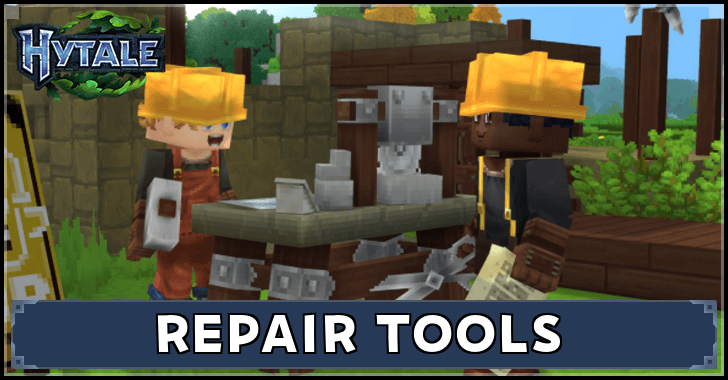
Repairing tools, weapons, and armor in Hytale requires Repair Kits. Learn how to repair tools and how to craft Repair Kits in this guide!
How to Repair Tools in Hytale
Craft a Repair Kit
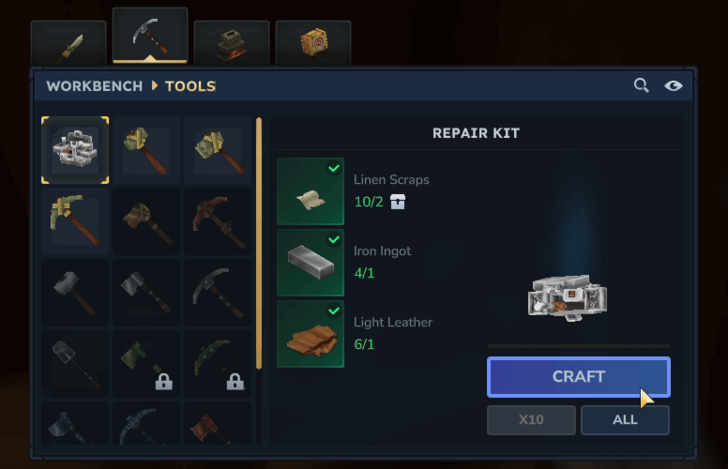
| Item | Requirements |
|---|---|
| Repair Kit |
・Linen Scraps x10 ・Iron Ingot x1 ・Light Leather x1 |
Using a Workbench, craft as many Repair Kits as your tools and gear that need to be repaired. One Repair Kit requires 10 Linen Scraps from humanoid enemies, 1 Iron Ingot obtained by smelting Iron Ore using a Furnace, and 1 Light Leather obtained by processing Light Hide on a Tanning Rack.
Use a Repair Kit to Repair Tools
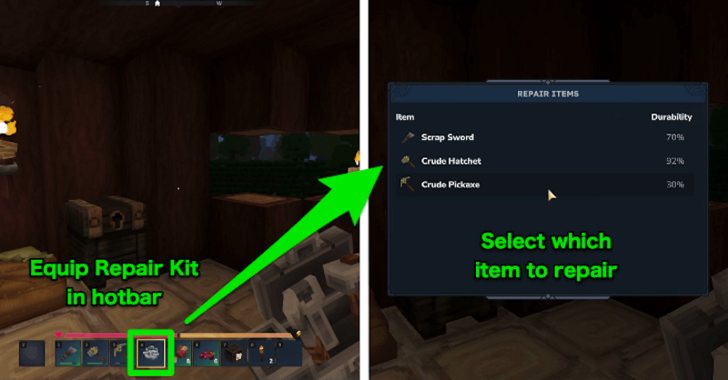
Once you have a Repair Kit, equip it in your hotbar and use it to open a window. Select the item you want to repair. Note that you can only repair one tool or gear per Repair Kit, and repaired items will lose 10% of their maximum durability.
When Should You Use Repair Kits?
Bring Repair Kits When Exploring
Repair Kits are best used when going on long trips far from your base, as it is highly possible that your pickaxes and other equipment will break during the expedition, and there is no easy way to craft replacements without setting up a remote base.
Craft Crude Tools as Emergency Replacement
Alternatively, if your inventory space allows it, you can also craft Crude Tools to temporarily replace broken Tools if you're out of Repair Kits. These can be made from Pocket Crafting with materials that you can pick up along the way.
Use Repair Kits on Gear Made With Rare Materials
Try to only use Repair Kits on tools and equipment made from materials rarer than Iron. Since the Repair Kits themselves require Iron Ingots to craft, they are best used on items on a higher tier than Iron, such as those made from Thorium or Cobalt.
Salvage Broken Tools
| Item | Station | Materials |
|---|---|---|
 Salvager's Workbench Salvager's Workbench
|
Workbench
(Tier 2) |
・Iron Ingot x6 ・Any Tree Log x5 ・Any Stone x5 |
For items that you would rather leave broken, these can be thrown into a Salvager's Workbench to retrieve some of the materials used in crafting them. Like Repair Kits, a Salvager's Workbench also uses Iron Ingots as its base material.
Hytale Related Guides

All Tips and Tricks Guides
Comment



Author

How to Repair Tools With Repair Kits

Rankings
- We could not find the message board you were looking for.
Gaming News

![The Liar Princess and the Blind Prince Review [PC] | Lovely to Look at but Tedious to Play](https://img.game8.co/4442586/8d95f5faf05780f1765ce7e0938bd825.jpeg/show)
![Monster Hunter Stories 3 Review [First Impressions] | Simply Rejuvenating](https://img.game8.co/4438641/2a31b7702bd70e78ec8efd24661dacda.jpeg/thumb)
![The Seven Deadly Sins: Origin [First Impressions] | A Promising Start](https://img.game8.co/4440581/584e0bfb87908f12c4eab6e846eb1afd.png/thumb)

Popular Games

Genshin Impact Walkthrough & Guides Wiki
Umamusume: Pretty Derby Walkthrough & Guides Wiki
Pokemon Pokopia Walkthrough & Guides Wiki
Honkai: Star Rail Walkthrough & Guides Wiki
Monster Hunter Stories 3: Twisted Reflection Walkthrough & Guides Wiki
Arknights: Endfield Walkthrough & Guides Wiki
Wuthering Waves Walkthrough & Guides Wiki
Zenless Zone Zero Walkthrough & Guides Wiki
Pokemon TCG Pocket (PTCGP) Strategies & Guides Wiki
Monster Hunter Wilds Walkthrough & Guides Wiki










Recommended Games
Diablo 4: Vessel of Hatred Walkthrough & Guides Wiki
Cyberpunk 2077: Ultimate Edition Walkthrough & Guides Wiki
Fire Emblem Heroes (FEH) Walkthrough & Guides Wiki
Yu-Gi-Oh! Master Duel Walkthrough & Guides Wiki
Super Smash Bros. Ultimate Walkthrough & Guides Wiki
Pokemon Brilliant Diamond and Shining Pearl (BDSP) Walkthrough & Guides Wiki
Elden Ring Shadow of the Erdtree Walkthrough & Guides Wiki
Monster Hunter World Walkthrough & Guides Wiki
The Legend of Zelda: Tears of the Kingdom Walkthrough & Guides Wiki
Persona 3 Reload Walkthrough & Guides Wiki










All rights reserved
©2026 HYPIXEL STUDIOS CANADA INC. ALL RIGHTS RESERVED.
The copyrights of videos of games used in our content and other intellectual property rights belong to the provider of the game.
The contents we provide on this site were created personally by members of the Game8 editorial department.
We refuse the right to reuse or repost content taken without our permission such as data or images to other sites.