
Best Realistic Sliders
★ Season of BOOM Launched
★ Beginner's Guide
★ The Basics: Attributes | Positions | Formations
★ All Player Ratings
★ Modes: Franchise | Superstar | Ultimate
Players can adjust their game sliders in Madden NFL 25 for more realistic gameplay. Check out our guide to see the most realistic sliders and how you can adjust it in the game.
List of Contents
Best Realistic Sliders
| Jump to a Section |
|---|
|
|

Along with selecting a difficulty settings for the game, players may also adjust their game sliders to make the game even more realistic! Click on a setting in the table above to jump ahead to that section!
Game Options
| Slider | Setting |
|---|---|
| Injuries | 30 |
| Fatigue | 65 |
| Player Speed Parity Scale | 60 |
| Physics Based Tackling Results | 50 |
Penalties
| Slider | Setting |
|---|---|
| Offside | 70 |
| False Start | 85 |
| Offensive Holding | 90 |
| Facemask | 60 |
| Illegal Block in the Back | 60 |
| Roughing the Passer | 50 |
| Defensive Pass Interference | 70 |
Player Skill
Passing
| Slider | Setting |
|---|---|
| QB Accuracy | 40 |
| Pass Blocking | 45 |
| WR Catching | 45 |
Rushing
| Slider | Setting |
|---|---|
| Run Blocking | 35 |
| Ball Security | 45 |
Pass Defense
| Slider | Setting |
|---|---|
| Reaction Time | 50 |
| Interceptions | 25 |
| Pass Coverage | 50 |
Rush Defense
| Slider | Setting |
|---|---|
| Tackling | 40 |
Special Teams
| Slider | Setting |
|---|---|
| FG Power | 50 |
| FG Accuracy | 40 |
| Punt Power | 50 |
| Punt Accuracy | 50 |
| Kickoff Power | 50 |
CPU Skill
Passing
| Slider | Setting |
|---|---|
| QB Accuracy | 45 |
| Pass Blocking | 50 |
| WR Catching | 55 |
Rushing
| Slider | Setting |
|---|---|
| Run Blocking | 45 |
| Ball Security | 50 |
Pass Defense
| Slider | Setting |
|---|---|
| Reaction Time | 55 |
| Interceptions | 35 |
| Pass Coverage | 55 |
Rush Defense
| Slider | Setting |
|---|---|
| Tackling | 45 |
Special Teams
| Slider | Setting |
|---|---|
| FG Power | 55 |
| FG Accuracy | 45 |
| Punt Power | 55 |
| Punt Accuracy | 55 |
| Kickoff Power | 55 |
How to Adjust Sliders
Adjust Sliders in Settings Menu
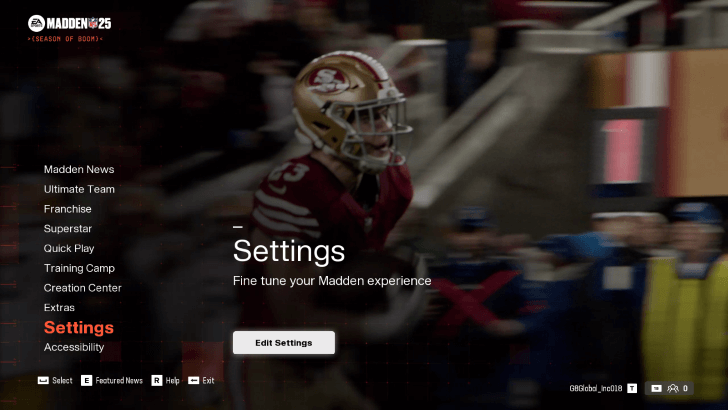
Players can adjust their game's sliders by selecting Edit Settings in the Settings tab of the game's main screen. From there, you'll have access to all the available sliders in the game as well as other game settings including Cross-Play settings, Accessibility settings, and Graphics settings.
Madden NFL 25 Related Guides
All Starter Guides
All Advanced Guides
Comment



Author

Best Realistic Sliders

Rankings
- We could not find the message board you were looking for.
Gaming News

![The Liar Princess and the Blind Prince Review [PC] | Lovely to Look at but Tedious to Play](https://img.game8.co/4442586/8d95f5faf05780f1765ce7e0938bd825.jpeg/show)
![Monster Hunter Stories 3 Review [First Impressions] | Simply Rejuvenating](https://img.game8.co/4438641/2a31b7702bd70e78ec8efd24661dacda.jpeg/thumb)
![The Seven Deadly Sins: Origin [First Impressions] | A Promising Start](https://img.game8.co/4440581/584e0bfb87908f12c4eab6e846eb1afd.png/thumb)

Popular Games

Genshin Impact Walkthrough & Guides Wiki
Umamusume: Pretty Derby Walkthrough & Guides Wiki
Pokemon Pokopia Walkthrough & Guides Wiki
Honkai: Star Rail Walkthrough & Guides Wiki
Monster Hunter Stories 3: Twisted Reflection Walkthrough & Guides Wiki
Arknights: Endfield Walkthrough & Guides Wiki
Wuthering Waves Walkthrough & Guides Wiki
Zenless Zone Zero Walkthrough & Guides Wiki
Pokemon TCG Pocket (PTCGP) Strategies & Guides Wiki
Monster Hunter Wilds Walkthrough & Guides Wiki










Recommended Games
Diablo 4: Vessel of Hatred Walkthrough & Guides Wiki
Cyberpunk 2077: Ultimate Edition Walkthrough & Guides Wiki
Fire Emblem Heroes (FEH) Walkthrough & Guides Wiki
Yu-Gi-Oh! Master Duel Walkthrough & Guides Wiki
Super Smash Bros. Ultimate Walkthrough & Guides Wiki
Pokemon Brilliant Diamond and Shining Pearl (BDSP) Walkthrough & Guides Wiki
Elden Ring Shadow of the Erdtree Walkthrough & Guides Wiki
Monster Hunter World Walkthrough & Guides Wiki
The Legend of Zelda: Tears of the Kingdom Walkthrough & Guides Wiki
Persona 3 Reload Walkthrough & Guides Wiki










All rights reserved
© 2024 Electronic Arts Inc. Electronic Arts, EA SPORTS, FieldSENSE, and Ultimate Team are trademarks of Electronic Arts Inc. The mark “John Madden” and the name, likeness and other attributes of John Madden reproduced on this product are trademarks or other intellectual property of Red Bear, Inc. or John Madden, are subject to license to Electronic Arts Inc., and may not be otherwise used in whole or in part without the prior written consent of Red Bear or John Madden. All rights reserved. Officially Licensed Product of NFL PLAYERS INC. and NFLPA.COM. Officially Licensed Product of the National Football League.
The copyrights of videos of games used in our content and other intellectual property rights belong to the provider of the game.
The contents we provide on this site were created personally by members of the Game8 editorial department.
We refuse the right to reuse or repost content taken without our permission such as data or images to other sites.