




This survey will take about 1 minute.
Your answers will help us to improve our website.
Nintendo Switch Sports
How to Play Basketball: Tips and Controls
Nintendo Switch Sports is available worldwide as of April 29, 2022!
★Release Date and Editions / Switch Sports Review
☆List of Sports / Pro League / Beginner's Guide
Can't decide on a title? Check out our Title Generator!
★ Best Title Combinations | Title Generator
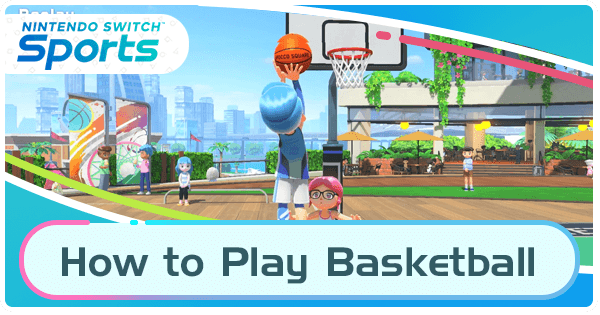
Basketball is a one to four player sport in Nintendo Switch Sports in which players must have the highest score within the time limit. Read on to learn Switch Sports' Basketball controls and mechanics, how to dash, how to do a fake out, how to dunk and more tips on how to win!
List of Contents
How to Play Switch Sports Basketball
Basketball General Information
| Basketball Overview | |
|---|---|
 |
|
| Difficulty | ★★★★ |
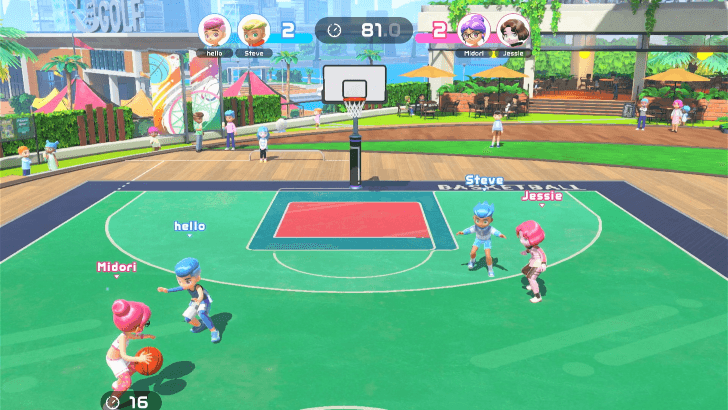
| Objective | Win the match by scoring 12 points or the most points within the time limit. |
| Number of Players | Local Multiplayer: 4 (2v2 or 1v3)
Online Multiplayer: 4 (2v2) Random Matchmaking: 4 (2v2) |
All Basketball Bonus Multipliers
| Bonus | Points/Multiplier | How to Get |
|---|---|---|
| Assist Ace | x1.1 | Pass to your teammate who then is able to score. |
| To the Buzzer | x1.1 | Your team tries to shoot the ball as the timer is close to 0. |
| Victory Bonus | x1.2 | Win the match. |
You can earn point bonuses after online basketball matches depending on your performance during the game. Always try to beat the buzzer, steal only when you're close enough to your opponents and always shoot while at the apex of your jump!
Switch Sports Basketball Modes
| Jump to a Section | |||
|---|---|---|---|
| Two-on-Two | Three-Point Challenge | Three-Point Contest | Five-Streak Battle |
Two-on-Two
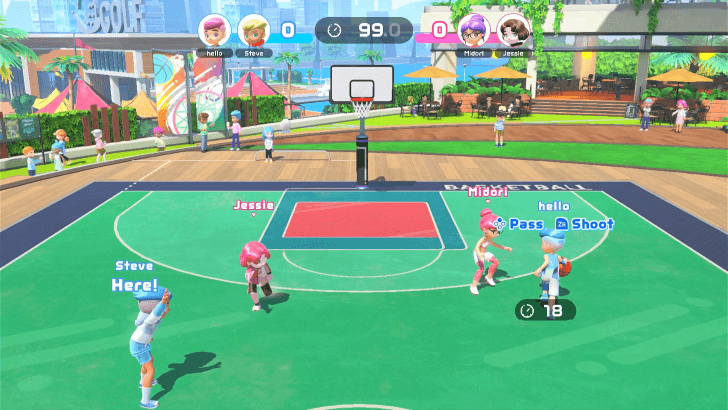
In this classic challenge, teams of 2 will alternate between offense and defense in a half court setting, with each player rotating between the left side and right side. Within 100 seconds, be the first to score 12 points or have a higher total score at the end of the time limit.
Three-Point Challenge
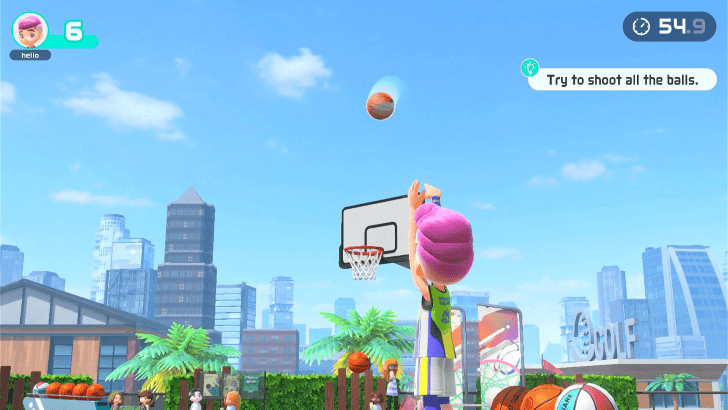
Within 80 seconds, try to shoot three pointers until the basketballs run out.This acts as a personal best mode and a great way to practice shooting. This mode is only available for one player.
Three-Point Contest
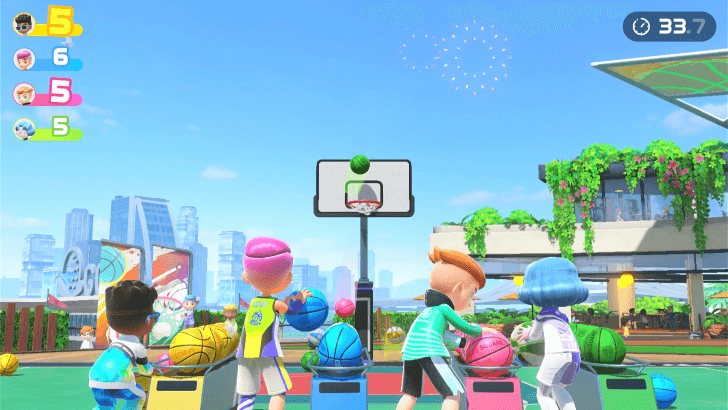
In this mode, 3 to 4 players will try to sink as many 3 pointers as they can in the same basket. Basketballs can intersect and throw each other off of getting to the ring so timing is key.
Five-Streak Battle
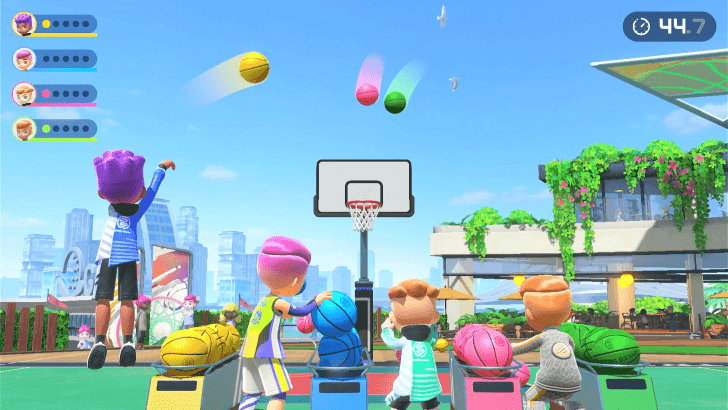
In this challenge, be the first to sink five shots in a row. Same as the Three-Point Contest, basketballs can collide and prevent each other from getting into the basket.
Modes Per Number of Players
| Number of Players | Game Modes |
|---|---|
| 1 | • Two-on-Two • Three-Point Challenge |
| 2 - 4 | • Two-on-Two • Three-Point Contest • Five-Streak Battle |
Switch Sports Basketball Important Areas
| Area | Description |
|---|---|
| Three-Point Line | 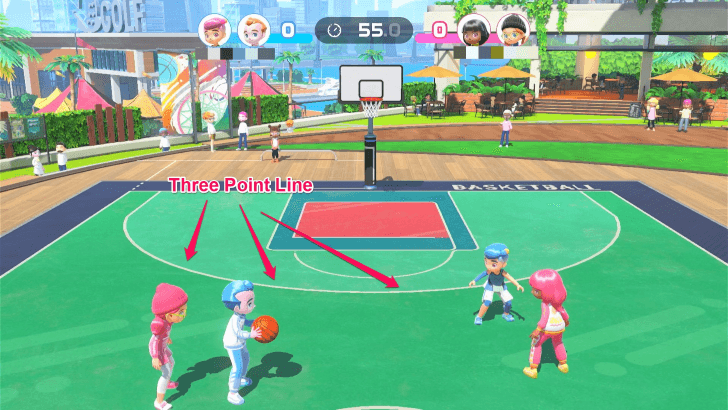 As long as players don't go beyond this line, their shots count as 3 points. However, the farther you are from the hoop the more difficult it is to sink these shots. |
| Area for Dunking | 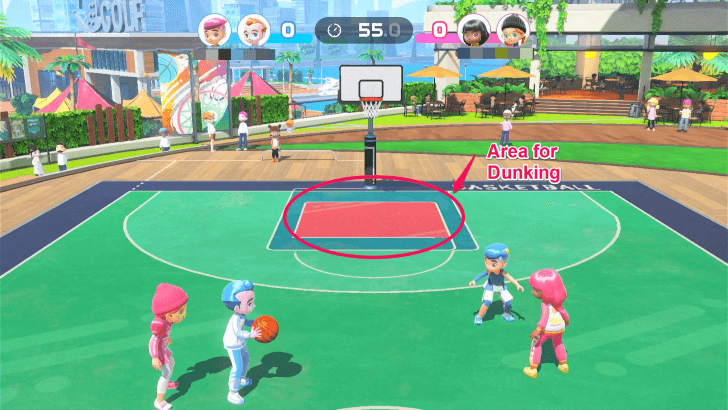 What is usually the free-throw lane, this area serves as the area where players' shots count as dunks. Note however, that players can only dunk if there are no opponents blocking them. |
Tips for Switch Sports Basketball
| Jump to a Section! | ||
|---|---|---|
| General | Offense | Defense |
General Tips
| Tips |
|---|
Practice with the Three-Point Challenge
Three pointers are immensely helpful especially when the timer is close to running out. Practice shooting your three pointers using the Three-Point Challenge Mode as it will help you get the feel of shooting farther from the basket.
Don't Dribble with Small Swings
The game doesn't completely mimic basketball's dribbling and slightly slower 45 degree swings is enough to keep up with the other players. This also helps prevent your arm from tiring out if you were dribbling/moving using smaller up and down movements.
| Jump to a Section! | ||
|---|---|---|
| General | Offense | Defense |
Tips for the Offensive Position
| Tips |
|---|
Use the Fake out when Shooting
When shooting, swing your controller slowly to fake out your opponent to use their block early. Be careful not to do this too fast as it will register that you are making the shot.
Make Use of Passing When Open
Thinking of this game as a maze where if you proceed further there are dead ends. In this case, if you proceed further, the basketball will be stolen by the other team.
Shoot Straight Ahead at the Apex of Your Jump
Shots made at the highest point of the jump with a steady joycon follow-through are much more likely to get into the basket. What makes it difficult to shoot those farther shots is the time pressure and the opposing team so practice making them using the three-point modes for consistent control.
Trick Your Blocker By Delaying Your Shot
When you line up to make the shot remember that you still have some time of when to release the ball. Making the shot late can trick your opponents into using their block or waiting too long to attempt it.
| Jump to a Section! | ||
|---|---|---|
| General | Offense | Defense |
Tips for the Defensive Position
| Tips |
|---|
Steal/Swipe Only When You're Sure It Will Land
If you fail to land a steal, your opponent can dash past you so make sure to steal only when you're sure that the opponent is directly in front of you. You can also check to see if their teammate is open for a pass to predict when they will be driving forward.
Practice Running Fast
Especially when at the left side of defending, keeping up with your opponent is important to block passes. Note that you do not need to swing the joycon up and down as fast as you would dribble a ball but that bigger swings at a slightly slower rate also works at moving the same speed.
Anticipate Blocking
Your opponents can also use tactics like the fake out to make you use your block too early. Remember that you need to block slightly earlier than when they release the ball, otherwise if you only jump when they jump, the ball will arc above your block.
Always Guard the Inner Box for Dunking
Sometimes it's better to allow the offensive team to pass to each other and stay closer to the dunking box to guard it. Otherwise, if you do not move fast enough, the other team will have the path wide open to make the shot. The video above shows what happens when leaving the box too open.
Switch Sports Basketball Controls and Features
| Actions | How to Execute |
|---|---|
| Shoot | Hold ZR or ZY, raise the Joycon beside your head then flick your wrist forward When you have the ball in possession, players can attempt to shoot at any point in the game. Simply hold down the ZR or ZY button, raise the joycon beside your head to jump and flick your wrist/arm forward. It is important to note that when jumping try to flick forward at the highest part of your jump and keep the joycon steady. |
| Block | Raise and point the Joycon upward Players on the defensive side can block the incoming shot by raising and pointing the joycon upward. Remember that the blocks itself takes some moments to jump so make sure to anticipate the shot and time it well. |
| Steal | Swipe the joycon across your body When players are on the defensive side and have an opponent in front with the ball in their possession, they can swipe the joycon to steal. Note that stealing has some cooldown and that if you fail to steal, the opponent can dash past you. Make sure to only use it at the right time |
| Passing the Ball | Press X or ▲ Press X or ▲ to pass the ball. your teammate can be blocked for a pass when they have opponents in front of them so only pass when your teammate is open. |
| Dribble (Move) | Swing the joycon vertically Players on either side can move or dribble by swinging the joycon up and down. If you're getting tired from doing this, remember that slightly larger swings also work to be the same speed as smaller more frequent swings. |
| Dash | Move fast after an opponent fails to steal your ball Players can only dash when you have the ball in your possession and the opponent in front of you will fail their steal. After this happens simply dribble as you normally would |
| Fake Out | When attempting to shoot, slowly move the joycon up and down When shooting, players can do a fake out by moving the joycon up and down slowly. Remember that this is quite sensitive and if you do it too fast it will register it as an attempt to shoot. |
| Dunk Shots | Make a shot within the box underneath the hoop without any opponents blocking
Dunk Shots will automatically trigger when the character attempts to make a shot within the box underneath the hoop with no opponents blocking or nearby. |
| Here! (Open to Pass) | Press the A or ▶ button
When you are on the offensive team and your teammate has the ball, press the A or ▶ button to signal for a pass. |
| Hold the Ball (Three-Point Modes) |
Hold ZR or ZL while pointing down During the Three-Point game modes where you have to continuously grab basketballs to shoot, hold ZR or ZL while pointing down to grab and hold the ball. |
Switch Sports Related Guides
All Guide Categories
| Site Map | ||
|---|---|---|
 News & Game Info News & Game Info |
 Patch Notes Patch Notes |
 Message Boards Message Boards |
 Tips and Tricks Tips and Tricks |
 Items Items |
 Titles Titles |
 Collections Collections |
- | - |
| List of Sports | ||
 Badminton Badminton |
 Bowling Bowling |
 Chambara Chambara |
 Golf Golf |
 Soccer Soccer |
 Tennis Tennis |
 Volleyball Volleyball |
 Basketball |
- |
Comment
Author
How to Play Basketball: Tips and Controls

Please participate in our site
improvement survey
03/2026
improvement survey
03/2026
Would you assist in
improving Game8's site?
improving Game8's site?

×
We are listening to our users' valuable opinions and discussing how to act on them.
The information collected through this survey will be used for the purpose of improving our services. In addition, the information will only be disclosed a part of a statistic in a format that will not allow identification of personal information.
Begin Survey
Not Now
×
Please rate each item regarding Game8.co's Advertisements.
Amount of Ads
Very Dissatisfied
Somewhat Dissatisfied
Fine
Somewhat Satisfied
Highly Satisfied
Placement of Ads
Timing of Ad Display
Ad Loading Speed
Safeness of Ads
Content of Ads
×
Please rate each item regarding Game8.co's Quality of Articles.
Amount of information
Very Dissatisfied
Somewhat Dissatisfied
Fine
Somewhat Satisfied
Highly Satisfied
Frequency of updates
Speed of new information
Accuracy of articles
Understandibility of articles
Readability of sentences
×
Please rate each item regarding Game8.co's Usability of the Site.
Ease of finding information
Very Dissatisfied
Somewhat Dissatisfied
Fine
Somewhat Satisfied
Highly Satisfied
Loading Speed
Use of Color
Font Size
Visibility of Images
Easy to Understand Layout
×
Please rate each item regarding Game8.co's Message Boards, Comments.
Ease of Writing
Very Dissatisfied
Somewhat Dissatisfied
Fine
Somewhat Satisfied
Highly Satisfied
Readability
Ease in Finding Information
Comment Quality
Comment Quantity
Admin Response
×
Please rate each item regarding Game8.co's Site's new design.
Please rate our site's new design
Very Dissatisfied
Somewhat Dissatisfied
Fine
Somewhat Satisfied
Highly Satisfied
Do you think that the website's design change makes the site easier to use?
Has the new design made it easier for you to find information on the site?
Has the new design improved the overall visual appeal of the site?
How would you rate your overall satisfaction with the new design of the site?
×
How likely are you to recommend Game8 to someone you know?
Very Unlikely
0
1
2
3
4
5
6
7
8
9
10
Very Likely
If you have other opinions regarding potential improvement to the website, please share them with us. We would appreciate your honest opinion.
Note: This is a free response section, so you can proceed without entering anything.
Note: Please be sure not to enter any kind of personal information into your response.
Note: Please be sure not to enter any kind of personal information into your response.
×
Thank You
×
Thank you for participating in our survey! Your answers will help us to improve the quality of our website and services.
We hope you continue to make use of Game8.
We hope you continue to make use of Game8.
Close
Rankings
- We could not find the message board you were looking for.
Gaming News





Popular Games

Genshin Impact Walkthrough & Guides Wiki
Resident Evil Requiem (RE9) Walkthrough & Guides Wiki
Honkai: Star Rail Walkthrough & Guides Wiki
Monster Hunter Wilds Walkthrough & Guides Wiki
Umamusume: Pretty Derby Walkthrough & Guides Wiki
Pokemon TCG Pocket (PTCGP) Strategies & Guides Wiki
Arknights: Endfield Walkthrough & Guides Wiki
Wuthering Waves Walkthrough & Guides Wiki
Zenless Zone Zero Walkthrough & Guides Wiki
Digimon Story: Time Stranger Walkthrough & Guides Wiki









Recommended Games
Yu-Gi-Oh! Master Duel Walkthrough & Guides Wiki
Super Smash Bros. Ultimate Walkthrough & Guides Wiki
Diablo 4: Vessel of Hatred Walkthrough & Guides Wiki
Fire Emblem Heroes (FEH) Walkthrough & Guides Wiki
Pokemon Brilliant Diamond and Shining Pearl (BDSP) Walkthrough & Guides Wiki
Elden Ring Shadow of the Erdtree Walkthrough & Guides Wiki
Monster Hunter World Walkthrough & Guides Wiki
The Legend of Zelda: Tears of the Kingdom Walkthrough & Guides Wiki
Persona 3 Reload Walkthrough & Guides Wiki
Cyberpunk 2077: Ultimate Edition Walkthrough & Guides Wiki










All rights reserved
© Nintendo.
The copyrights of videos of games used in our content and other intellectual property rights belong to the provider of the game.
The contents we provide on this site were created personally by members of the Game8 editorial department.
We refuse the right to reuse or repost content taken without our permission such as data or images to other sites.