
List of All Wind Waker Songs
▲ 100% Completion Checklist
▲ All Heart Pieces & Empty Bottle Locations
▲ Treasure Charts | Triforce Charts
▲ GameCube and Wii U Version Differences
▲ Upgrades ▶︎ Wallet | Magic Meter | Picto Box
This is a list of all songs that you can conduct in The Legend of Zelda: The Wind Waker. Learn the controls for the songs, how to get them, and what their effects are!
List of Contents
List of All Wind Waker Songs
Wind Waker Song Effects and Controls
| Name | Controls | Effect | Where to Get |
|---|---|---|---|
| Wind's Requiem | ▲, ◀, ▶︎ (3/4 Tempo) |
Changes the direction of the wind | At the Wind Shrine of Dragon Roost Island |
| Song of Passing | ▶︎, ◀, ▼ (3/4 Tempo) |
Changes the time of day | From Tott at Windfall Island |
| Ballad of Gales | ▼, ▶︎, ◀, ▲ (4/4 Tempo) |
Warps you to another area of the map | From Cyclos after hitting him with 3 arrows (Location varies) |
| Command Melody | ◀, ◆, ▶︎, ◆ (4/4 Tempo) |
Lets you control another character | In the Tower of Gods Dungeon |
| Earth God's Lyric | ▼, ▼, ◆, ▶︎, ◀, ◆ (6/4 Tempo) |
Used to navigate the Earth Temple Dungeon | In the cave at Headstone Island |
| Wind God's Aria | ▲, ▲, ▼, ▶︎, ◀, ▶︎ (6/4 Tempo) |
Used to navigate the Wind Temple Dungeon | In the cave at Gale Isle |
After getting the Wind Waker, you can conduct songs that can aid you in your exploration. You must learn a song before you are able to use its effects.
How to Play Wind Waker Songs
Bring Out the Wind Waker
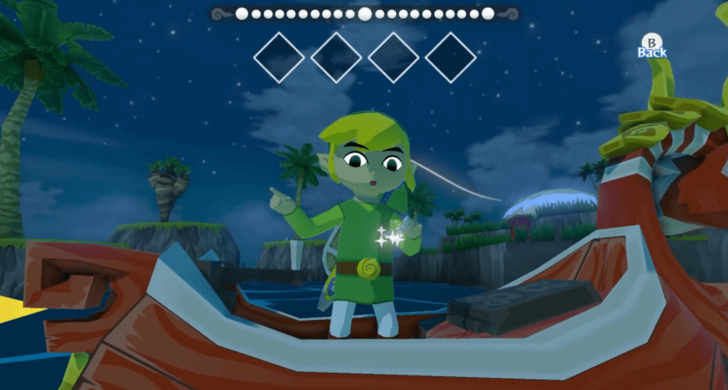
You have to take out and use the Wind Waker to conduct any song.
If you are playing the GameCube version of the game, you must equip the item to the X, Y, or Z button from the bag. In the HD version, you can simply press up on the D-pad to use the Wind Waker.
GameCube and Wii U Version Differences
Change Tempo With the Left Stick
| Action | Controls |
|---|---|
| Play in 3/4 | Don't touch Left Stick |
| Play in 4/4 | Tilt Left Stick to the left |
| Play in 6/4 | Tilt Left Stick to the right |
| Play Notes | Move Right Stick/C-Stick Up, Down, Left, Right, or No Input |
You might need to change the tempo depending on how many inputs the song has. This is represented by the diamonds on the upper part of the screen. 3/4 tempo songs have 3 inputs, 4/4 tempo songs have 4 inputs, while 6/4 tempo songs have 6 inputs.
You will not need to change anything for 3/4 tempo songs. For 4/4 tempo songs, you will need to tilt your left stick to the left. For 6/4 tempo songs, you will need to tilt your left stick to the right.
Time Your Inputs

When you use the Wind Waker, a line of circles will appear at the top. A yellow circle will move from one end to the other. Time your inputs according to when the yellow circle hits the center in order to conduct a song successfully.
You may move the right stick to the direction of the next input as soon as the previous one is finished. This will ensure that the correct input is registered as soon as the yellow circle hits the center again.
The Legend of Zelda: The Wind Waker Related Guides

The Legend of Zelda:
The Wind Waker Wiki Top
Guides by Category
| List of Categories | |
|---|---|
 Walkthrough Walkthrough |
 Islands Islands |
 Tips and Tricks Tips and Tricks |
 Side Quests Side Quests |
 Bosses Bosses |
 Enemies Enemies |
 Items Items |
 Mini Games Mini Games |
 Songs Songs |
 Characters Characters |
Recommended Guides
 Heart Piece Locations
 All Nintendo Gallery Figurines
 GameCube and Wii U Version Differences
 Is Wind Waker on Switch?
 Savage Labyrinth Guide
 List of All Dungeons
 All Upgrades and How to Obtain Them
 All Great Fairy Locations
 All Big Octo Locations
 All Lookout Platform Locations
 Best Controllers
 100% Completion Guide
Comment



Author
The Legend of Zelda: The Wind Waker Walkthrough & Guides Wiki
List of All Wind Waker Songs

Rankings
- We could not find the message board you were looking for.
Gaming News

![Monster Hunter Stories 3 Review [First Impressions] | Simply Rejuvenating](https://img.game8.co/4438641/2a31b7702bd70e78ec8efd24661dacda.jpeg/show)
![The Liar Princess and the Blind Prince Review [PC] | Lovely to Look at but Tedious to Play](https://img.game8.co/4442586/8d95f5faf05780f1765ce7e0938bd825.jpeg/thumb)
![Marathon Cryo Archive Map Teased as [REDACTED] on Selection Screen](https://img.game8.co/4442236/6357203e58172f6de57f1991e7c39b22.png/thumb)

Popular Games

Genshin Impact Walkthrough & Guides Wiki
Umamusume: Pretty Derby Walkthrough & Guides Wiki
Pokemon Pokopia Walkthrough & Guides Wiki
Honkai: Star Rail Walkthrough & Guides Wiki
Monster Hunter Stories 3: Twisted Reflection Walkthrough & Guides Wiki
Arknights: Endfield Walkthrough & Guides Wiki
Wuthering Waves Walkthrough & Guides Wiki
Zenless Zone Zero Walkthrough & Guides Wiki
Pokemon TCG Pocket (PTCGP) Strategies & Guides Wiki
Monster Hunter Wilds Walkthrough & Guides Wiki










Recommended Games
Diablo 4: Vessel of Hatred Walkthrough & Guides Wiki
Cyberpunk 2077: Ultimate Edition Walkthrough & Guides Wiki
Fire Emblem Heroes (FEH) Walkthrough & Guides Wiki
Yu-Gi-Oh! Master Duel Walkthrough & Guides Wiki
Super Smash Bros. Ultimate Walkthrough & Guides Wiki
Pokemon Brilliant Diamond and Shining Pearl (BDSP) Walkthrough & Guides Wiki
Elden Ring Shadow of the Erdtree Walkthrough & Guides Wiki
Monster Hunter World Walkthrough & Guides Wiki
The Legend of Zelda: Tears of the Kingdom Walkthrough & Guides Wiki
Persona 3 Reload Walkthrough & Guides Wiki










All rights reserved
© Nintendo. The Legend of Zelda and Nintendo Switch are trademarks of Nintendo.
The copyrights of videos of games used in our content and other intellectual property rights belong to the provider of the game.
The contents we provide on this site were created personally by members of the Game8 editorial department.
We refuse the right to reuse or repost content taken without our permission such as data or images to other sites.