

 Switch 2 New Features and Upgrade Price
 Version 3.0 All New Content and Features
 Version 3.0 Release Date and Time
 All amiibo Rewards and Unlocks
 LEGO Collaboration Guide
 Zelda Collaboration Guide
 Splatoon Collaboration Guide
 How to Get Nintendo Collab Items
 List of New Features
 List of New Horizons DLC
 April Ver 1.2 Update
 July Ver 1.3 Update
 August Ver 1.4 Update
 September Ver 1.5 Update
 November Ver 1.6 Update
 January Ver 1.7 Update
 February Ver 1.8.0 Update
 1st Anniversary Event
 March Ver 1.9.0 Update
 April Ver 1.10.0 Update
 April Ver 1.11.0 Update
 ACNH Direct and November Update
 Nintendo Switch Online + Expansion Pack
 November Ver 2.0.1 Update
 November Ver 2.0.2 Update
 November Version 2.0.3 Update
 December Ver 2.0.4 Update
 Sanrio amiibo Pack
 Build-A-Bear Collection
 How to Use the Island Tour Creator
 Original Soundtrack and Sheet Music
 UNIQLO Collection
 PUMA x ACNH Collab
 Maintenance | Fix Errors
 How to Update and Update Patch Notes
 How to Climb the 4th Cliff Level
 How to Plant Trees on Clifftop Edges
 1x1 Item Duplication Glitch
 2x1 Item Duplication Glitch
 Mailbox Item Duplication Glitch
 How to Plant Trees on Paths
 How to Swim in Rivers | How to Sit in Pools
 How to Center Items on Tables Outside
 Animal Crossing Direct
 Is there a Demo?
 Pre-order Bonuses
 Giveaways
 How to Pre-load


This survey will take about 1 minute.
Your answers will help us to improve our website.
Animal Crossing: New Horizons (ACNH)
October 8 Update | Version 1.5.1 Patch Notes and How to Update
★ Update 3.0 and NS2 Editions are out now!
┗ Unlock the Hotel & the Special Nintendo Catalog.
┗ Collab Guides with LEGO, Splatoon, and Zelda
☆ Switch 2 Edition Features and Price
★ Enjoy sandbox building in Slumber Islands.
☆ New Villagers: Cece, Viche, Tulin, and Mineru!
This page has the latest information on updates for Animal Crossing: New Horizons (ACNH) for the Nintendo Switch. Keep reading to learn about free updates and seasonal events, as well as how to update Animal Crossing: New Horizons.
List of Contents
Latest Update Patch Notes
Ver. 1.5.1 Update (10/08/2020)
| Ver 1.5.1 | October 8, 2020 |
|---|
The following patch notes are from Nintendo's official site.
| Bug Fixes |
|---|
|
Ver 1.5.0 Update (09/30/2020) - Fall and Halloween Update
| Ver 1.5.0 | September 30, 2020 |
|---|
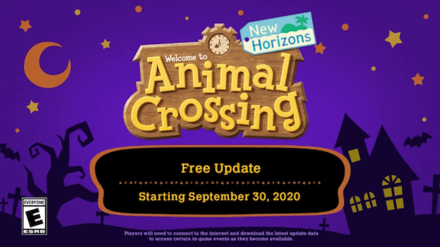
The following patch notes are from Nintendo's official site. You will also receive a Ring-Con from Nintendo upon updating the game, as well as Jack's Portrait from Jack.
This is the promotional video released on September 25, 2020, by Nintendo's official account on YouTube.
Update Summary List
 New seasonal event: HalloweenJack, the Czar of Halloween, will visitPumpkin Farming and DIYsTrick-or-TreatingNew Skin and Eye ColorsNookLink UpdateRevisit Dream Towns New seasonal event: HalloweenJack, the Czar of Halloween, will visitPumpkin Farming and DIYsTrick-or-TreatingNew Skin and Eye ColorsNookLink UpdateRevisit Dream Towns |
Halloween and Fall Update | September 30 Ver 1.5 Update
| General Updates |
|---|
|
| Fixed Issues |
|
New Seasonal Event: Halloween
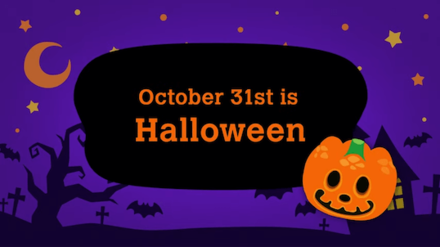
The biggest fall event this October is Halloween! The event itself will be held October 31, from 5 PM to Midnight. That is the time Jack the Halloween Czar will visit and you can get special rewards, so make sure to prepare.
Jack, the Czar of Halloween

On the night of Halloween, a special visitor will be on your island. Give Jack some Candy and Lollipop, and you will get spooky items in return!
Pumpkin Farming and DIY

The long expected gardening and farming update is finally arriving in Animal Crossing: New Horizons (ACNH). Take care of your Pumpkins, and use them for spooky DIY items!
Trick-or-Treating
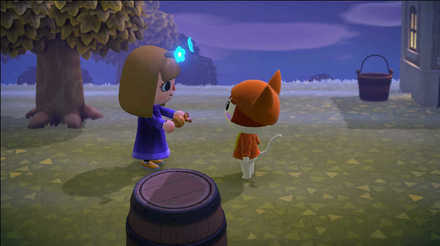
Don Halloween costumes with villagers to give and receive Candy! You can also get Spooky furniture and recipes, and even new Reactions when you go trick-or-treating!
New Skin and Eye Colors
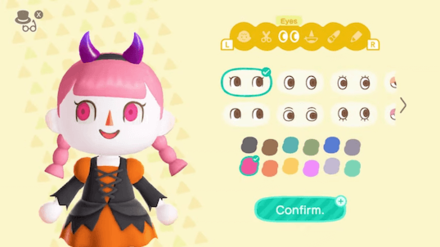
On this update, 4 skin colors (or paint) will be unlocked, along with 4 new eye colors; perfect for the creepy Halloween look!
NookLink Update
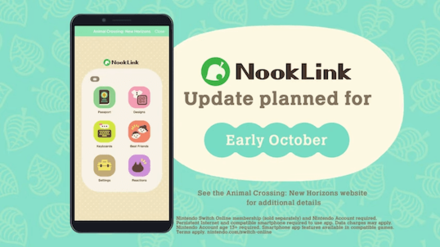
An update to the NookLink app allows you to perform Reactions in-game! Learn more about NookLink in our guide!
NookLink Features and Release Date
Dream List Added to Dream Suite
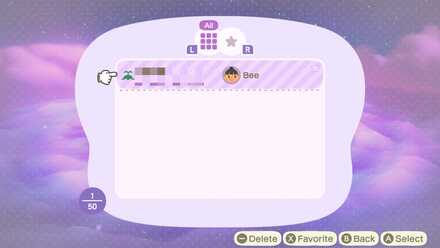
Once the update hits, Luna will keep a record of the last 50 Dream addresses you have visited, and you will even be able to save your favorites for quick, inspirational visits!
Dream Suite Guide - How to Visit Dream Islands (Dream Towns)
Winter Update Coming this November

The next update, which seems to include both the Thanksgiving and Christmas events, will be available late November!
In the meantime, check out our Festive Furniture guide to get into the Christmas spirit!
List of Festive Series Furniture & Item Recipes
How to Update Animal Crossing

Press the + Button on the Home Screen
With the Animal Crossing: New Horizons game selected on the Home screen, press the + button on your Switch to view the game data.
Select Software Update
Select Software Update from the left tab.
You can update your game Via the Internet or you can Match Version with Local Users.
Issues with Updating
If you have trouble updating your game, you can refer to the following solutions.
Check the Game's Official Twitter
You may not be able to update your game due to server failure. You can check the game's official Twitter account for information.
Check Nintendo's Server Maintenance Status
Depending on Nintendo's server maintenance status, you may not be able to update your game. You can check their official website for more information.
Maintenance Updates
We will also keep you posted with the latest server maintenance status here at Game8! Click the link below to view past and upcoming server maintenance with Animal Crossing: New Horizons
Maintenance | How to Fix an Error
Check Your Internet Connection
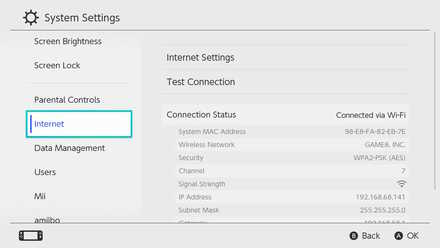
Check if your Switch is connected to the internet.
You can check your internet status by going to the System Settings from the Home screen, and selecting Internet on the left tab.
If the problem persists, you can try restarting your Switch or your router.
How to Check if Update is Complete
Press the + Button on the Home Screen
With the Animal Crossing: New Horizons game selected on the Home screen, press the + button on your Switch to view the game data.
Select Software Information
Select Software Information from the left tab. You can go to the Nintendo eShop to see if your game is up-to-date.
Related Guides
Version 3.0 News
All News and Updates
Comment
14  Anonymous over 5 years
Anonymous over 5 yearsNice, but we still need bulk crafting!!!
Author
October 8 Update | Version 1.5.1 Patch Notes and How to Update

Please participate in our site
improvement survey
03/2026
improvement survey
03/2026
Would you assist in
improving Game8's site?
improving Game8's site?

×
We are listening to our users' valuable opinions and discussing how to act on them.
The information collected through this survey will be used for the purpose of improving our services. In addition, the information will only be disclosed a part of a statistic in a format that will not allow identification of personal information.
Begin Survey
Not Now
×
Please rate each item regarding Game8.co's Advertisements.
Amount of Ads
Very Dissatisfied
Somewhat Dissatisfied
Fine
Somewhat Satisfied
Highly Satisfied
Placement of Ads
Timing of Ad Display
Ad Loading Speed
Safeness of Ads
Content of Ads
×
Please rate each item regarding Game8.co's Quality of Articles.
Amount of information
Very Dissatisfied
Somewhat Dissatisfied
Fine
Somewhat Satisfied
Highly Satisfied
Frequency of updates
Speed of new information
Accuracy of articles
Understandibility of articles
Readability of sentences
×
Please rate each item regarding Game8.co's Usability of the Site.
Ease of finding information
Very Dissatisfied
Somewhat Dissatisfied
Fine
Somewhat Satisfied
Highly Satisfied
Loading Speed
Use of Color
Font Size
Visibility of Images
Easy to Understand Layout
×
Please rate each item regarding Game8.co's Message Boards, Comments.
Ease of Writing
Very Dissatisfied
Somewhat Dissatisfied
Fine
Somewhat Satisfied
Highly Satisfied
Readability
Ease in Finding Information
Comment Quality
Comment Quantity
Admin Response
×
Please rate each item regarding Game8.co's Site's new design.
Please rate our site's new design
Very Dissatisfied
Somewhat Dissatisfied
Fine
Somewhat Satisfied
Highly Satisfied
Do you think that the website's design change makes the site easier to use?
Has the new design made it easier for you to find information on the site?
Has the new design improved the overall visual appeal of the site?
How would you rate your overall satisfaction with the new design of the site?
×
How likely are you to recommend Game8 to someone you know?
Very Unlikely
0
1
2
3
4
5
6
7
8
9
10
Very Likely
If you have other opinions regarding potential improvement to the website, please share them with us. We would appreciate your honest opinion.
Note: This is a free response section, so you can proceed without entering anything.
Note: Please be sure not to enter any kind of personal information into your response.
Note: Please be sure not to enter any kind of personal information into your response.
×
Thank You
×
Thank you for participating in our survey! Your answers will help us to improve the quality of our website and services.
We hope you continue to make use of Game8.
We hope you continue to make use of Game8.
Close
Rankings
- We could not find the message board you were looking for.
Gaming News




![Monster Hunter Stories 3 Review [First Impressions] | Simply Rejuvenating](https://img.game8.co/4438641/2a31b7702bd70e78ec8efd24661dacda.jpeg/thumb)
Popular Games

Genshin Impact Walkthrough & Guides Wiki
Honkai: Star Rail Walkthrough & Guides Wiki
Umamusume: Pretty Derby Walkthrough & Guides Wiki
Pokemon Pokopia Walkthrough & Guides Wiki
Resident Evil Requiem (RE9) Walkthrough & Guides Wiki
Monster Hunter Wilds Walkthrough & Guides Wiki
Wuthering Waves Walkthrough & Guides Wiki
Arknights: Endfield Walkthrough & Guides Wiki
Pokemon FireRed and LeafGreen (FRLG) Walkthrough & Guides Wiki
Pokemon TCG Pocket (PTCGP) Strategies & Guides Wiki










Recommended Games
Diablo 4: Vessel of Hatred Walkthrough & Guides Wiki
Cyberpunk 2077: Ultimate Edition Walkthrough & Guides Wiki
Fire Emblem Heroes (FEH) Walkthrough & Guides Wiki
Yu-Gi-Oh! Master Duel Walkthrough & Guides Wiki
Super Smash Bros. Ultimate Walkthrough & Guides Wiki
Pokemon Brilliant Diamond and Shining Pearl (BDSP) Walkthrough & Guides Wiki
Elden Ring Shadow of the Erdtree Walkthrough & Guides Wiki
Monster Hunter World Walkthrough & Guides Wiki
The Legend of Zelda: Tears of the Kingdom Walkthrough & Guides Wiki
Persona 3 Reload Walkthrough & Guides Wiki










All rights reserved
©2020 Nintendo
The copyrights of videos of games used in our content and other intellectual property rights belong to the provider of the game.
The contents we provide on this site were created personally by members of the Game8 editorial department.
We refuse the right to reuse or repost content taken without our permission such as data or images to other sites.
Anyone else’s money tree disappear with the update? I found 1,000 bells in a star-shaped hole, but the hole didn’t glow so I couldn’t bury 10,000 for a money tree. I also noticed that excess bells are now in 10,000 bell increments, taking up more space in your pockets.