
Combat System Explained
Here is a combat system guide for The Seven Deadly Sins: Origin (7DSO). See all the combat mechanics and some tips for defeating enemies!
List of Contents
Combat System Explained
| Click on the text to jump to a section! | |
|---|---|
|
|
|

Basic Combat System Overview
The Seven Deadly Sins: Origin combat system is real-time and action-based. The player's party can contain up to Four Heroes at a time, each with their own weapon types and element. Characters cannot be switched during fight, so organize your team before entering combat!
Types of Attacks
| Action | Attack Description |
|---|---|
| Normal Attack | Normal attacks can be performed by pressing the attack button. Continuously using normal attacks allows you to execute combos. |
| Plunging Attack | Holding your attack button while in the air allows you to perform a Plunging attack, which deals damage to the surrounding area upon impact. |
| Normal and Special Skill | Normal and Special skills are attacks that do not require Magic Points, but have a cooldown period between each use. |
| Ultimate Move | Ultimate Move can only be used when you have enough Magic Points. Ultimate Moves usually allow you to do major damage across a large area. |
| Tag Skill | Tag skill are attack that a character does when switching into battle. Using a Tag skill in the right situation can allow you to stun enemies. |
| Counter | When an enemy glows blue, it means you can counter their attacks. Using a Tag Skill at that moment initiates a counter, temporarily stunning the enemy. |
| Combined Attack | If an off-field hero has full Magic Points, they can carry out a Combined Attack with the on-field hero during an Ultimate Move. Depending on the team composition and available resources, you can perform a Duo or Trio Combined Attack. |
Twelve Types of Weapon
| All Weapon Types | |||
|---|---|---|---|
 Dual Swords Dual Swords
|
 Greatsword Greatsword
|
 Lance Lance
|
 Longsword Longsword
|
 Sword and Shield Sword and Shield
|
 Rapier Rapier
|
 Gauntlets Gauntlets
|
 Nunchaku Nunchaku
|
 Axe Axe
|
 Grimoire Grimoire
|
 Staff Staff
|
 Wand Wand
|
There are twelve different weapon types, and each character can equip three of them. Equip the weapon that best matches the hero's playstyle and switch based on the situation.
Try to fill all of the weapon slots because weapon passives impact the character even when they are not actively utilizing it.
Element System
| All Elements | |||
|---|---|---|---|
 Earth Earth
|
 Fire Fire
|
 Lightning Lightning
|
 Wind Wind
|
 Cold Cold
|
 Physical Physical
|
 Darkness Darkness
|
 Holy Holy
|
In the game, there are 8 types of elements, and each character has between 1 and 3 elements, which change as you change their weapon type. Each element can contribute to the Burst Effect, with different effects depending on the character's element.
Elements do not react with each other; instead, enemies will have a predetermined element that they are weak or strong against.
How to Determine Enemy Element Weakness
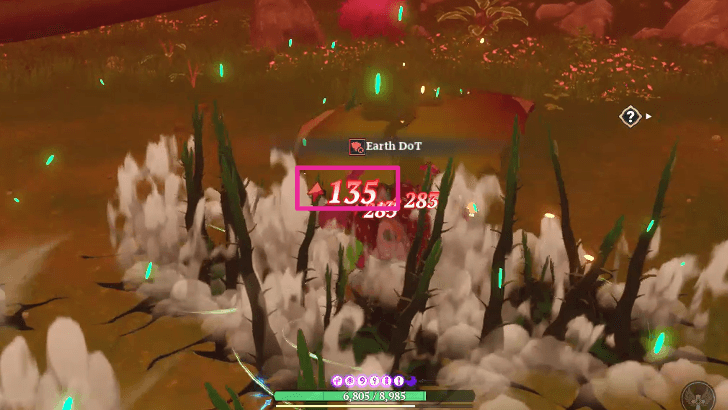
To determine if the element is strong or weak against the opponent, look at the arrows that appear next to the Damage numbers whenever you attack an enemy.
If the damage indicator shows an arrow up (⬆), the element is strong against the opponent, whereas an arrow down (▼) indicates it is weak against them.
Shared HP Bar for the Entire Party
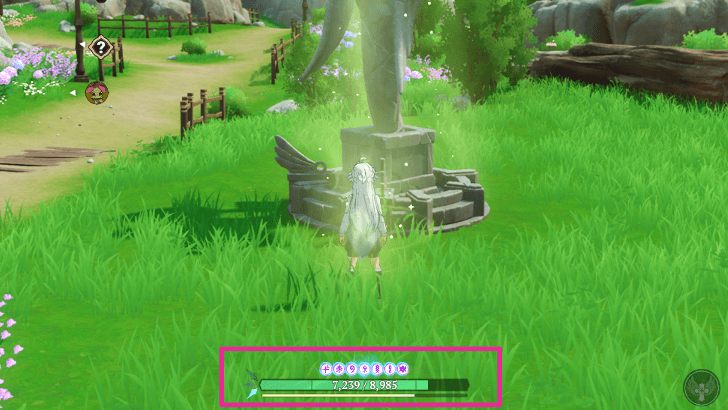
Your active team has a combined health pool. This means that if you take damage while fighting with your on-field character, the damage will be carried over even if you switch out.
You can restore your HP by using Recovery Potions, visiting Healing Statues, or relying on Heroes with healing skills.
Combat Tips
Lock Onto Targets
| How to Lock Onto Enemies | |
|---|---|
 Click Mouse Wheel Click Mouse WheelPC |
 Press R3 Press R3PS5 |
When dealing with a powerful foe, it's best to lock onto them and keep an eye on them at all times. This allows you to detect an attack cues and study their attack patterns, making it much easier to dodge.
To do so, simply click your mouse wheel if you're playing on PC, or press R3 if you're using a game controller.
Initiate Perfect Dodges
When in battle, dodging at the right time will allow you to nullify any incoming damage. It will be difficult to time it with small enemies, but larger or boss enemy's incoming attacks are frequently denoted by red markers on the ground, so keep a watch on them.
Interrupt Enemy Attacks
When fighting boss opponents, they will occasionally perform high-damage charge attacks, which are signified by them glowing blue. At this point, you can stop their attack by countering them with the Tag skill, stunning them in the process.
You'll know if a party member can use a Tag skill when their icon lit up.
Aim for Bursts With Continuous Element Damage
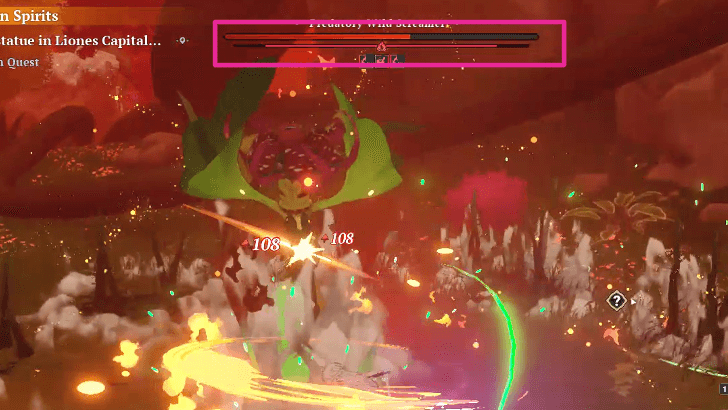
Under the enemy's HP bar, there is another bar that fills up with each attack, indicating the Burst value. Continuously doing damage of the same element allows the Burst value to accumulate, and when it does, it enters the Burst state.
During the Burst state, if you continue attacking the enemy with the same element, you will deal more damage, allowing you to defeat them faster.
Aside from the increased damage, entering the Burst state will also activate the Burst effect, which will vary depending on the element.
The Seven Deadly Sins: Origin Related Guides

The Seven Deadly Sins: Origin Wiki Front
Guides by Category
| The Seven Deadly Sins: Origin Categories | |
|---|---|
 Redeem Codes Redeem Codes |
 Characters Characters |
 Banners Banners |
 Weapons Weapons |
 Armor Armor |
 Accessories Accessories |
 Quests Quests |
 Interactive Map Interactive Map |
 Pets Pets |
 Items Items |
 Tips and Tricks Tips and Tricks |
 Events Events |
 Achievements Achievements |
 Latest News Latest News |
All Tier Lists and Meta Guides
 Character Tier List Character Tier List |
 Reroll Guide and Tier List Reroll Guide and Tier List |
 Best Team Comps Best Team Comps |
- |
All Helpful Tools
 Hero Tier List Maker Hero Tier List Maker |
- |
All Recommended Guides
 How to Pre-register
 Twitch Drops Reward
 Multiplayer Guide
 Server Reset Times
 How to Link Accounts
 Is There Controller Support?
 All Voice Actors List
 Gacha System Explained
 Pity System Explained
 Best Settings
 Best Banner to Pull On
 Dailies Guide
 Weeklies Guide
 Missables and Points of No Return
 How to Level Up Fast
 Calm Days Unlock Requirements
Comment



Author

Combat System Explained

Rankings
Gaming News

![Monster Hunter Stories 3 Review [First Impressions] | Simply Rejuvenating](https://img.game8.co/4438641/2a31b7702bd70e78ec8efd24661dacda.jpeg/show)
![Monster Hunter Stories 3 Review [First Impressions] | Simply Rejuvenating](https://img.game8.co/4438641/2a31b7702bd70e78ec8efd24661dacda.jpeg/thumb)
![The Seven Deadly Sins: Origin [First Impressions] | A Promising Start](https://img.game8.co/4440581/584e0bfb87908f12c4eab6e846eb1afd.png/thumb)

Popular Games

Genshin Impact Walkthrough & Guides Wiki
Umamusume: Pretty Derby Walkthrough & Guides Wiki
Pokemon Pokopia Walkthrough & Guides Wiki
Honkai: Star Rail Walkthrough & Guides Wiki
Monster Hunter Stories 3: Twisted Reflection Walkthrough & Guides Wiki
Arknights: Endfield Walkthrough & Guides Wiki
Wuthering Waves Walkthrough & Guides Wiki
Zenless Zone Zero Walkthrough & Guides Wiki
Pokemon TCG Pocket (PTCGP) Strategies & Guides Wiki
Monster Hunter Wilds Walkthrough & Guides Wiki










Recommended Games
Fire Emblem Heroes (FEH) Walkthrough & Guides Wiki
Diablo 4: Vessel of Hatred Walkthrough & Guides Wiki
Cyberpunk 2077: Ultimate Edition Walkthrough & Guides Wiki
Yu-Gi-Oh! Master Duel Walkthrough & Guides Wiki
Super Smash Bros. Ultimate Walkthrough & Guides Wiki
Pokemon Brilliant Diamond and Shining Pearl (BDSP) Walkthrough & Guides Wiki
Elden Ring Shadow of the Erdtree Walkthrough & Guides Wiki
Monster Hunter World Walkthrough & Guides Wiki
The Legend of Zelda: Tears of the Kingdom Walkthrough & Guides Wiki
Persona 3 Reload Walkthrough & Guides Wiki










All rights reserved
ⒸNS,K/TSDSRP,M ⒸNS,K/TSDSDJP,TX ⒸNS,K/TSDSFKAP ©Netmarble Corp. & Netmarble F&C Inc. All Rights Reserved.
The copyrights of videos of games used in our content and other intellectual property rights belong to the provider of the game.
The contents we provide on this site were created personally by members of the Game8 editorial department.
We refuse the right to reuse or repost content taken without our permission such as data or images to other sites.