
Connect to Pokemon HOME to Battle with Pokemon from Previous Games
★ Switch Version available starting April 2026!
☆ Champions will launch on Switch, Android, and iOS!
★ Transfer Pokemon from Pokemon Home for battles.
☆ Check out the Pokemon in the Champions Roster.
Trainers can bring their Pokemon from previous games to fight alongside them in Pokemon Champions by connecting to Pokemon HOME! Learn how to connect to Pokemon HOME in previous titles and if there are limitations in this guide!
List of Contents
Bring Your Favorite Pokemon Through Pokemon HOME!
Pokemon HOME Compatibility Confirmed
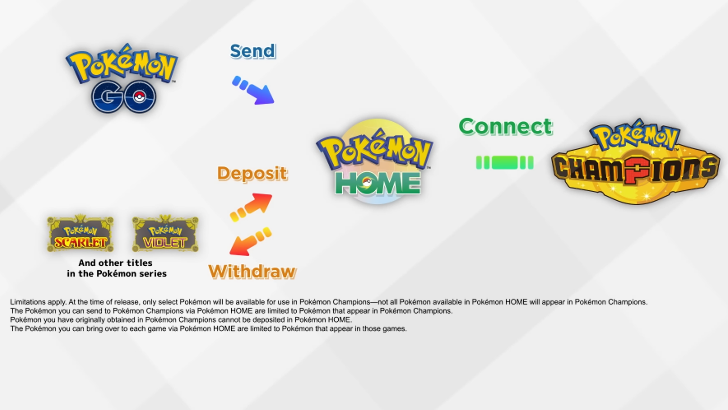
Along with its announcement, Pokemon Champions was confirmed to support transfers through Pokemon HOME! It was shown during the Pokemon Presents 2025 that trainers can connect to Pokemon HOME to battle with their Pokemon from Pokemon GO, Pokemon Scarlet and Violet, and other previous titles in the series!
Pokemon Limitations Will Be Applied
Sadly, not all Pokemon are transferable from other games to Champions via Pokemon HOME. Pokemon available via HOME are limited to those included in Champions on release and in the game's future updates. Additionally, Pokemon obtained in Champions cannot be sent to Pokemon HOME.
This guide will be updated as soon as the complete Pokemon Champions roster is announced!
How to Transfer From Pokemon HOME
Link Your Nintendo Account to HOME First
Pokemon games that you want to connect through Pokemon HOME must first be linked through your Nintendo Account. After using your Nintendo Account to log in to the HOME app, you will gain access to all Pokemon games connected to it and their Box systems.
Using the Nintendo Switch Version
To transfer your Pokemon from Pokemon HOME to Champions, you'll need to download the Nintendo Switch Version of Pokemon HOME.
| Transfer Pokemon to Champions via Switch Version | |
|---|---|
| 1 | 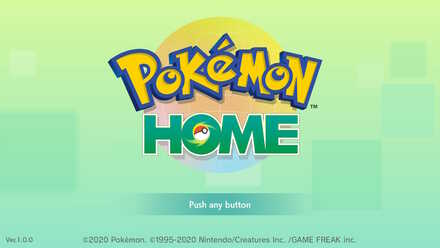 Open Pokemon HOME on your Nintendo Switch. |
| 2 | 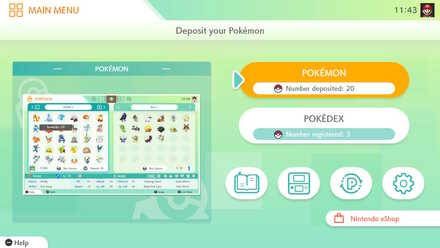 Select Pokemon in the main menu. |
| 3 | Choose Pokemon Champions in the options. |
| 4 | 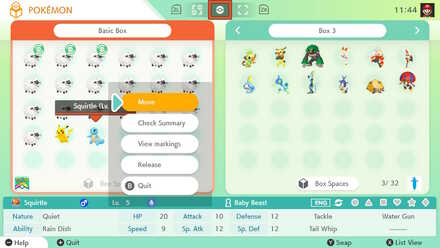 Select the Pokemon you want to transfer, then press A on the controller and select Move. |
| 5 | 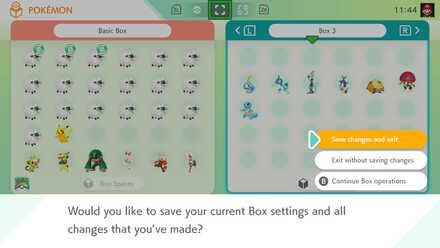 Press the + button after you are finished and select Save Changes and Exit to finalize the transfer. |
Using the iOS or Android Version
To send Pokemon from the mobile version of Pokemon HOME to Pokemon Champions, download both the mobile version and the Nintendo Switch version of Pokemon HOME, and connect both versions to the same account.
Once downloaded, you can access the same Pokemon on both devices which will allow you to transfer Pokemon obtained in the mobile version of Pokemon HOME via the Switch version of Pokemon HOME.
| Transfer Pokemon to Champions via Mobile Version | |
|---|---|
| 1 | Download the mobile version of Pokemon HOME. Login with the Nintendo Account you want to use. |
| 2 | Close the mobile version and download the Nintendo Switch version of Pokemon HOME. Login with the same Nintendo Account you used on the mobile version. |
| 3 | Close the Nintendo Switch version of HOME and reopen the mobile version. Receive the Pokemon you want to transfer. |
| 4 | Close the mobile version of HOME and reopen the Nintendo Switch version. Check that the Pokemon you received in the mobile version has appeared in the Nintendo Switch version of HOME. |
| 5 | Follow the steps in the above section on transferring Pokemon from the Nintendo Switch version of Pokemon HOME to Pokemon Champion. |
Pokemon Champions Related Guides
Comment



Author

Connect to Pokemon HOME to Battle with Pokemon from Previous Games

Rankings
- We could not find the article you were looking for.
- We could not find the message board you were looking for.

Gaming News

![The Liar Princess and the Blind Prince Review [PC] | Lovely to Look at but Tedious to Play](https://img.game8.co/4442586/8d95f5faf05780f1765ce7e0938bd825.jpeg/show)
![Monster Hunter Stories 3 Review [First Impressions] | Simply Rejuvenating](https://img.game8.co/4438641/2a31b7702bd70e78ec8efd24661dacda.jpeg/thumb)
![The Seven Deadly Sins: Origin [First Impressions] | A Promising Start](https://img.game8.co/4440581/584e0bfb87908f12c4eab6e846eb1afd.png/thumb)

Popular Games

Genshin Impact Walkthrough & Guides Wiki
Umamusume: Pretty Derby Walkthrough & Guides Wiki
Pokemon Pokopia Walkthrough & Guides Wiki
Honkai: Star Rail Walkthrough & Guides Wiki
Monster Hunter Stories 3: Twisted Reflection Walkthrough & Guides Wiki
Arknights: Endfield Walkthrough & Guides Wiki
Wuthering Waves Walkthrough & Guides Wiki
Zenless Zone Zero Walkthrough & Guides Wiki
Pokemon TCG Pocket (PTCGP) Strategies & Guides Wiki
Monster Hunter Wilds Walkthrough & Guides Wiki










Recommended Games
Diablo 4: Vessel of Hatred Walkthrough & Guides Wiki
Cyberpunk 2077: Ultimate Edition Walkthrough & Guides Wiki
Fire Emblem Heroes (FEH) Walkthrough & Guides Wiki
Yu-Gi-Oh! Master Duel Walkthrough & Guides Wiki
Super Smash Bros. Ultimate Walkthrough & Guides Wiki
Pokemon Brilliant Diamond and Shining Pearl (BDSP) Walkthrough & Guides Wiki
Elden Ring Shadow of the Erdtree Walkthrough & Guides Wiki
Monster Hunter World Walkthrough & Guides Wiki
The Legend of Zelda: Tears of the Kingdom Walkthrough & Guides Wiki
Persona 3 Reload Walkthrough & Guides Wiki










All rights reserved
©2025 Pokémon. ©1995–2025 Nintendo / Creatures Inc. / GAME FREAK inc. TM, ®, and character names are trademarks of Nintendo.
The copyrights of videos of games used in our content and other intellectual property rights belong to the provider of the game.
The contents we provide on this site were created personally by members of the Game8 editorial department.
We refuse the right to reuse or repost content taken without our permission such as data or images to other sites.