
How to Get The Defender Shield
⚁ Today's Free Dice Links! (9/23 @ 8am PDT)
┗ How to Get More Dice | Beginner's Tips Guide
☆ Today's Events▶︎Dino Treasures | Flash Events
★ Trade Boards▶︎Sticker Trades | Friend Codes
☆ Lists▶︎Sticker | Token | Shield | Event | Tournies
┗ Wild Sticker | Golden Stickers | Golden Blitz
The Defender is a Shield that can be equipped in Monopoly GO! Read on for more information about The Defender Shield, how you can equip it, and how to get it.
List of Contents
The Defender Overview
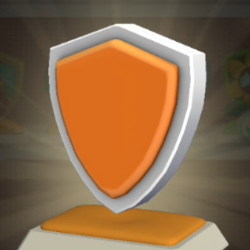 The Defender The Defender
|
|
| Description | The default shield in the game. |
|---|---|
| How to Get | Default Shield |
How to Get The Defender Shield
Default Shield
The Defender is the default shield that you should have automatically upon starting the game. If you don't have any other shield skins, The Defender will be the shield used.
How to Equip Tokens and Shields
Equip Upon Obtaining
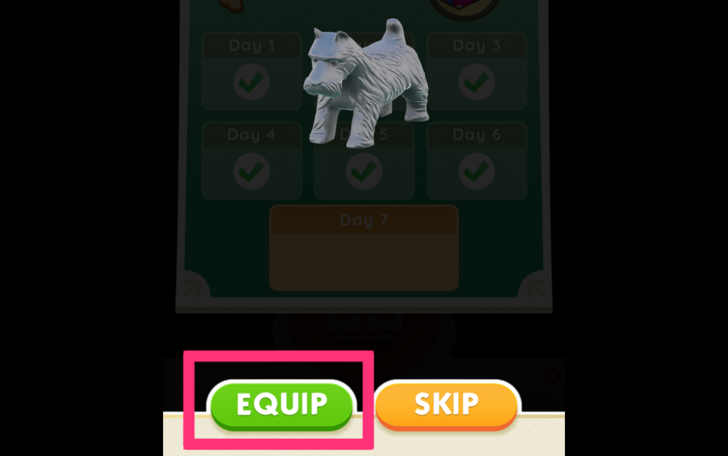
Once you get a new token or shield, you will automatically be given the option to equip it. Tap on the Equip button at the bottom if you want to change your current equipment.
Go to Your Showroom
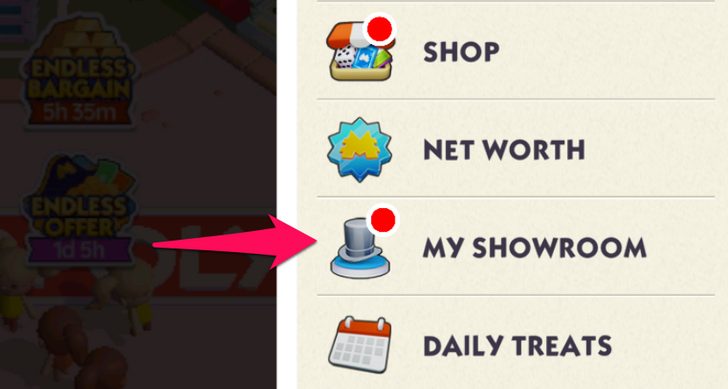
You can also change equipped tokens and shields by going to your Showroom. This can be found through the menu on the upper right.
Monopoly GO! Related Guides

Item Lists
| All Item Lists | |
|---|---|
| List of All Shields | List of All Tokens |
Shield List
Comment



Author

How to Get The Defender Shield

Rankings
Gaming News




![Monster Hunter Stories 3 Review [First Impressions] | Simply Rejuvenating](https://img.game8.co/4438641/2a31b7702bd70e78ec8efd24661dacda.jpeg/thumb)
Popular Games

Genshin Impact Walkthrough & Guides Wiki
Honkai: Star Rail Walkthrough & Guides Wiki
Umamusume: Pretty Derby Walkthrough & Guides Wiki
Pokemon Pokopia Walkthrough & Guides Wiki
Resident Evil Requiem (RE9) Walkthrough & Guides Wiki
Monster Hunter Wilds Walkthrough & Guides Wiki
Wuthering Waves Walkthrough & Guides Wiki
Arknights: Endfield Walkthrough & Guides Wiki
Pokemon FireRed and LeafGreen (FRLG) Walkthrough & Guides Wiki
Pokemon TCG Pocket (PTCGP) Strategies & Guides Wiki










Recommended Games
Diablo 4: Vessel of Hatred Walkthrough & Guides Wiki
Cyberpunk 2077: Ultimate Edition Walkthrough & Guides Wiki
Fire Emblem Heroes (FEH) Walkthrough & Guides Wiki
Yu-Gi-Oh! Master Duel Walkthrough & Guides Wiki
Super Smash Bros. Ultimate Walkthrough & Guides Wiki
Pokemon Brilliant Diamond and Shining Pearl (BDSP) Walkthrough & Guides Wiki
Elden Ring Shadow of the Erdtree Walkthrough & Guides Wiki
Monster Hunter World Walkthrough & Guides Wiki
The Legend of Zelda: Tears of the Kingdom Walkthrough & Guides Wiki
Persona 3 Reload Walkthrough & Guides Wiki










All rights reserved
© 2024 Scopely, Inc
The MONOPOLY name and logo, the distinctive design of the game board, the four corner squares, the MR. MONOPOLY name and character, as well as each of the distinctive elements of the board, cards, and the playing pieces are trademarks of Hasbro for its property trading game and game equipment used with permission. © 2024 Hasbro.
All Rights Reserved. Licensed by Hasbro.
The copyrights of videos of games used in our content and other intellectual property rights belong to the provider of the game.
The contents we provide on this site were created personally by members of the Game8 editorial department.
We refuse the right to reuse or repost content taken without our permission such as data or images to other sites.